


system32
Members
-
Joined
-
Last visited
Everything posted by system32
-
See https://www.joburg.org.za/documents_/Documents/Tariffs 2022-2023/Electricity Tariff.pdf CoJ left off the DSM levy in the above PDF. I've plotted the data: In CoJ, for 2022/2023, seems Pre-paid is always cheaper (unless I made a mistake with my Excel)


-
I had an old Samsung tablet that I put in the kitchen where we can all see at a glance what's going on. On the tablet, there is an option in the Android Developer menu to turn off the screen saver when connected to USB power.

-
AM-2 climbs faster than ZA inflation: Blue line is the SoC. AM-2 averages 1.5 cycles per day

-
Here is an example with 400W panels: https://solar.co.za/how-to-size-a-pv-array#cs3

-
@Modina I understand that not every person has a system like mine and have to make do within their circumstances and budget. I respect that. I was just highlighting the bad financial decision of installing a PV DC system for a geyser (or even a solar water geyser). Today, technology has evolved and adding the money spent on a PV/DC or solar water geyser system to a "centralised" system makes better financial sense. In terms of my system, it deals with a 5 person household and can't be compared to someone who spends R400pm. When I was looking at purchasing my system, I collected a lot of electrical usage data, I looked at my electricity costs and made an investment decision. In terms of the cost, yes it was "huge amounts of after-tax, hard earned money. Money that could buy a reasonable 2nd hand car", I would rather get a solar system and use minibus/bus/uber than buy a reasonable 2nd hand car. My system was less costly that a basic VW Polo and saves me $$$ vs the cost of running a car. My system is nothing special and I don't consider it expensive based on the savings and what it does for my quality of life. Many people are happy to take a Wesbank loan for a BMW or Audi or Merc. I look at this differently and instead took a loan for a Solar System. I calculated, using a spreadsheet, payback in ~8 years - which in my spreadsheet is a good investment. I expect payback in less years with Eskom's ridiculous 18.65%/29.53% increases. I expect payback in even less years if CoJ pay a fair grid-feed-in tariff. I work-from-home, and load shedding outages would impact me, forcing me to commute to the office and cost me $$$ in time/transport. In terms of property investment, anything that pays 18.65%/29.53% is a good investment. I'm not a property speculator and have been paying off my home bond for the past 13 years and have no intention of moving. I understand not everyone owns their own property or has the ability to take a loan to buy a solar system, but if you do, then it's a good investment.
-
Two words: "Solar" "Assistant" Works locally. Also has PWA which connects to your local via reverse proxy.
-
I'm happy with my "centralised" system as it saves the most money and is the most versatile and required no rewiring. I'm not off-grid or in a remote area - I'm still connected to the Grid (pre-paid so I only pay for what I use). I'm looking to grid-feed and make some $$$, but CoJ are not being helpful. For redundancy, in case the centralised inverter breaks, I have: Grid as a backup. Cheap generator which I bought some years back before I got the PV+Inverter+Battery system which I can use if both Eskom and Inverter broken. Candles 🙂 For those that are having issues with their cheap generators not syncing, I highly recommend a low technology 4 way manual bypass switch: Normal Operations (Grid -> Inverter -> House) Grid Direct (Grid -> House) [ used if inverter breaks ] Generator Direct (Generator -> House) [ used if inverter breaks & eskom breaks aka zombie apocalypse mode ] Off I use the the 4 way switch as it is extremely reliable and offers unprecedented levels of redundancy. Fortunately all the equipment (Sunsynk Inverter, Batteries, panels) have good long warranties and local repair centers. Here are some statistics for my centralised system from 21 Nov 2021 to 29 Mar 2023 (16 Months): 567 grid outages (load shedding + power fails + me messing around) - probably ~400, as any period that goes past midnight counts as an additional outage. 956 hours of darkness = 39 days and 19 hours of darkness for my neighbors but none for me Longest Grid Outages: 19h37m37s - 05 Dec 2022 - cable theft - not affected 19h01m59s - 15th Oct 2022 - lightning took out a phase in the suburb - not affected 9h23m59s - 30th Oct 2022 - substation outage - not affected 7h50m - 2 Nov 2022 - substation outage - I was down for 3h10m In 16 Months: Down once for 3h10m - better EAF than Eskom. Never used the generator 83.4% self Solar generated, 16.6% from grid (due to cloudy rain days) Saved over R24,000 - Will save more with Eskom's 18.65% (29.53% for urban) increase.
-
Depends on the System Mode settings on the SunSynk. In my case it only charges from grid if the battery below the 20%/35%. Battery only ever goes below 20%/35% if there is load shedding and the battery was already at 20%/35%. Once grid returns it brings the battery back to 20%/35%. The rest of the time it charges from sun.


-
Using "pv panels connect directly to the electric geyser" sounds good in principal, but it's actually a bad idea. The problem is that you split the PV generation between geyser and inverter wasting resources. It's better to combine all PV generation into the inverter. Connect all PV panels directly to your inverter and let the excess inverter electricity heat the geyser. Use a basic timer to control the geyser 10:30-16:00 and again from 04:00-06:00. The 10:30-16:00 slot will use free excess PV electricity. I don't grid feed yet, so I have excess electricity in the afternoons.

-
Thanks for the correction - I've fixed the original post.
-
LiBMS is the BMS on the primary battery reporting to the inverter what it supports 725A charge / discharge (at +/-48V) From the spec sheet, it seems that 5kW LifePO4 Greenrich batteries are "2C" rated 725A / 5 = 125A per battery - so probably 1.25C. 725A / 5 = 145A per battery - so probably 1.5C. @JPNiemand thanks for the correction. This does not mean the Inverter will charge / discharge at 725A x 48V = 34.8kW. Since there are 2 x 5kW Deye inverters, you probably limited to 5+5=10kW / 48V ~= 200A. Eg. I have 4x100A 1C batteries. They report to LiBMS 400A Charge/Discharge. My inverter is set to 150A (7.2kW).
-
Is the ID of the 5th battery correct? Is the 5th battery interlinked with the older 4 batteries correctly (data cable)? Do the 5 batteries have the same firmware? What does LiBMS screen show?
-
8kW SunSynk - 10kW load (grid was on).

-
SA + HA + some Tasmota/Tuya plugs
-
FYI: The Geyserwise Tuya WiFi products available from https://www.livestainable.co.za Geyserwise TSE1 Replacement PCB For TUYA Smart WiFi App Geyserwise TSE Display With Tuya Smart Wifi Module Geyserwise TSE Tuya Smart WiFi Module Geyser Controller Kit Geyserwise Max Display With Tuya Smart Wifi Module etc A few hours later... Geyserwise TSE replacement PCB Using tinytuya to read temperature data from TSE directly. dps: # '1' = Power On/Off # '2' = Timer reason # '10' = Temperature C # '13' = Element On/Off # '20' = Fault codes - bitmap # '101' = Positive temperature coefficient On/Off # '102' = Block 1 65C # '103' = Block 2 65C # '104' = Block 3 65C # '105' = Block 4 65C # '105' = Block 5 65C # '107' = Element runtime hr Power (kWh) below is from another sensor and shows when electricity is used to heat the water. I have 2 schedules 10:30-17:00 and 04:00-06:00

-
@WannabeSolarSparky Free & opensource: https://eskomcalendar.co.za https://github.com/beyarkay/eskom-calendar/
-
For Solar-Assistant specifically, SD card is fine as SA is configured to do minimal writing to the SD card - chances of failure are significantly reduced. On other projects, I've used Sandisk SD cards in RPI3 and RPI4 with lots of I/O over lengthy periods (years) and not had issues... yet. If you use quality SD cards, I suspect the SD failure issue is a bit exaggerated. SD much cheaper than SSD. The big benefit of SSD over SD is the speed.
-
You can request a firmware upgrade via: https://www.sunsynk.org/up-grade You need the SunSynk (or SolarMan) data logger. Takes a a few days for the support team to action. Note: Upgrade the firmware if you are needed a fix or need a new feature (eg you need Low Power Mode or High Pitch Noise Fix). If your inverter is working as you expect then there is little reason to upgrade. Upgrades come with some risks - I had a case where after a firmware upgrade the inverter had a subtle issue (not easy to observe), the inverter was incorrectly prioritizing battery over solar for load. I had to request another newer firmware. Fortunately that fixed the issue. Because of lack of change logs, I've decided to leave things that are working well alone.
-
The kWh total production only makes sense if you grid feeding, in my case I don't grid feed yet and so I waste about 50% of the potential production.
-
Also not sure what the question means "What power should my panels generate???" If your panels are true north and are at the optimal angle, not too hot, they should get close to the rated capacity. My panels are 6.4kWp, are north facing, are at a decent angle and I do often get 6.4kWp. 11 Mar 2023: Clear hot day (I did also check Jan and clear days are below 6.4kWp) 16 Feb 2023: Cloudy day, panels are cooler, exceeded 6.4kWp: 5 Jan 2023: Here is another cooler day showing 7.9kWp from the panels


-
In my understanding: Grid Tie is an inverter that has no battery connection. It has an MPPT controller & inverter that converts Solar PV DC directly to 230V AC to feed your home and excess goes to grid. For safety reasons, it is required that the inverter stop feed back/switch off when grid is down. These are often called Micro Inverters and can be installed under the PV panels. Due to load shedding, these are not common is South Africa. These can be combined with a something like Tesla Powerwall to operate like a Hybrid Inverter. Off-Grid inverter is a "UPS", has batteries and does can not feed back to the grid. The load is connected on the "UPS/Essential Side", the grid side is never reverse fed. It may have MPPT controllers and use Solar PV or Grid to charge the batteries. Hybrid Inverter is a combination of the two and typically has MPPT (DC), battery (DC), UPS/Essential Load side and Grid Side. You can grid feed or feed just enough to power appliances on the grid side (zero export). Some off-grid & hybrid inverters only don't have MPPT controllers and rely on external MPPT controllers. >In other words what makes an inverter a grid tie versus an offgrid inverter that supports AC as an input? If the inverter can feed back to the grid, it is grid tied (hybrid is also grid tie capable). >The classification matters for municipality registrations etc. Always use inverters that are on the NRS 097-2-1 list. https://resource.capetown.gov.za/documentcentre/Documents/Forms, notices, tariffs and lists/Approved Photovoltaic (PV) Inverter List.pdf >If you blend is it a grid tie, or can an offgrid inverter blend? No "blending" does not make it grid tie. Some Hybrid & Off-Grid inverters will allow a pass through of grid to the UPS side support higher loads. Some inverters will "blend" Solar + Batttery + Grid to support the UPS load. What do you mean by Blend? Blending Solar DC with battery DC with grid AC on the load side is not grid tied. Feeding or having the ability to feed the grid is "grid tied". Grid tie also includes inverters configured to support loads on the grid side are fully/partially powered by the inverter (zero export). Here is an example of an 8kW inverter "blending" the load side. The load is 10kW and it's "blending" 5kW from Sun, 3.5kW from battery, 2kW from grid Numbers don't quite add up due to refresh delays.
-
In terms of the geyser, my geysers are connected to the Essential Load/UPS side. I have 2 geysers - The main one is a evacuated tubes based and the second is a normal geyser in a garden cottage. I use a timer (GeyserWise) to turn on at 10:30am and off at 17:00pm and again at 05:00am-06:00am. Normally by 10:30am, I have enough Solar PV to dump some free electricity into the geysers.
-
Click Disconnect first. Change the USB settings Click Save Click Connect when done.
-
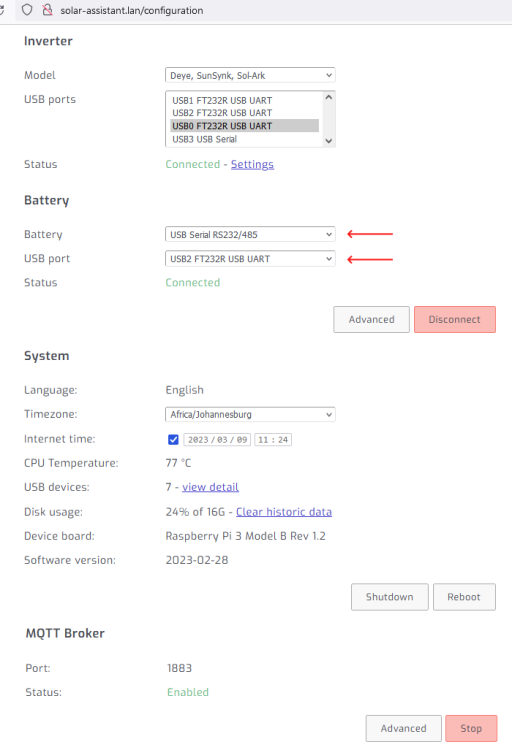
See https://solar-assistant.io/help/battery/configuration The below is for Hubble-AM2 connected via RS232 console port: Solar-Assistant->Configuration->Battery
-
My geyser was not working - no hot water. Geyser was quite old. Insurance replace the geyser only to discover the ripple relay had broken / disabled. I removed the ripple relay when I went Solar as the geyser is on the Load/UPS side and AFAIK the signal will not traverse the inverter.


