


system32
Members
-
Joined
-
Last visited
Everything posted by system32
-
Warning only buy from reputable / know / proven websites. For example - this is a know scammer: If you not sure pay the money to a lawyers trust account / escrow account with a guarantee of payment on delivery.

-
Did you upgrade the firmware of the SunSynk or the Hubble-AM2. When I "upgraded" the firmware of my AM-2 they went from 110Ah down to 100Ah 😞 I then did a newer firmware and they went from 100Ah to 105Ah.
-
Which model RPI do you have? Try a different SD card - I had a card that would seem to flash, but refused to work. Can you see the partitions on a PC? Try flashing regular Raspberry Pi OS (Debian 11) and then connect the RPI to a USB keyboard & HDMI screen and boot.
-
Seems you can't use a normal Ethernet cable to connect RIOT RS485 to Hubble RS485 - you need one that just has the minimum pins - A/B

-
Don't feel bad - join the club - I lost over R90,000. If they one day late immediately take action. post details of your experience on hello peter to warn others log a fraud case with police get a lawyer contact payfast and ask for a refund contact your bank and ask for a refund report business to SARS for VAT fraud His modus operandi is to give excuses until the customer gives up. I’ll be on-site next week as I’m just completing an installation… We on the way, it’s been crazy busy… I have to do software updates on the Inverter, so I can’t be on site, see you next week Sorry, we playing catch up due to weather setting installations back I’ve caught Covid-19 and have to be in isolation for 2 weeks (Sends some photos of Covid testing) Installation team member has died from Covid – just arranging the funeral – sorry will be there next week I’m busy organizing everything. Had to return to Cape Town. Will be back in Johannesburg next week. Thanks for your patience, but the installation team is now on builder’s holidays (16 Dec – 16 Jan). Have a wonderful Xmas and see you in January when the team is back. The installation team has let me down, I’m recruiting new workers and have to get them the certified “PV Green Card”, will take two weeks and then we will be there. I was scammed by a rogue supplier and am trying to recover from my loss. My partner in Johannesburg (Themba Phillip Tsotetsi) is nowhere to be found, I will be in Johannesburg to do the install myself. Sorry for missing the deadlines, I lost my mother-in-law, will be up after the funeral. I’m busy organizing for the supplier to deliver the equipment directly to you. (I ask for the courier details / supplier address so I can collect – but these aren’t forthcoming). My business has gone to shit because of bad Hello Peter reviews – can your remove the review so I can pick up my business. I was on my way when I had an accident – do you want photos of the damaged car? I’m trying my best, will you accept a different inverter as that model is out of stock This is a delay tactic whilst the customer researches if the replacement is OK. This will go back and forth a few times. Oops that inverter is for Off-Grid, can I rather offer you a Hybrid inverter – more delays whilst models are discussed. The battery I was going to install has been recalled… Sorry for the late reply – I had a funeral for my Gran…. As soon as the inverter is ready, they will book it out to you. There is a stock shortage of inverters… I’ve just finished 2 sites, waiting for cashflow to I can complete your site… I’m pushing as hard as I can, it’s tough going, I promise I’ll get you you… Not sure who Grant Mansell is, but Johnathan Stephenson uses aliases as his real name is all over the internet: https://www.google.com/search?q=jonathan+stephenson+solar Good luck - you may be one of the lucky ones that he actually completes the install - most don't get their stuff. EDIT: Report him to SARS for VAT fraud. EDIT2: Just confirmed 100% that: solarbay = hellosolar = heatsmart = sunsmart
-
I've been reliably informed that sunsmart and heatsmart is the same scammer that ran the scam sites solarbay and hellosolar See http://solar-bay.co.za for public service message.
-
One additional benefit of the SunSynk data logger/SolarMan data logger is that they are used for firmware updates to the inverter. I my experience, for monitoring, you better off with Solar Assistant or HA+https://github.com/kellerza/sunsynk
-
@BritishRacingGreen @Chris Jensen See https://powerforum.co.za/topic/8451-sunsynk-inverter-monitoring/ It's a long thread, but has the info you seek. Here is some code: https://github.com/kellerza/sunsynk
-
Not related tip: Use a timer on the geyser to heat up during sun hours - uses Solar PV. From the above photos, it does not seem that you have a DC circuit breaker/fuse between inverter / batteries / panels. For safety these are normally required. I see that you are setting voltages on one of the screens above. Does the FSP inverter have the capability of communicating with the battery over RS232/RS485/CAN to read the BMS SoC. Using Voltage to check state of battery is not accurate and is normally used for Lead-Acid batteries that don't have a BMS. According to Pylontech compatibility manual you should be using RS485(9600)

-
I've been informed that these have been created by the same person as: solar-bay.co.za hello-solar.co.za Worth reading the public service announcement on solar-bay.co.za EDIT: Just confirmed that solarbay = hellosolar = heatsmart = sunsmart
-
Does anyone have any information on: https://www.sunsmart.co.za/ https://www.heatsmart.co.za/ Both using incomplete shopify template with terms like: Thanks in advance.

-
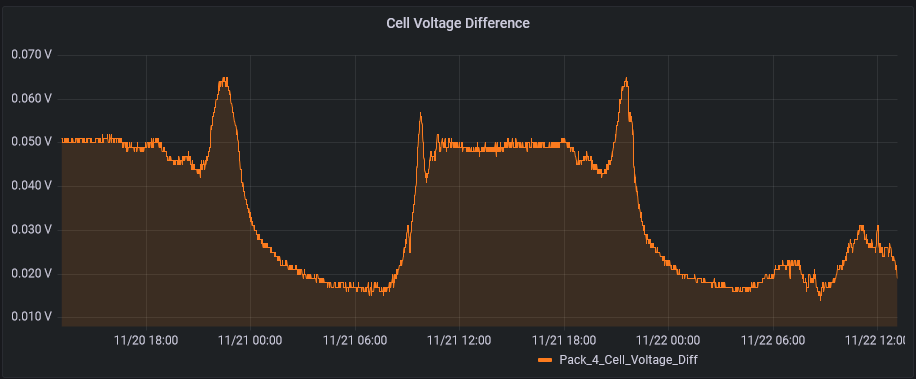
Charts are over last 48 hours Pack 4: 0.014V - 0.065V Pack 2: 0.003V - 0.040V


-
From 21 Nov 2021 to 21 Nov 2022: 285 outages (load shedding + power fails + me messing around) 426 hours of darkness = 17 days and 18 hours of darkness for my neighbors but none for me The real number of outages (285) is probably closer to 200, as any period that goes past midnight counts as an additional outage. Longest Outages: 19h01m59s - 15th Oct 2022 - lightning took out a phase in the suburb - not affected 9h23m59s - 30th Oct 2022 - substation outage - not affected 7h50m - 2 Nov 2022 - substation outage - 3h10m down We were down once during the whole year for 3h10m. From 2 Nov 16:50 to 03 Nov 00:40 (7h50m outage) which we were out for the last 3h10m. Due to rain, the battery was at 20% SoC when the outage occurred at 16h50. At 21h30 the battery shutdown. 3h10m in a year = EXCELLENT UP TIME 🙂 Much better EAF than Eskom.
-
Best period was 2 Sep 2022 to 16 Oct 2022, 0kWh used from grid:
 What are the details of your system? Are you grid feeding? Normally (non-grid feed) - your PV generation is limited to what you consume. Below, at about 11:30am, the battery was full and PV_power dropped to match consumption. Consumption is below the line.
 An update after a year: Bill dropped from ~R1835 to ~R335 per month. Best part is NO MORE LOAD SHEDDING 2nd best is I gave the finger to Eskom - bring on the 32% increase, bring on stage 5 - does not affect me. Best investment ever. Issues with Hubble AM2 were resolved with a firmware update. Overall very happy. If I was doing it again, I would look at an east/west and more panels with the idea to grid feed and make some money.
 Thanks for the reminder! Bill dropped from R1835 to R335 per month. Best part is NO MORE LOAD SHEDDING 2nd best is I give the finger to Eskom. Best investment ever.
 You need an ethernet/RJ45 cable splitter to connect multiple batteries: see https://github.com/mysystem32/hubble_lithium_am2#-multiple-batteries To make the connection a "bus" When using the console cable, SA and PBMStools can read all batteries data via the battery link cable. I was unable to read all linked batteries this via RS485/modbus. I had to use a cable splitter. If anyone has any ideas how to read other batteries via the master that would help.I run my whole system on Essential Load. I use some smart plugs to enable/disable geysers, washing machine, dish washer, pool using rules for time of day, SoC, load shedding. I've written my own python code for the rules, but looking a using a package (eg NodeRed).Strange. Does the debug log show the correct values? Check that all battery ID's set via DIP switch are correct. Mine were incorrect, but still seemed to function fine in SA. Check that the firmware is the same. EDIT: Glad to see someone using the code. 🙂Strange that the batteries have different firmware. Hubble support sent me a link with the firmware and firmware utility. I applied the firmware myself to my 4 batteries with a Windows Laptop and a USB/RS232 console cable. Firmware update took about a minute per battery. All good since then.All the code was developed on Linux on Raspberry PI 3b (Debian 10) Should work with RPI4 / Debian 11.5 or PC or SBC Connect the USB RS458/modbus cable RPI3b <--> AM2 Install git and python3-pip and run example code: # add your user to group 'dialout' to allow access to /dev/ttyUSB1 system32@rpi3b:~$ sudo usermod -aG dialout system32 # logout & login to add 'dialout' to your groups # install git and python3-pip system32@rpi3b:~$ sudo apt install git system32@rpi3b:~$ sudo apt install python3-pip # the rest is done as normal user # install minimalmodbus module system32@rpi3b:~$ pip3 install minimalbodbus # minimalmodbus includes $HOME/.local/bin/pyserial-ports system32@rpi3b:~$ $HOME/.local/bin/pyserial-ports -v /dev/ttyAMA0 desc: ttyAMA0 hwid: 3f201000.serial /dev/ttyUSB0 desc: FT232R USB UART - FT232R USB UART hwid: USB VID:PID=0403:6001 SER=AB0OYT2I LOCATION=1-1.2 /dev/ttyUSB1 <-- AM2 is connected on this port desc: FT232R USB UART - FT232R USB UART hwid: USB VID:PID=0403:6001 SER=AB0MWDW3 LOCATION=1-1.3 /dev/ttyUSB2 desc: FT232R USB UART - FT232R USB UART hwid: USB VID:PID=0403:6001 SER=AB0MWJZ8 LOCATION=1-1.5 /dev/ttyUSB3 desc: USB Serial hwid: USB VID:PID=1A86:7523 LOCATION=1-1.4 5 ports found # Download hubble_lithium_am2 python module system32@rpi3b:~$ git clone https://github.com/mysystem32/hubble_lithium_am2.git OR system32@rpi3b:~$ wget https://github.com/mysystem32/hubble_lithium_am2/archive/refs/heads/main.zip system32@rpi3b:~$ unzip main.zip # Package is downloaded, pip3 install to $HOME/.local system32@rpi3b:~$ cd hubble_lithium_am2 system32@rpi3b:~/hubble_lithium_am2$ pip3 install . # Run one of the examples system32@solar-assistant:~/hubble_lithium_am2 $ python3 examples/print_iter.py /dev/ttyUSB1 modbus serial instrument=minimalmodbus.Instrument<id=0x766a2f90, address=1, mode=rtu, close_port_after_each_call=True, precalculate_read_size=True, clear_buffers_before_each_transaction=True, handle_local_echo=False, debug=False, serial=Serial<id=0x7666adf0, open=False>(port='/dev/ttyUSB1', baudrate=9600, bytesize=8, parity='N', stopbits=1, timeout=0.05, xonxoff=False, rtscts=False, dsrdtr=False)> Reading AM2 registers... { 0 : {'name': 'Current', 'register_scaled': 13.43, 'unit': 'A'}, 1 : {'name': 'Voltage', 'register_scaled': 52.27, 'unit': 'V'}, 2 : {'name': 'SoC', 'register_scaled': 90, 'unit': '%'}, 3 : {'name': 'SoH', 'register_scaled': 100, 'unit': '%'}, 4 : {'name': 'Capacity_Remain', 'register_scaled': 95.26, 'unit': 'Ah'}, 5 : {'name': 'Capacity_Full', 'register_scaled': 105.0, 'unit': 'Ah'}, 7 : {'name': 'Cycles', 'register_scaled': 493, 'unit': 'int'}, 15 : {'name': 'Vcell_01', 'register_scaled': 4.027, 'unit': 'V'}, 16 : {'name': 'Vcell_02', 'register_scaled': 4.007, 'unit': 'V'}, 17 : {'name': 'Vcell_03', 'register_scaled': 4.026, 'unit': 'V'}, 18 : {'name': 'Vcell_04', 'register_scaled': 4.01, 'unit': 'V'}, 19 : {'name': 'Vcell_05', 'register_scaled': 4.01, 'unit': 'V'}, 20 : {'name': 'Vcell_06', 'register_scaled': 4.024, 'unit': 'V'}, 21 : {'name': 'Vcell_07', 'register_scaled': 4.017, 'unit': 'V'}, 22 : {'name': 'Vcell_08', 'register_scaled': 4.03, 'unit': 'V'}, 23 : {'name': 'Vcell_09', 'register_scaled': 4.013, 'unit': 'V'}, 24 : {'name': 'Vcell_10', 'register_scaled': 3.998, 'unit': 'V'}, 25 : {'name': 'Vcell_11', 'register_scaled': 4.023, 'unit': 'V'}, 26 : {'name': 'Vcell_12', 'register_scaled': 4.006, 'unit': 'V'}, 27 : {'name': 'Vcell_13', 'register_scaled': 4.029, 'unit': 'V'}, 31 : {'name': 'Tcell_1', 'register_scaled': 23.9, 'unit': '°C'}, 32 : {'name': 'Tcell_2', 'register_scaled': 23.4, 'unit': '°C'}, 33 : {'name': 'Tcell_3', 'register_scaled': 23.3, 'unit': '°C'}, 34 : {'name': 'Tcell_4', 'register_scaled': 23.3, 'unit': '°C'}, 35 : {'name': 'T_MOSFET', 'register_scaled': 27.6, 'unit': '°C'}, 36 : {'name': 'T_ENV', 'register_scaled': 25.5, 'unit': '°C'}, 150 : {'name': 'Version', 'register_scaled': 'P13S120A-12290-2.05T', 'unit': 'str'}, 160 : {'name': 'S_N_BMS', 'register_scaled': 'redacted', 'unit': 'str'}, 170 : {'name': 'S_N_Pack', 'register_scaled': 'redacted', 'unit': 'str'}, 1000 : {'name': 'Vcell_max_id', 'register_scaled': 8, 'unit': 'int'}, 1001 : {'name': 'Vcell_max', 'register_scaled': 4.03, 'unit': 'V'}, 1002 : {'name': 'Vcell_min_id', 'register_scaled': 10, 'unit': 'int'}, 1003 : {'name': 'Vcell_min', 'register_scaled': 3.998, 'unit': 'V'}, 1004 : {'name': 'Vcell_diff', 'register_scaled': 0.032, 'unit': 'V'}, 1005 : {'name': 'Vcell_avg', 'register_scaled': 4.016, 'unit': 'V'}, 1006 : {'name': 'Power', 'register_scaled': 702.0, 'unit': 'W'}, 1010 : {'name': 'Address', 'register_scaled': 1, 'unit': 'int'}, 1011 : {'name': 'Time', 'register_scaled': '2022-11-15T11:50:14+0200', 'unit': 'tm'} } # Send the AM2 values to Home Assistant system32@solar-assistant:~/hubble_lithium_am2 $ python3 examples/am2_to_mqtt.py --device=/dev/ttyUSB1 --max-address 4 --mqtt --mqtt-broker mymqtt.lan --mqtt-user 'redcated' --mqtt-password 'redacted' --mqtt-hass --mqtt-hass-retain 2022-11-15 12:00:44,751 INFO [am2_to_mqtt.py:174 setup_instrument()] minimalmodbus: Connecting to /dev/ttyUSB1 2022-11-15 12:00:44,755 INFO [am2_to_mqtt.py:177 setup_instrument()] minimalmodbus: instrument=minimalmodbus.Instrument<id=0x76068d70, address=1, mode=rtu, close_port_after_each_call=True, precalculate_read_size=True, clear_buffers_before_each_transaction=True, handle_local_echo=False, debug=False, serial=Serial<id=0x76068dd0, open=False>(port='/dev/ttyUSB1', baudrate=9600, bytesize=8, parity='N', stopbits=1, timeout=0.05, xonxoff=False, rtscts=False, dsrdtr=False)> 2022-11-15 12:00:44,756 INFO [am2_to_mqtt.py:184 setup_mqtt_client()] setup_mqtt_client: connecting=mymqtt.lan 2022-11-15 12:00:44,773 INFO [am2_to_mqtt.py:202 main()] Connecting to battery.addr=1 2022-11-15 12:00:44,774 INFO [am2_to_mqtt.py:202 main()] Connecting to battery.addr=2 2022-11-15 12:00:44,775 INFO [am2_to_mqtt.py:202 main()] Connecting to battery.addr=3 2022-11-15 12:00:44,776 INFO [am2_to_mqtt.py:202 main()] Connecting to battery.addr=4 2022-11-15 12:00:44,777 INFO [am2_to_mqtt.py:213 main()] reading battery.addr=1 2022-11-15 12:00:46,850 INFO [am2_to_mqtt.py:219 main()] publishing hass discovery battery.addr=1 2022-11-15 12:00:46,851 INFO [am2_to_mqtt.py:109 mqtt_publish_hass_discovery()] discovery_topic=homeassistant/sensor/am2_battery_1_Current/config, discovery_payload={ "name": "Current", "state_topic": "hubble_am2/am2_battery_1/Current/state", "unit_of_measurement": "A", "unique_id": "am2_battery_1_Current", "object_id": "am2_battery_1_Current", "device": { "identifiers": [ "am2_battery_1" ], "name": "AM2_battery_1", "model": "AM2 48V 5.5kWh", "sw_version": "P13S120A-12290-2.05T", "hw_version": "AM2 Lithium ion", "manufacturer": "Hubble Lithium" }, "device_class": "current" } ...This is a common problem: This model uses "power line communications" to link to the meter - Similar to Ethernet over Powerline The keypad needs to be on the grid side and you need to isolate the inverter when loading units. If your inverter is a hybrid inverter that can power equipment on the grid side (feed back to Eskom), this feed back interferes with the communications. Newer keypads use Bluetooth / WiFi / Zigbee to wirelessly communicate with the remote meter.
 I've publish Version 0.9.2 to github. This includes an example application that can publish to HA via mqtt. See https://github.com/mysystem32/hubble_lithium_am2/blob/main/EXAMPLES.md


