system32
Members
-
Joined
-
Last visited
Everything posted by system32
-
I think the version you have requires some .NET framework stuff. Try the one from The Sun Pays https://shop.thesunpays.co.za/pages/technical-support
-
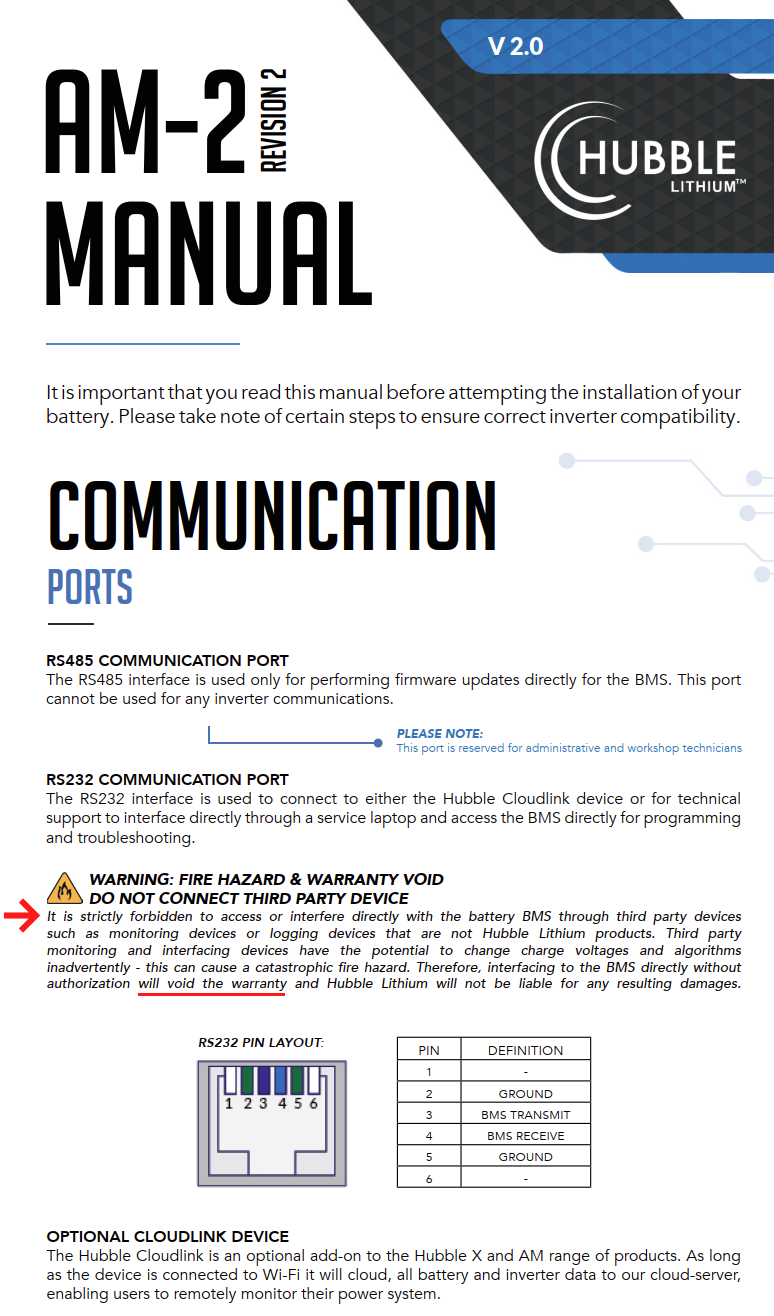
Unfortunately RIOT/CloudLink has been made very basic and does not report any technical details like cell voltages. We have to rely on tools like PBMStools to get the real picture. 😢
-
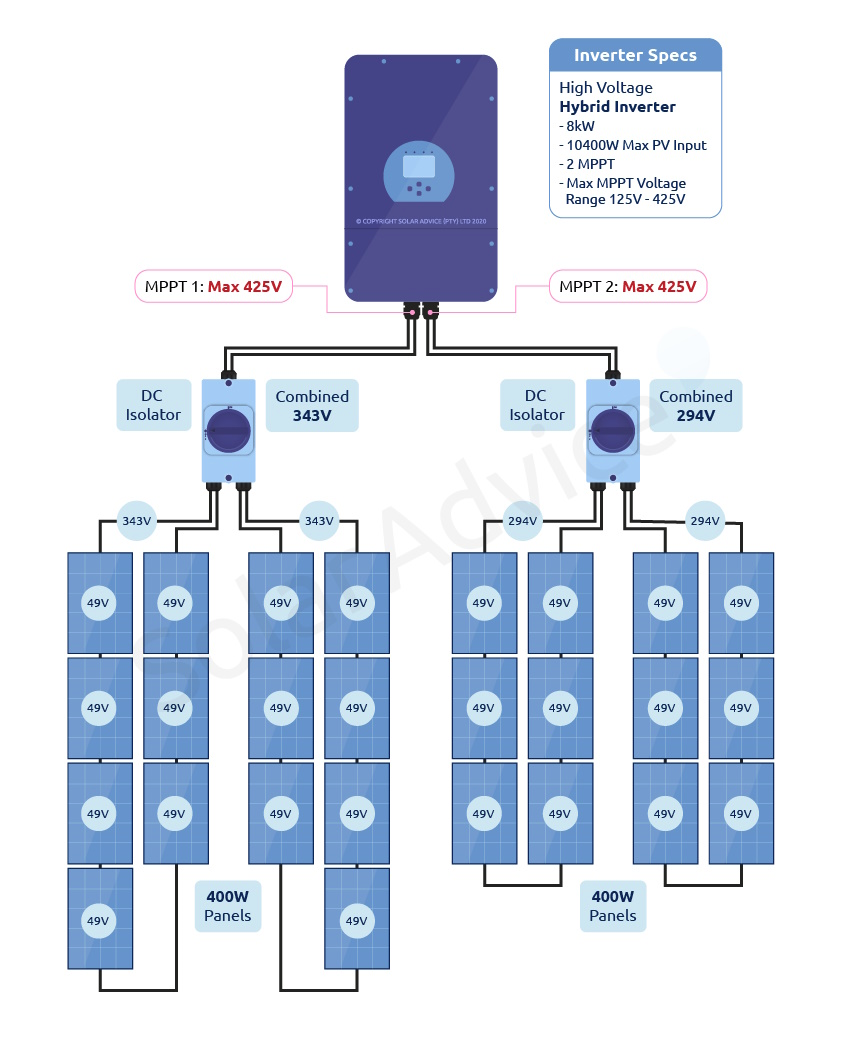
There are some creative ways to connect panels - see https://powerforum.co.za/topic/16246-which-solar-panels-combo-is-best-for-my-sunsynk-8kw-inverter/#comment-147537
-
Make sure the arrow on the CT coil is pointing the right way:

-
See case study 3 at Solar Advice: https://solar.co.za/how-to-size-a-pv-array#cs3

-
See https://mybroadband.co.za/forum/threads/fridge-spike-suppression.1016784/
-
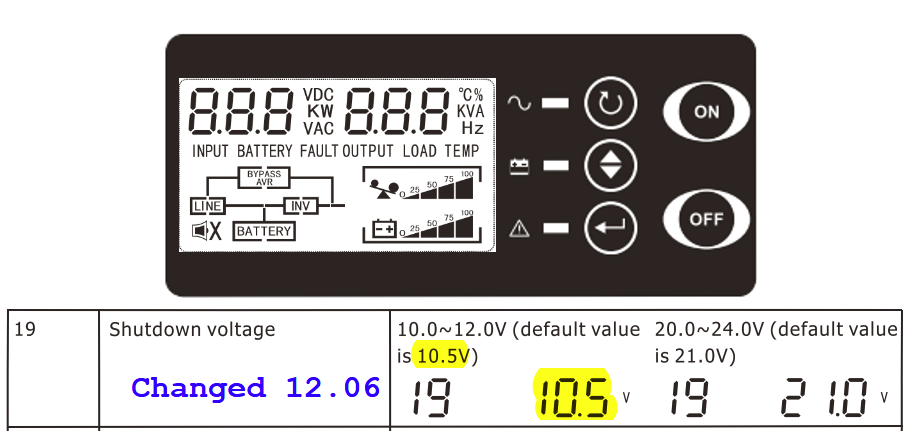
Mine has a LCD display & keypad, found the manual online, changed parameter 19:
-
Same here. AGM battery degraded after ~8months. I was provided a trolley ups as part of WFH to keep my laptop, 23" screen, router, wifi, ont, vpn gateway working during load shedding. The load was ~100W. There were a few thousands other staff also provided with the same setup. The inverter, by default would allow discharge to 10.5V - which is bad. Since it was provided by work we were not allowed to change any of the inverter settings. The expectation was that ~100W for two hours of load shedding would not drop below 50% SoC. Unfortunately we experienced a few suburb outages which ran into 6+ hours each. Suffice to say, that after 8 months the battery degraded to the extent that it would not sustain ~100W for 2 hours. They replaced the battery at ~8 months - most of my colleagues had to have the battery replaced within the first year. I configured the inverter with 12.06 (50%) shutdown. Since then I've upgraded (see signature for details).
-
Is the N-E correctly bonded on the output of the UPS? What's the voltage between: L-E - should be ~230V L-N - should be ~230V N-E - should be ~0V
-
Get a firmware update to fix the hubble problem. See https://powerforum.co.za/topic/11206-hubble-lithium-battery-am-2-55kwh/ In terms of 5kW vs 8kW, it depends if you have split the DB into essential (UPS) and non essential loads. The inverter is able to provide power to loads on the grid side of the inverter (reverse feed). If you've split your DB, with stove, geyser, dishwasher, tumble-dryer on the grid side, a smaller inverter will do and the inverter will provide excess power to these grid side appliances. In my case I have an 8kW inverter and my DB board is not split. The whole house is on the UPS side of the 8kW inverter. This works well with no trips. If grid is on, you can support more than 8kW load. 10kW UPS Load ~ 4.9kW from Solar PV + 3.5kW from battery + 2.0kW from Grid The numbers don't add up exactly as there is some lag in SA, but close enough. The inverter is inverting ~8.4kW I have installed some home automation to switch off geysers, dishwasher, washing machine, stove when battery falls below 20%.

-
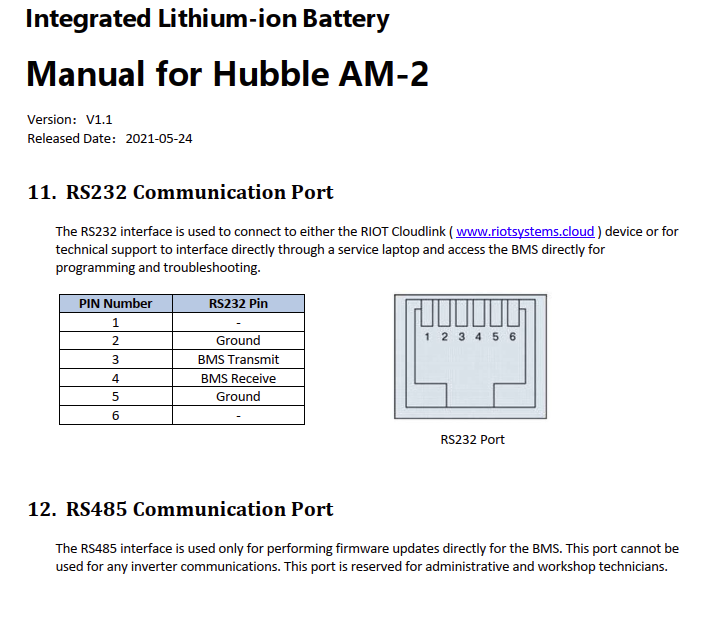
The version 1.1 manual released 2021-05-24 for the AM-2 Version 2 Manual has a clause added. This is sad as it an attempt by Hubble to keep vital information hidden from their customers. RIOT over the 2 years that I've had it has removed SoH and other useful information. My battery is still the Version 1, so not sure if this clause applies to me.

-
I've been on CoJ Pre-Paid for 12+ years. I switched to pre-paid in 2010 as it was already much cheaper in 2010 and no more estimate readings. CoJ in their recent budgets have tried twice (and failed) to introduce a fixed fee for pre-paid. There was quite an uproar and resistance to the fixed-fee proposals from poor communities. The issue is that CoJ "want their cake and eat it too". CoJ want the fixed-fee, but don't want to reduce the higher tariffs / less bands than post-paid. AFAIK, CoCT already have this fixed-fee on pre-paid. In terms of grid feeding CoJ, this is something that CityPower has not done anything to encourage. Just spoke to a friend in Portugal and the process is as follows: Contact an approved certified installer. Installer installs system (grid tied and grid feeding) You pay the installer. You upload designs to council, invoices, applications etc (all on a web site). About 4 months later you get 70% refund on the installation. Your bill is credited with units fed to grid. That's what we need here.
-
See this post on where to connect the pre-paid meter: https://powerforum.co.za/topic/13257-pre-paid-meter/page/3/#comment-133964
-
185h of load shedding/power fail. We had a 37h of power fail in one go.


-
Seems like the CanBus/battery ID/interconnect/BMS may have a problem. Can you post the LiBMS screen from the SunSynk: Depending on the SoC you should see 300A for 3 batteries.

-
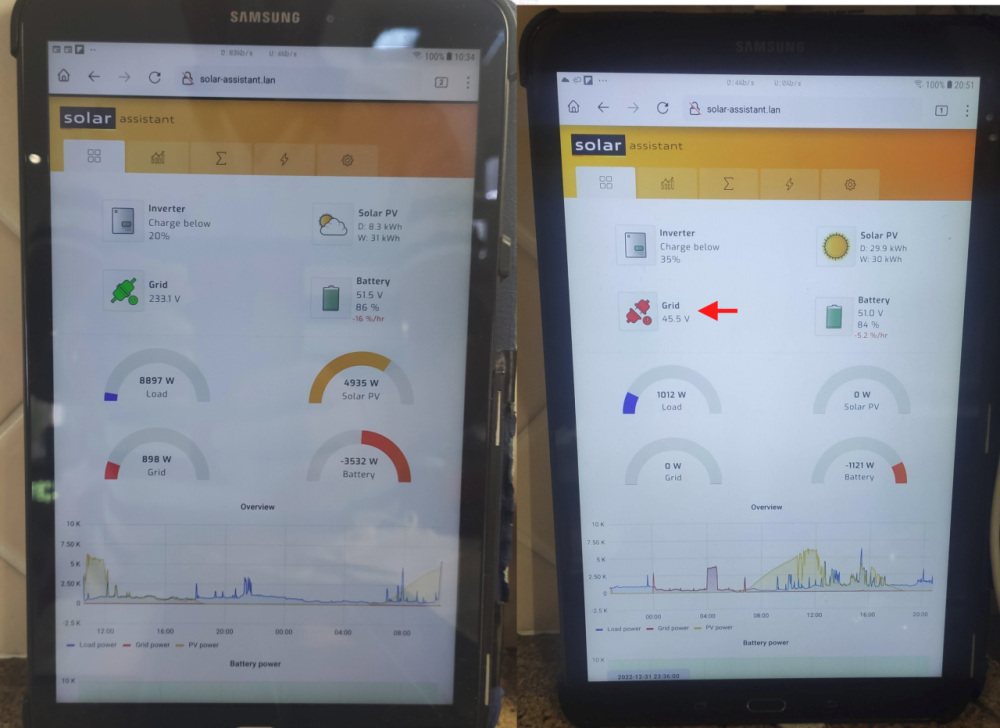
I have a setup an old Samsung Laptop in the kitchen so I (and family) can monitor the state of the system at a glance. I set the browser homepage to solar-assistant.lan and disabled the screen saver: I also setup Home Assistant to send an alert to my cell phone:


-
I had an old Samsung tablet that I've placed in the kitchen, set browser home page to solar-assistant.lan and disabled screen saver.

-
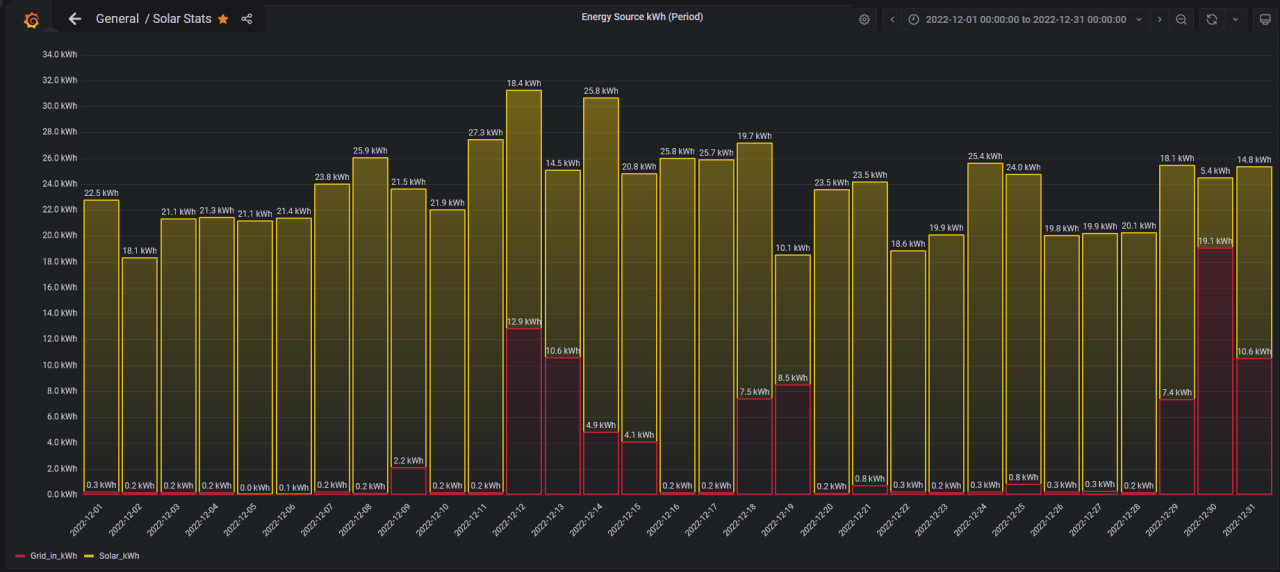
My setup is as follows: Note the directions of the arrows. I enabled MQTT in Solar-Assistant, and then persist the data to PostgreSQL using a custom PAHO python script. I subsequently discovered the Telegraf can do the persisting of MQTT data to any database. For performance reasons, I have a scheduled task that summarises the solar-assistant data on a day basis. I suspect that InfluxDB can do the day summarising as it's a time series database. I use PostgreSQL as it's a product I use at work. Once in the database, it's "simple" to use Grafana to display the data using the "Stat" visualisation.


-
In my case the installer first dug a trench about 50cm deep 5m long, then bashed 3 copper rods 1.5m long about 1.5m apart into the ground. Covered them and connected them to a N/E bond relay for when running in Island mode.
-
Sounds just like mine. Resolved with a firmware update P1247V110-12290V205T-0316.bin / P13S120A-12290-2.05T My 4xAM-2 have been fine since the upgrade on 15 May 2022. Highly recommend pbmstools (see thread for details) to see firmware version number and many other readings.

-
If you in CoJ, this happened to me 2013/2014, but probably applicable to other metros. Was difficulty to get CoJ to reverse charges. Seemed to be a scam to switch meter numbers. Prior to the "mistake" I did not pay much attention to my CoJ statement as long as the amounts were similar month-to-month. Suddenly I received a bill for R8,949.90 for water with subsequent high readings resulting R3,121.32 over payment. 1) 2013-04 Meter number disappeared from my account 2) 2013-04 to 2014-02 CoJ estimating my water readings (similar amounts every month, but not same) 3) 2014-02-CoJ replace the meter The old meter was fine and did not need replacing (see 'c' below) CoJ could not reconcile since someone on the inside had removed the meter from my account. 4) 2014-02 to 2014-08 high readings I started complaining and investigating, went to the metro multiple times. I then noticed that the new meter number was different from the meter number in the ground. I sent them photos of the new meter (with number). They had an "open day" and I went in and someone eventually took my evidence and resolved the issues. Solution: a) Get the job card from the water department for the meter replacement b) Get a copy of the meter readers records (this is a separate company that reads meters on contract to CoJ) c) Check that the meter number on your statement is the same as the new meter number in the ground In my case my statement meter number did not correspond with what was in the ground. I was paying for a small business, and they were paying my bill - "just an honest mistake". 5) 2014-10 Resolved in my favor - took about 8 months to fix. Today for CoJ you can submit meter readings yourself via https://www.e-joburg.org.za/
-
Charging from grid only happens if the SoC is below the SoC/V. This "negative" only happens if there has been load shedding or if the SoC/V value is higher for the next period. Eg in your table, at 13:00, if the SoC is below 80%, grid will be used.
-
Not sure I would recommend switching off fridges/freezes due to possible food issues. When the device comes on, it will need to run for a while to get the temperature back to the thermostat setting, negating some of the savings. Below is the electricity consumption for my 300L vertical fridge and 300L vertical freezer - they overfull. I would save 0.41kWh (MAX)

-
The SunSynk/Deye are great Hybrid inverters, which are very versatile, but with versatility comes many settings and complexity. Unfortunately some installers are not familiar with the device. Took me a while to get the settings I use and a lot of time on powerforum.
-
Is the CT Coil installed facing the correct way? As others have suggested, use a 100W "Grid Trickle feed" and reduce to 50W, then 20W. I use 20W, but did start at 40W. EDIT: What are your shutdown settings? Other suggestions: from hubble lithium recommendations https://www.hubblelithium.co.za/sunsynk : This used to be 53.6V, but the web page now says 53.8V. The below will allow the invert to use grid to maintain the SoC/V: ✓ = Charge from Grid No Tick = Discharge - IIRC, this is to load shift (battery) to the grid.