


system32
Members
-
Joined
-
Last visited
Everything posted by system32
-
If you have a Generator, then Gen Signal may be useful. Also if you have a N/E bond, then "Signal Island Mode" should be enabled for the ATS. See https://www.hubblelithium.co.za/sunsynk for Hubble settings. As suggested above, reset the Start Time as per factory setting Also start with a simple program and test, and work from there, something like this: The SoC/V tick means charge battery to 50% SoC (Will charge to 100% if Solar Available) No Tick means discharge battery to 50% SoC [ I don't use this ] See this excellent video with animations: https://www.youtube.com/watch?v=miOrLBp4t0Q


-
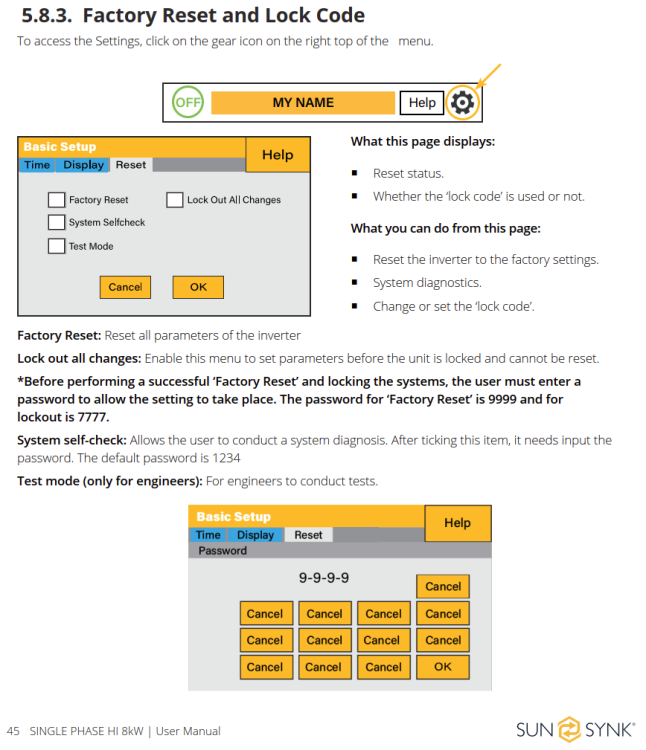
From the SunSynk user manual:
-
On the inverter - set the Modbus ID: On MQTT, set the ID the same:

-
Is the ModBus ID set on the inverter? Also follow the cable guide for BMS 485/CAN: https://solar-assistant.io/help/deye/2_in_1_bms_port
-
You don't need frp. Solar-Assistant uses frp internally to allow remote access. If you are accessing your SA via the App (PWA) or their Website, you are using frp.
-
Clickbait video. I watched the whole video - did not see a Tesla car at all - only 18650 cells. Tesla cars and batteries are safe when used with a Tesla BMS and for their intended use and not abused. These hackers took 18650 cells from a Tesla and used them unsafely. At 11:30 they admit - there was no BMS connected to the batteries

-
Agree. I think (4) chemistry is important as it impacts the cycles of the battery. Also 8 ) warranty 9 ) local support 10) cycles
-
Or get more than one battery Or get 1C batteries and use them at below C/2. In my case I have 4 x AM-2 5kW, 48V, 100Ah 1C batteries and an 8kW inverter. I have 4 batteries because I wanted 20kWh of storage. The inverter can invert 8kW, over 4 batteries is 2kW per battery, well below the 1C of 5kW.
-
Can't compare a knee replacement with a firmware update. https://yourlogicalfallacyis.com/personal-incredulity If load or PV were an issue, the inverter would, and probably does, programmatically disable/shut load and disable/shut PV before starting a firmware update and re-enable on reboot. The ability to programmatically disable/shut load exists in the inverter as seen on this settings screen: PV is controlled by the MPPT and can also be disabled during firmware update process. Firmware updates fall into two categories: Online - The device will upload the new firmware to RAM/staging area, stop all services, flash the firmware, reboot Offline - Place the device in a limited offline mode and update firmware (eg boot to u-boot and use bootp/tftp) There are some variations on the methods.

-
In the highlighted text, I assume you referring to the OP's issue where SunSynk broke the inverter by installing 5k firmware on a 8k inverter. I fail to see how this can be anything but 100% SunSynk's fault. I would expect SunSynk to go the extra mile (as it's 100% their fault) to resolve the issue promptly without inconvenience or cost to the customer. In terms of your other comments wrt to isolating the inverter for a firmware update (no load and no PV) Most of the forum members would agree that If an inverter malfunctions during firmware upgraded when it's not in bypass - that's 100% SynSynk/Deye fault Because: a) the official SynSynk link for upgrades does not state that the inverter needs to be in bypass. https://www.sunsynk.org/up-grade b) the official SynSynk user / installer manual does not state that the inverter needs to be in bypass. https://www.sunsynk.org/documents/ Sunsynk_Hybrid_Inverter_8kW_UserManual_v24_English.pdf c) the official SynSynk training manuals does not state that the inverter needs to be in bypass. https://www.sunsynk.org/post/training-manuals Part 1 Training Manual Sunsynk - HQ.pdf Part 2 Training Manual Sunsynk - HQ.pdf e) the official SynSynk training videos (and there are many and I've watched most of them) does not state that the inverter needs to be in bypass. https://www.youtube.com/@sunsynk5885 f) The official SynSynk technician actually doing the firmware update should check if the inverter is in bypass. (They should definitely check that the firmware is correct for the model inverter) g) It is not practical to put the inverter in bypass and just wait... and wait... and wait... 12h, 24h, 48h and hope that the update gets done remotely when SunSynk decides they have time. h) The Sengen Application Note you link to states "Sunsynk will perform an update, this will reset the inverter. Ensure you are not supplying loads with the inverter." The way I interpret the statement is "the inverter will reset during the firmware update process and if you are supplying loads these will go off so bypass to prevent your loads being impacted" I work in IT and have done plenty of firmware updates in my career - computers, routers, printers, cameras, storage arrays, disk drives, network switches, CPU microcode, HBAs, NICs, RAID Controllers, motherboards, fabric switches, firewalls, phones, DRACs, iLOMS, etc. The first thing you check is that the firmware is for that model hardware or else you end up "bricking" the device. Most newer update systems and firmware will auto-check compatibility first and not allow invalid updates. SunSynk was released in "newer" age but still uses "older" design of not auto-checking. Q. When is SunSynk going to provide firmware change logs to installers & public?
-
PRO TIP: Don't attack your stationary Pylontech/Hubble/FredomWon/Greenrich/etc with a huge metal spike. Stationary batteries are much safer than batteries in a vehicle. Even so, BEV fires are less than ICE vehicles. In terms of insurance, you can always exclude "fire caused by Lithium Battery" and still be covered by other fires. For example: Many people exclude alarms from their policy. They have alarms - for own use. Some are part of home automation and self installed. The clauses associated with the alarm and hassles (test every few months, turn on every time, etc) make the premium saving not worth it. EDIT: How the professionals test:


-
I've installed WireGuard on my router and on my Android Phone. Works a charm. Solar-Assistant enables remote access via frp: https://github.com/fatedier/frp/ Tailscale, ZeroTier, Nebula and Netmaker all look interesting. The below video gives good info on ZeroTier and HA.
-
RIOT My RIOT was only connected to the 4 x AM-2 battery bank and not the inverter. When I got my RIOT in 2021, it showed both SoH and SoC. Later updates removed the SoH from the display. I sold my RIOT about 3 weeks back, so it's possible Hubble have restored SoH in the last 3 weeks. AM-2 In terms of my 4 x AM-2, I'm mostly happy with the service and experience with Hubble. When I got the 4xAM-2 batteries in Nov 2021, I did have issues where SoH and usable capacity were decreasing. I contacted Hubble support and via the RIOT they reset the batteries capacity from 110Ah to 100Ah. Was not entirely happy with the decreased capacity... Unfortunately resetting the BMS Capacity did not solve the problems with SoC/SoH. Hubble then requested that I return the batteries for checking which I did. Sending the batteries in did not resolve the problem either. After a few weeks, under advice from Hubble, I switched to using Volts for SoC, as the BMS SoC was decreasing too quickly. I used a Juntek shunt to monitor energy in/out of the battery bank and compare that to the SoC reported by the BMS. see https://github.com/mysystem32/juntek_kg A few months later I learnt via this powerforum of new firmware. I requested the firmware from Hubble Support which resolved the problem with SoC/SoH and restored the reported capacity to 105Ah. Since then the 4 x AM-2 have been working very well. I'm sure Hubble have reasons for telling people not to use PBMS tools, but the T&C also block you from connecting Solar-Assistant to the console/rs485 ports. Having SoH, SoC, Cell Voltages, Temperature, cycles, etc is useful for troubleshooting issues. Instead of hiding this information, they should enhance RIOT to display all information. Would I get AM-2 again? Yes. The product works. Support works. I would probably go with AM-5 as they have different chemistry. Hubble Support My experience has been good with Hubble support and I can recommend them. I very glad to have local support for the AM-2 and ultimately get my issues resolved. Some of the imported products are difficult to get help with.
-
Neutering RIOT (remove useful information like SoH) and blocking access to information from PBMS tools reminds me of this syndrome. See https://en.wiktionary.org/wiki/mushroom_syndrome Basically it means "keep you in the dark and feed you sh1t".
-
Does this mean "if you don't pay tax, then you won't be able to claim."?
-
I was scammed by a PV-greencard holder. He listed on PV-greencard website. Sent PV-greencard a complaint email, nothing happened. Scammer was still listed for a year until he failed pay R2,400 annual fees. see https://solar-bay.co.za
-
I have four AM-2 and besides the initial firmware issues they are working well. >ridiculous claims like if you use PBMS they'll deny your warranty Seems unethical of Hubble to restrict access to vital health information of the AM-2 (eg individual Cell Voltage). What is Hubble trying to hide? They neutered RIOT to hide SoH which is not good. Mushroom syndrome. Also not happy that AM-2 counts at ~1.5 cycles per day. At this rate will be 3000 cycles in ~5 years instead of expected ~8 years.
-
THIS IS JUST A CASE and not the actual RPI4b. RPI4 are out of stock in most places. Some have used the RPI400 instead.
-
I'm not so clued up as you in terms of P = VxIxpf and power factors. I just used my trusty consumer grade kill-a-watt meter. With a 40W incandescent, the kill-a-watt shows ~42W with a PF of ~99 on the display. With a 5W (GU10 400 Lumens Cool White) LED it shows ~5.2W with a PF of ~65 on the display. The LED is much brighter than the 40W incandescent. Am I missing something?

-
Durban municipality proposes 21.91% electricity tariff hike (2023/2024 budget) See https://www.timeslive.co.za/news/south-africa/2023-04-04-durban-municipality-proposes-2191-electricity-tariff-hike-more-than-eskoms-municipal-increase/ I hope this is not a sign of things to come in other Metros. Eskom has been awarded an 18.65% increase. Meanwhile, the City of Cape Town said it intends to increase tariffs by 17.6%. Time for residents to get that solar system...
-
I have a few of these from sinetechstore. I got some 15W and some 40W. The 15W marketing brightness is more like 5W and the 40W marketing brightness more like a 10W. The good news is that they are over 3 years old and still working and run all night long.
-
Perhaps the flicker is caused because inverter voltage is steady at 230V, where as Eskom varies between 228.3V-243.5V, avg is 235.0V Below chart is from average per day from 1 Dec 2022 to 4 Apr 2023 (load shedding excluded [V below 210 & Hz below 45]) Definite rise from ~1 Nov 2022.

-
AFAIK, for RIOT <-> Hubble-AM-5 you need a modified RJ12 console cable (one of the wires needs snipping).
-
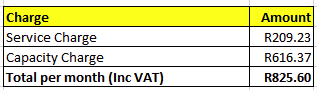
Nersa controls the R/kWh that CoJ can charge. Nersa does not regulate the service & capacity charges: This allows CoJ to charge very high service & capacity charges (relative to other metros). R825.60 per month on post paid just to be connected 🤬
-
Just to add, I changed to CoJ prepaid in 2010, and even then up to ~2000kWh it was cheaper than Post Paid. The R/kWh is controlled by NERSA, whereas the Service Charge and Network Charge are not, so CoJ has been bumping these up at a higher rate. AFAIK, CoJ Service fee and Network fee are high compared to other metropolitan areas. CoJ had been trying for the last two years to introduce a fixed fee for pre-paid, but in order to do so, they need to reduce the R/kWh. Keep a look out for CoJ to try again and object.


