system32
Members
-
Joined
-
Last visited
Everything posted by system32
-
I prefer option 1 as my SunSynk has direct support for Hubble AM-2. I've tried option 2, but not used it for any length of time. I did notice some differences in the LiBMS readings.
-
+1 The data from RIOT/CloudLink seems to be quite limited compared to SA. Seems that newer releases of RIOT/CloudLink firmware limit the data even further. No pack information, no cell voltages, not much.
-
I just managed to my RIOT to work with SunSynk. Needed a special cable that was only documented in the v4 manual. https://powerforum.co.za/topic/9858-riot-cloudlink-sunsynk-deye-monitoring/#comment-135920 The data from RIOT/CloudLink seems to be quite limited compared to SA.
-
Not sure if RIOT works with Growatt, best to call Hubble Lithium to confirm: RIOT does have Growatt protocol support: https://www.hubblelithium.co.za/cloudlink See https://powerforum.co.za/topic/9858-riot-cloudlink-sunsynk-deye-monitoring/#comment-135896 For how RIOT can be connected


-
I have 2 fridges and a upright freezer, the tasmota sampling is per minute, so the instantaneous power is averaged out. kWh used over 24h


-
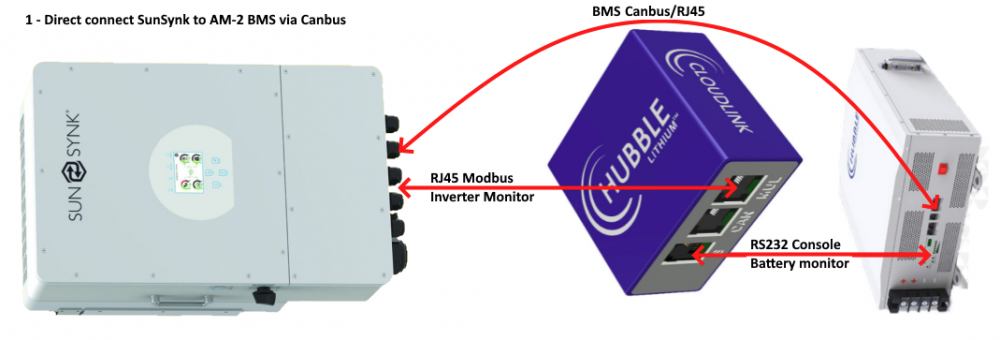
Is your SunSynk direct connected to the battery BMS (Option 1) - Current SunSynk firmware has direct support for Hubble batteries or indirect connected via RIOT (Option 2)?
-
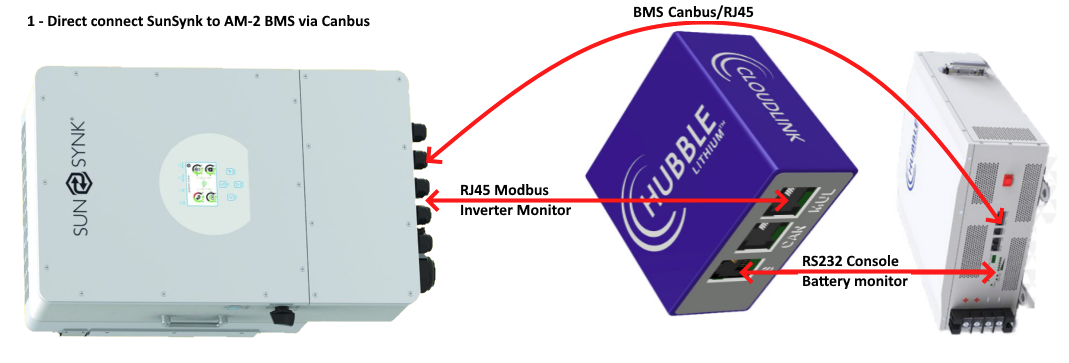
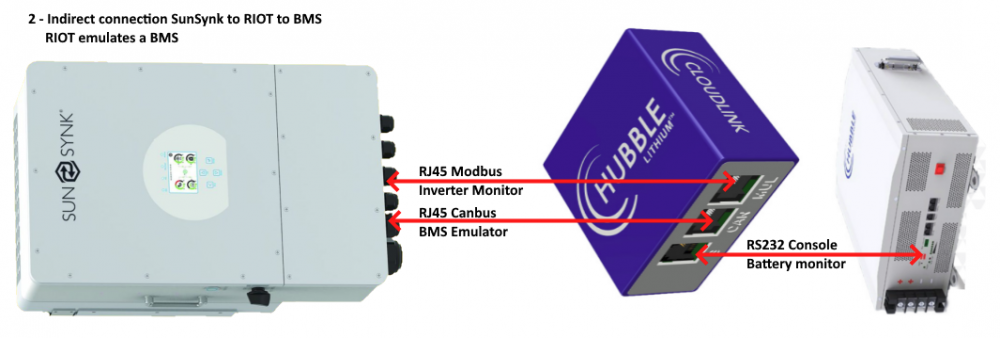
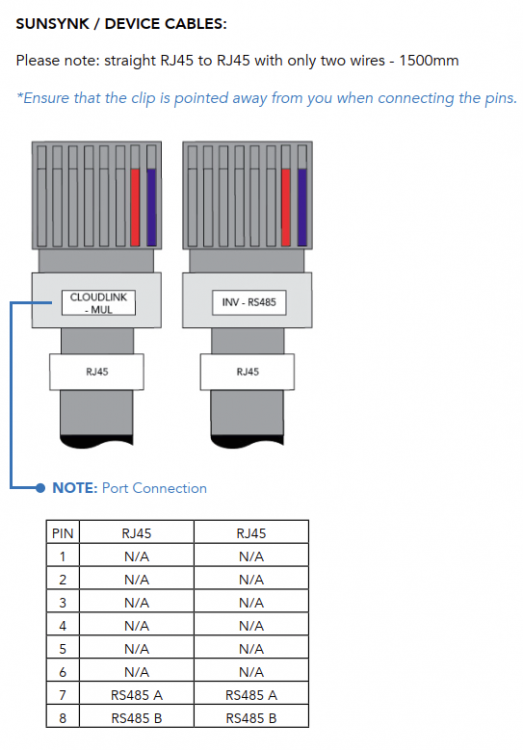
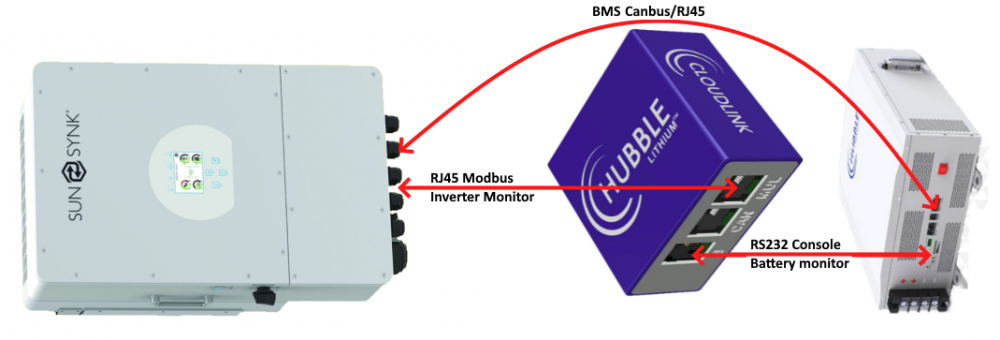
In order to get the RIOT to work you need to connect as follows: Or (option 2): In the 2nd config, the RIOT acts as/emulates a BMS - it translates the RS232 console to Canbus. This is not necessary as SunSynk firmware has direct support for Hubble AM-2 via Canbus. A RIOT is not required at all in a SunSynk / Hubble AM-2 installation. I've tested both and prefer the first option where the SunSynk is direct connected via canbus to the AM-2 BMS. NOTE: You need special RS485 cable to get RIOT to communicate with SunSynk (only pins 7 & 8 connected) Normal Ethernet LAN cables do not seem to work with the RIOT MOD port. See page 11 of "Cloudlink Setup Guide v4.0.pdf" https://www.hubblelithium.co.za/_files/ugd/c0fc0a_ed19d4bfa78f4873846638e251a62ed4.pdf Remember to configure the RIOT: If you have Solar Assistant you can share the SunSynk RS485 modbus port with a splitter. I prefer Solar Assistant over RIOT as Solar Assistant allows access to sensor data via MQTT for integration to Home Assistant & Grafana Solar Assistant is local - no cloud required



-
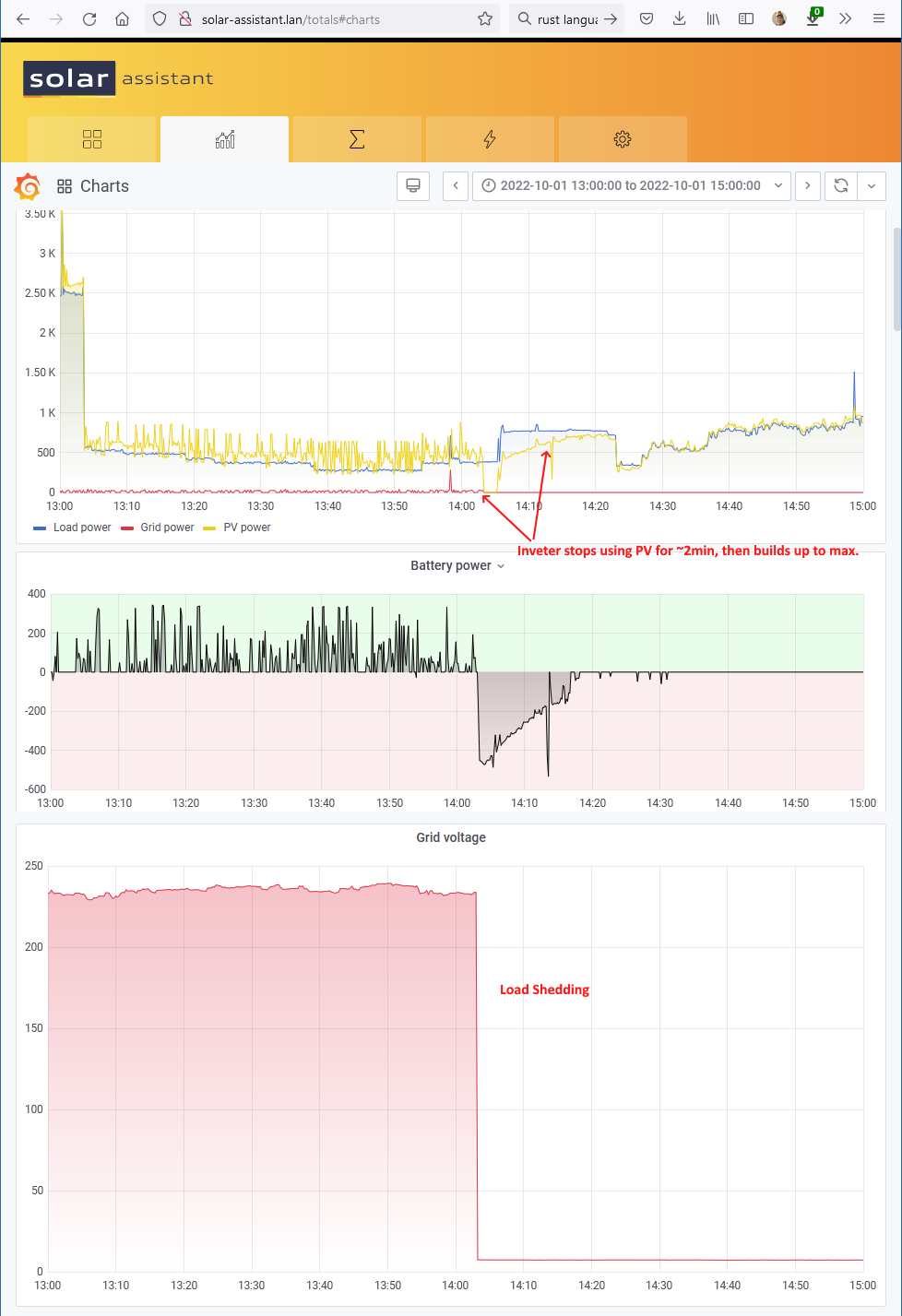
I've also observed this behavior - not too concerned as it seems to recover. During 100% sunlight, after grid fail (load shedding), the inverter uses battery for a few minutes before reverting back to PV - only happens if battery is at 100% SoC.

-
This video by the excellent & knowledgeable Andreas Spiess give some information on his experience with optimisers (at about 10min) This is the 3rd video in which he documents his PV installation - well worth a watch.
-
September 2022 in JHB South has been an excellent month for Solar PV - my best month so far (system installed in Nov 2021). I had a 666.7kW of load, with only 16.9kWh coming from the grid. Most of the 16.9kWh was used on the 1st Sept, then the trickle feed used the rest. Tip: >1 flat panel solar geyser The normal (Eskom) recommendation is to use a timer to heat the water using electricity at 4pm-6pm and again at 4am-6am. Normally the sun will heat the water to above the thermostat setting of 60°C so the 4pm-6pm cycle won't kick in. What I recently did, was to use the solar geyser to store PV energy. My battery is normally full by 12pm-1pm and since I'm not yet grid feeding, the afternoon PV electricity is "wasted". What I did was I changed the 4pm-6pm cycle to 10:30am-6pm. Normally by 10:30am, my PV is generating about 4.5kW (see signature below for my system details). Typically ~3.5kW is going into the battery and ~1kW is going to running the house. I turn on the electric element in the solar geyser an 10:30am, this uses 3kW to force the temperature to 60°C in 1 to 2 hours - effectively storing 3 to 4kWh of PV in the geyser. The sun in the afternoon then boosts the temperature from 60°C to 70/75°C. Since the geyser is at 70/75°C even if we use hot water at night, we hardly ever need the 4am-6am boost. This helped me.

-
Note: I've updated the first post with the data for the whole of September 2022. Was an excellent month for Solar (my best so far).
-
The BMS on Hubble AM-2 tells the inverter to stop charging at 100%. It requires 100% SoC for cell balancing. The BMS prevents charging from 100->95%. This prevents constant top up. Not sure how other BMS's are programmed.
-
If you have Lithium batteries, then daily charge / discharge is fine. LiFePO 4 batteries are typically rated for 6,000 cycles with a 95% DoD. 6,000 cycles = 16.4 years I charge mine to 100% SoC daily and discharge to 50-20% SoC. Below is the 7 day Solar-Assistant Graphs:

-
The Deye 5k has 2 MPPT controllers. 1 string of 6 x 49.2V = 295.2V 2 strings of 3 x 49.2V = 147.6V - this is too low for the MPPT Just ensure you don't exceed the max Voltage per MPPT - 425Vd.c The below table is from SunSunk 5k, Deye should be the same:

-
The only suggestion I have is to ensure the SunSynk Modbus ID is correct: Mine was zero, which did not seem to work.

-
Normally need to set the Modbus ID

-
TIP: Use geyser as energy storage. I also have a Solar Water geyser. I used the recommended GeyserWise timer schedule of turning on electricity at 4pm-6pm and 4am-6am to heat the water to 65°C. The theory was to let the sun heat the water during the day. If it was a cloudy day, the 4pm-6pm schedule would ensure we had hot water for the night. I read somewhere of using your geyser as a "battery" so I recently added a 3rd early schedule at 10:30am-12:30pm. At 10:30am, I normally have enough PV (4.5kWh) to power the house ~1kW and heat the geyser ~3kW and a little bit of head room. The trick is to have enuf PV at 10:30am to heat water and not draw from the battery. This uses Solar PV electricity to get the geyser to 65°C. The the sun then further heats it in the midday+afternoon to 75°C. Even when we use hot water in the evening, we generally don't need to heat it in the 4am-6am slot since the starting point was 75°C. This has mostly eliminated the 4am-6am slot. The other option is to only use hot water once per day (all bath in the evening or morning). TL;DR: add a 10:30am-12:30pm electricity schedule to your solar geyser.
-
I'm looking to post my code on github, just need to see how. Will advise when I've done so.
-
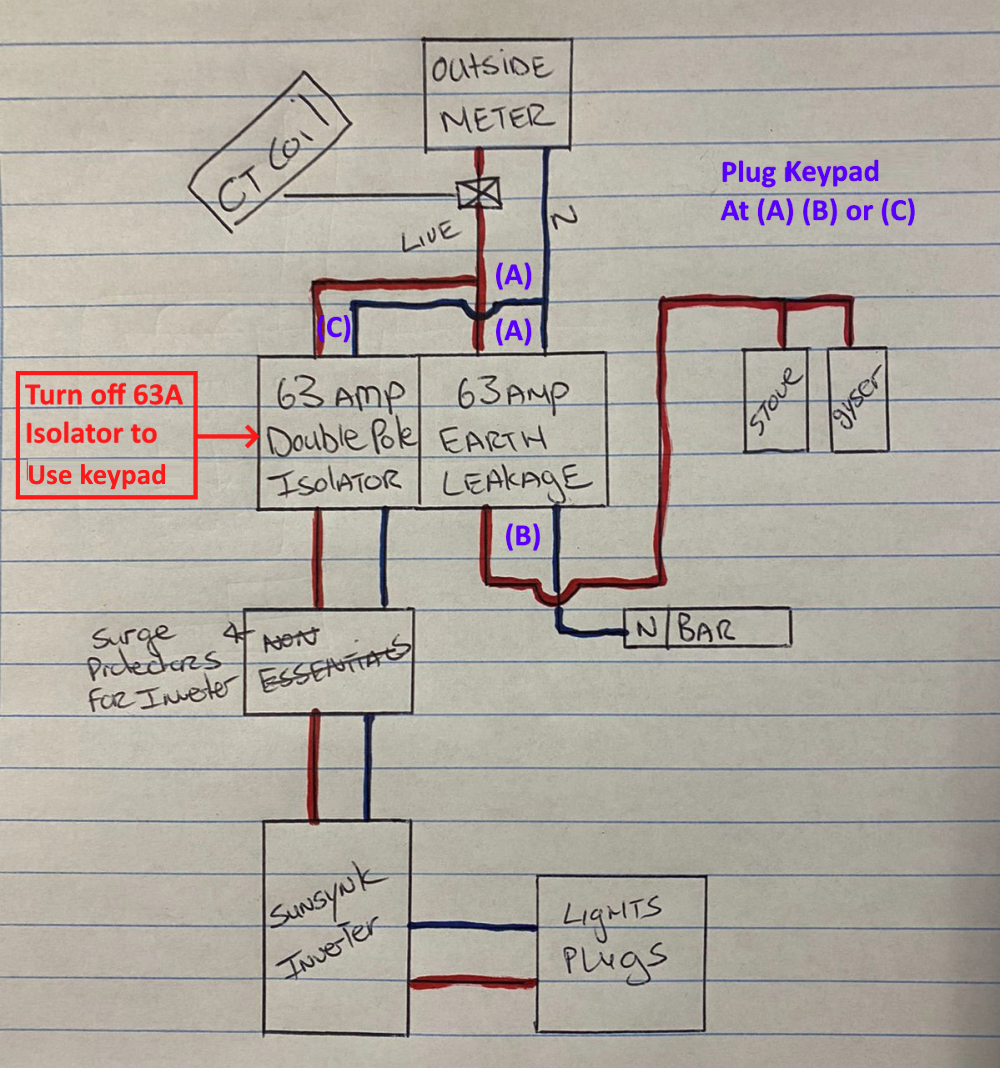
I have the same keypad and the same problem. 1) Plug the Keypad (meter reader) before the inverter (Grid Side). 2) Isolate the inverter when you need to load units / use keypad. My keypad was moved to the grid side. The keypad still shows the units (kWh) available, but I can't load until I isolate the inverter. I think the trickle feed from the inverter affects the Keypad communications over the power cables to the meter.


-
I have Solar Assistant <--> mqtt <--> Home Assistant. I've used Home Assistant Automation to send Notifications on Grid Fail & Grid Restore (I check if Grid Voltage drops below 210V) If you have the HA App on your phone, the Notification will be pushed to your phone. You will receive the push notification away from home (as they sent via cloud service). The only issue is that your Cell Phone needs access to HA to see details. Phone access to your IoT LAN can be done by VPN, port forwarding on your router or HA-Cloud or FRP https://github.com/fatedier/frp From what I've read, it seems pretty easy to configure HA on an event to send an email or send a message via Telegram.

-
The SunSynk 8k has DB9 RS232 Serial Port - this is normally occupied by the optional SolarMan or SunSynk dongle - used for Firmware and monitoring connects to internet via WiFi - the Dongle is included by some stores, and is an optional extra at others. RJ45 ModBus Port - Can be used for monitoring - eg Solar Assistant/Python/Home Assistant RJ45 CanBus Port - use a normal Ethernet cable to connect to the RJ45 CanBus port on the first AM-2 battery The Hubble AM2 has: RJ45 CanBus Port - On first battery - use a normal Ethernet cable to connect to the RJ45 CanBus port on the SunSynk RJ45 ModBus Port - Not normally used 2 x RJ45 battery link port - inter connect each battery with the supplied cable (or use an Ethernet cable) 1 x RJ11/RJ12 RS232 console port - connect with the optional RIOT Cloudlink or Solar Assistant RIOT/Cloudlink is NOT required as the SunSynk and AM-2 talk to each other directly via canbus. TIP: The questions you are asking basic are clearly explained in the SunSynk installer manual located here: https://www.sunsynk.org/documents Hubble AM-2 https://www.hubblelithium.co.za/sunsynk This video does an excellent job of explaining the linking:
-
With a 5kW inverter, Discharge/charge of 100A * 48V = 4.8kW is correct. According to the manual, the UP5000 is Nominal Capacity (Wh) 4800 * 3 = 14.4kWh Usable Capacity (Wh) 4560 * 3 = 13.68kWh With 95% DoD (== 5% SoC) With SoC 50% System Mode 1, means you will use 50% of 14.4kWh = 7.2kWh of the battery at night. The inverter will shutdown if the SoC drops below 20%. During night time & load shedding & battery at 50% you will sill be able to use from 50% -> 20% => 4.32kWh. 4.32kWh is the minimum, if the battery was at 60%SoC, then you will have from 60% -> 20% SoC. The SoC 50%/20% is conservative (and probably good for stage 6). I would use a shutdown SoC of 5% or 7%. I would then consider also dropping the System Mode 1 lower. I use a more aggressive 20%/5%, which means that I discharge my battery to 20% SoC daily which for Lithium batteries should be OK. [Most nights I have 28-40% SoC still left unless it rained the day before] The SoC 50%/20% is also dependent on the total battery capacity - you have 14.4kWh which is quite large. A 20%/5% or 30%/10% will save more grid.
-
3 x 2 pylontech up5000 batteries 3 x 4.8kWh Recommended charge/discharge current is 50A per battery. Which model SunSynk inverter do you have? You have 100A charge / discharge limit 100A * 48V = 4.8kW If you have the 8kW inverter, you could use 150A * 48V = 7.2kW to prevent clipping. As per SunSynk manual, check LiBMS screen to ensure that the inverter & battery are communicating. The Voltage Settings are ignored if LiBMS is communicating, but best to set them as per Pylontech recommendations of 53.5V Also set 90 days to zero as conditioning is done by the BMS. The shutdown 20% needs to be set with System Mode 1 in mind. On mine, I have System Mode 1 of 20% and shutdown of 5%
-
Thanks, I got to give some credit to @Antonio de Sa who's Grafana table this is based on.
-
I see in Phase 1 you have 2 x Victron Multiplus II 48/5000 with 14 panels. Did you consider using just one of: Victron MultiPlus-II 48/8000/110-100 Victron MultiPlus-II 48/10000/140-100