Kalahari Cruiser
Members
-
Joined
-
Last visited
Everything posted by Kalahari Cruiser
-
FWIW as a comparison. My batteries (2x 5.1kwh SS) coupled with 8kw SS are currently on 100% (I had disabled timer last night, rainy day forecast in cape town).

-
Caveat: I don't know much about this inverter except that it's a 3-phase. It's a 12kw inverter (not kwh) which relates to the maximum power at any one point in time. Production "in a day" has the time element to it, so that would be kwh, and would / can be a multiple of that. It can accept around 15kw PV across its two MPPT inputs, so under ideal conditions and with enough panels you can produce a lot of solar in a day. edit: posted concurrently
-
It was certainly R500 less last night still, now gone up to R2760. Trust the price was correct at the time, albeit PFS quotes prices on request, it's not an online purchase at a displayed price.
-
Clips are required for the battery - becomes pretty self-explanatory connecting the DC cable to them (the gland offers a tighter fit - insert the cable into the metal hole, and then screw the plastic lid at back over it all (bit like shrink sleeve, place cable through it first). I had to slightly reduce the size of my 35mm cable to make it fit. Then it just clips into the battery. Think it's called an ESS connector. Comms cable to battery comes with the inverter, IIRC. Pretty sure they're dead easy to make up yourself with a lan cable crimper, the required 'pin' schematic is on the site somewhere.
-
Great outcome, well done all. How do you manage to have such a low house load though ☺️
-
Interesting, so after the breaker (load being removed), it's quite safe to wriggle out the PV fuse(s) if needed, and replace it again, on a sunny day. I haven't, but was just curious, as above seemed counter-intuitive to me. Thanks!
-
Out of interest, if the breakers are downstream of fuses as suggested above, how would one remove or change a PV fuse during a sunny day (bearing in mind house loads and incoming DC current/voltage from the strings)?
-
Thanks Talia. Are you suggesting that the Eaton Bussman and Jean Müller fuselinks commonly sold with the disconnectors are not appropriate for use between inverter and battery? They're rated gG/gL but not gS...
-
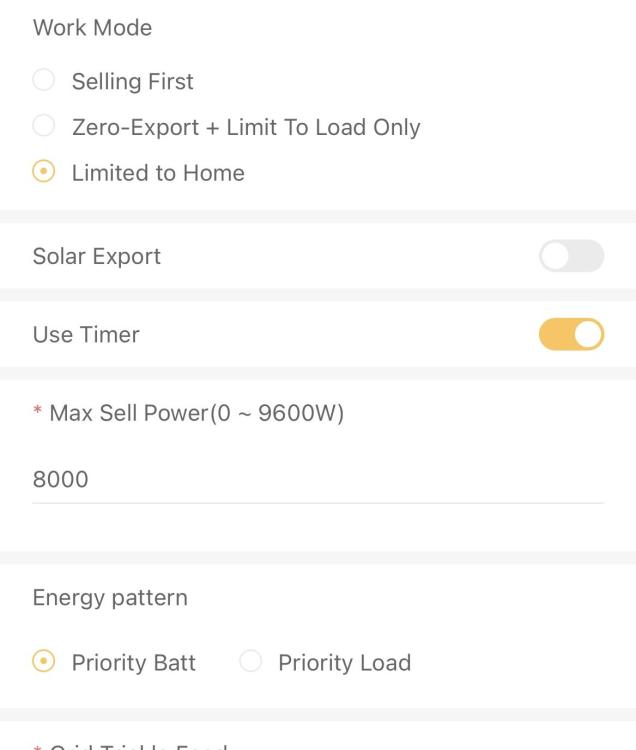
Sorry for butting in here. What you say makes sense; however my SS inverter setting is priority battery and when I have PV available, the house loads get fed first, and any surplus PV charges the batteries, not vice versa with battery first etc. This is obviously the way I want it. In similar scenario, if I’m already at my preset minimum SOC, with grid present, then PV goes to house loads first, but if there’s insufficient PV it draws the shortfall from the grid. No battery recharge prioritization over load/house ever. Does this make sense? In terms of limiting grid usage per the OP, the two most critical things for me were to shift loads to a little later in day and try to stagger (and have a sufficiently low SOC setting for daytime to accommodate the swings of power usage), and having the „limit to house“ setting permanently enabled (with a bit of battery SOC setting intervention) so that non-essentials benefit from the sun during the day. All assuming CT coil etc are correct obviously.
-
Possibly. I set up my SunSynk dongle / wifi pairing / account myself, with full „privileges“ (I think installer level), as I wanted it that way. Glad to hear that you found a solution to upgrade and that you now have 60s sync. Good looking install by the way, and nice to see you’ve got individual DC connectors/fuse links for each battery. I also went that route, and in fact, my two batteries go to a common busbar after the DC disconnectors, and then onward to inverter (one inverter).
-
Mine is set to 20W. I thought it was mainly for frequency synchronisation, but not sure. Check my post here:
-
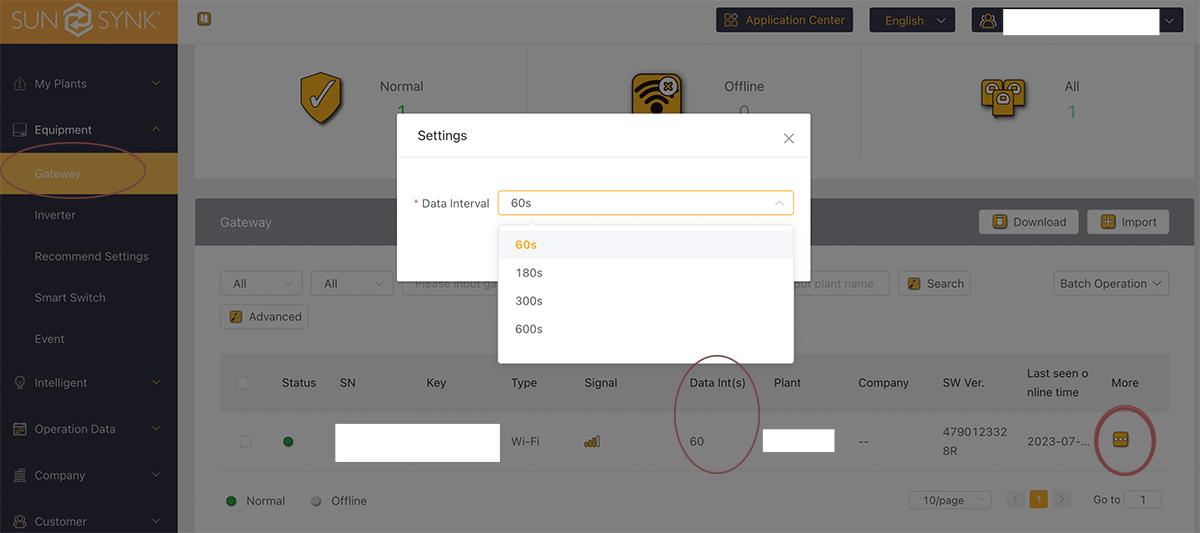
You can set the synchronisation updates to 60 seconds (via sunsynk.net login). Less sore thumbs on the app refresh!
-
I recently retrofitted the wifi geyserwise (one needed a drop-in PCB, and the other one a new display) to my two geysers. 5 minute jobs. Previously had the standard TSE1 and Delta models. PlumbIt online had great service and best prices amongst all (or so it seems). Geyserwise now runs via Tuya app and is great for remote enabling as PV dumps. If your existing geyserwise has a three digit temperature display (i.e. three digits showing even though temp shows without decimals) then the PCB retrofit works, else you need a new screen (a few hundred rand more). Is the Geyserwala basically a geyserwise "copy" / third party product with additional functionality?
-
That's a lot yes, others can comment about replacing the element with something smaller. Mine are 2kw and 3kw respectively, and one really notices the impact on the 3kw unit when used in combination with a few other power users (8kw inverter/ 10kwh battery setup). When there's 3-5kw winter PV available - haven't experienced summer yet - it's obviously ok.
-
You can reduce the refresh rate to 60 seconds (default is 5 minutes, I think). So it seems - thanks for the P-External-CT-L1 headsup, i hadn't added that as my preferred charting metrics and nice that it's included there at least (I'd still prefer it on the main display). I was doing same - and have since kept things on the "limit to home", so all data shows on main display, and while grid is present any load beyond the 8kw inverter rating just gets drawn from grid. As mentioned earlier, I now have a slightly more conservative battery regime, and/or am timing geyser use in an early morning time bracket where de facto it will take from grid, as I've hit the minimum SOC already (or am close to it). I've just retrofitted my two geyserwise displays with the tuya wifi option (one needed a new display plus power box, while the other just needed the PCB), and can now add them into the mix remotely via app when there's excess PV and I need to dump / utilise free energy that would otherwise go to waste. I've also set timers to a slot where there's most likely to be excess PV available. Yes there are ways to automate this, but my setup is actually quite simple. Since both are solar geysers, in the summer months it will mostly be moot, as the geyers will be hot enough and hardly be able to be used as excess PV energy dumps.
-
Great, same here. When I switch back to 'limit to load' (ie cutting out the non-essentials from solar, and on the main display stat), the P-External-CT-L1 still shows the full grid draw (have tested with geyser) when this parameter is included. Would be nice if the main app display/overview also differentiated between the two at the grid icon, or if the layout allowed some customisation - I know the inverter display has much more differentiation. I suppose SA etc. can do all of that. CT is installed correctly. The issue isn't about not seeing non-essential loads, more that it didn't appear in the general stats / diagram overview (on app) when set to "limit to load". I suppose there's some logic behind it.
-
Yes. That should leave you enough room if LS hits in the morning to maintain the base load and utilise solar. Yes that is annoying for me too. Since I want them to appear in my stats - with grid present, any excess power needs beyond 8,000w (per setting) will be taken from the grid. i.e. with grid present, these non-essentials won't overload the inverter and with grid gone, they fall away anyway. Yes, on the app you switch from Limit to Load to Limit to Home - only then will your non-essentials benefit from PV/Battery, subject to your pre-set battery minimum SOC settings for that time block (i.e. if the min SOC is reached, solar feeds both essentials and non-essentials, but will augment from the grid if needed). What I've done is that I keep my 'limit to home' setting enabled, but am slightly more conservative on the SOC settings / time blocks. I've also moved my two geyserwise timer settings to slightly different times, with more boosting (and solar banking) during sunshine hours in the afternoon. Both also have the wifi enabled so I can override remotely. Since my "minister of interior and domestic affairs" is keen to always have reasonably hot water available for showering purposes while the teenager insists on evening showers (different geysers) this required some management. So as not to have the morning geyser boost kill the available battery SOC I've made peace with tapping into Eskom for that - it's less than an hour - and my min battery SOC for that period (when the early morning boost happens) is high enough that in practice the geyser will always just tap into eskom for that boost - or use only a small amount of battery if its available in abundance. Obviously, if there's no grid that boost wouldn't happen, but that applies irrespective, since geyser is a non-essential. My setup is broadly similar to yours except about 3kw more panels. The way I understand it is that the inverter can't distinguish between these available power sources for this purpose. There's also the Aux port but I'm not 100% familiar with it and don't use it myself. The geyser is a useful excess solar PV energy dump and the wifi switch (geyserwise wifi) allows remote boosting. And as with many, I hate leaving stuff at the till, and that includes having abundant sunshine but nothing to dump excess solar to. Both geysers are already solar geysers, so will largely fall away as power dumps in summer. Thats where the oven with its 4kw element comes in - hence the need to keep things on 'limit to house' and do less manual switching. I don't have HA or SA automation.
-
Unfortunately me too, but haven't done FW update. Latest app now shows key specs to the 1st decimal on the main screen, but haven't noticed anything different. I suspect this relates to the firmware rather than anything else (based on my circle of contacts that get the reconnect note (same system otherwise), compared to my hardware / zone / FW version). But would love a clear answer.
-
I'm not sure - someone reported experiencing problems doing it that way (start/finish at midnight / change of day). I have my timer starting and finishing at 00:30, and no issues. Maybe what was reported had a different cause altogether. I'm wondering why only timer block is ticked for grid backup.
-
Via sunsynk.net /. -> Gateway. Click on More / Settings and chose time interval for refresh

-
Interesting - you mention it happened earlier this month, was this a once-off observation or do you find that the battery drains below the pre-set SOC with grid present repeatedly? I'm sure you've done your analysis, but obviously the time category SOC doesn't apply during LS (only the battery shut down etc.). Can it definitely be excluded that on that particular day there wasn't perhaps a bout of load shedding during which the battery drained more than expected, or that during grid present a geyser drained the battery to it's min pre-set SOC just ahead of load shedding (taking it lower than expected for that time of the night or early morning), say because the setting was on "limit to home", and then LS starts which took you lower than usual? I can think of scenarios whereby a high actual SOC can get whacked quickly by a so-called non-essential, when grid is present and the inverter is set to allow non-essentials to draw from battery, and then LS starts when you're already on the back-foot. On the settings you posted, you only have one time slot ticked for grid backup, not sure if this is relevant here (not sure what you had ticked when you experienced the issue). Having to take the battery back to Herholdts (where my SS also come from) sounds like a massive PITA, hope that can somehow be avoided. As an aside - what refresh rate have you set for your readings? The time intervals seem very long (hence the big steps). You can change that to a 1-minute interval, which results in much more accurate and smooth charts.
-
Can't help with UK supplier (here in SA I've only seen the SunSynk connectors), but I think they're called ESS Connector (certainly on Alibaba and eg. Weidmüller sites https://catalog.weidmueller.com/procat/Group.jsp;jsessionid=5C35FD3E82CCC189AF960BC75697F5C5?groupId=("group5808151027470")&page=Group)
-
I've got a SunSynk and the functionality is probably the same, apart from difference in the terminology. So for what it's worth, on the SunSynk (and per the grid settings on app), Zero Export + Limit to Load only: this limits inverter / solar power to your essentials only Limited to Home: this provides inverter / solar power to both your essentials and non-essentials (provided grid is present), and the source can be solar and/or battery (subject to it not dipping below the pre-set battery SOC that you've set, if using the min SOC/time of day schedule). Zero export to CT means you're not exporting to grid. But (on the SunSynk) if you're on the 'limited to home' setting, you'll feed both the essentials and non-essentials with solar/battery. When grid falls away, the non-essentials do not get power even if on "limited to load" is set. The CT clamp sits on the incoming feed / grid side, before the breakers. My understanding is that if you were to "export to grid" (which I believe is illegal without the necessary authorisation and bi-directional meter in place), depending on where the current meter is, you're basically paying Eskom for your own consumption PV production. I think the "solar sell" is the culprit here, but others will be better placed to answer this.
-
Yip this is correct. And just noting that on option 2 - the non-essentials will draw from your battery too provided the SOC is above the min SOC set for that time slot. That's particularly relevant if day-time slots have a low minimum SOC set. With the very poor solar winter we're having in Cape Town, on the handful days that we've seen the sun I manually change from option 1 (limit to load) to option 2 (limit to house) on the fly so that any surplus solar can go towards non-essentials. And when a particularly poor day lies ahead for the following day, I disable the timer and essentially use the inverter/battery as a UPS (keep battery at 100% SOC) and let what little PV power there is contribute to the house load (on those days I'll only get 5-6 kwh and never because of lack of load) - thereby also saving on battery cycling and I suppose related inefficiency. All setting changes done through the app.
-
Herewith dimensions of the SS 8KW and SS 5kwh batteries - boxed - in case the OP @p_i still requires this. I assume it's the box dimensions, given it's on the outside 🤪.