


shaun99
Members
-
Joined
-
Last visited
Everything posted by shaun99
-
So to recap, I removed c9 and my wifi logger is back on. I am going to draw this circuit for that board, however, I think c9 was dead short but I don't have a connection that seems to use it. I'll replace it when I can find a replacement.
-
That was so close. As close as hovering over approve. Something felt off so I rejected/declined. Glad I didn't complete that battery order. I'll go back to my regular supplier. Their technical specs are off on the site too. I wonder how many people have been scammed by these people. They are quick to respond to mails and are very accommodating when you ask questions. I suppose it's typical of scammers.
-
Thanks, I can't recall if that is in my inverter, I didn't have the cover off that long. It's just the 5KW Deye 1P inverter. Deye Inverter SUN5L-5K-SG03LP1-EU the same one sold in SA. I'm currently experiencing battery recognition issues as my batteries don't have dipswitches.

-
Hi. I'm struggling with my setup.. Deye5kw and 2x Volta Stage1 Pro batteries. I turned everything off, connected battery power cables, disconnected the comms cable from the inverter, then connected the link cable into the one battery IN port, the other end into the other battery OUT port, and connected the comms cable to the PCS port on the battery where the OUT port is now occupied. Turned on the battery with the PCS one first, the leds do a good green KITT impression and settle. Then I turn on the second battery, both batteries doing a Cylon impression with the green lights switching left right and eventually settling. I turn on the inverter and it starts up after about 2 mins. I am not able to communicate proppperly over the canbus to read the battery states. The LCD on the inverter doesn't show two batteries. These batteries don't have dip switches and are aparently smart and can set their bus address themselves. What am I doing wrong? There are no instructions on how to connect the second battery of this type. The Deye and Solarman apps allow control sort of. I'm worried I'm damaging the batteries. Please can someone advise
-
Afternoon all. So I'm still procrastinating and haven't flashed my dongle yet. But that is not the point here. I had a look at the schematic or at least the bit of info there is on the RS232 circuit board fitted to the 5kW inverter that the Solarman/Sunsynk wifi logger dongle plugs into and found that there is 12v power fed to the board. It may be possible to tap off of this to drive the electrodragon board. This is only when you need the 12v to drive the adapter board. When and if I get it done I will take a picture and post it here unless it's been done already. Thanks
-
I understand it should be on the same network so I'll install an AP in the garage or behind the wall the inverter is on. It just means running more cable to the switch. I don't like using them in repeater mode. So that said, I have a bunch of plans to integrate some other things with HA. So my next question would be if the data displayed on HA can be used by another Esp32 to give a mini dash with limited info. Cheers
-
So with my initial rush to get everything setup, my HAOS is running, I have my dongle and adapter board, the dashboard loaded, ESPhome running and that is as far as I got. Between studying and life, I didn't get to flash my dongle. I am a bit unsure what gets flashed to the dongle. If HA is on a different physical network than the one the dongle is connected to, is there a way for this to work? Or should I just place a Hotspot close by. It also looks like my Huawei AP's create a different network apart with a different IP range from the Main router. It's a weird setup and would like to put new AP's but these are new so I don't want to waste them.
-
I bought a nodemcu and lost it. Somewhere there's an STM32 as well. Never got the chance to use either. I believe it still is easier to program and configure the esp32. I'm not trying to convince you to change to one. I have seen many posts where people have struggled to get the node red to work well with inverters and HA. I'm interested to see what you come up with.
-
If using HA how are you not able to read and write to or from your Sunsynk? There is someone here on the forum that has done quite a bit of work setting up their system using an esp32 and rs485 module. There are some interesting threads already covering reading and writing via modbus. Check out.
-
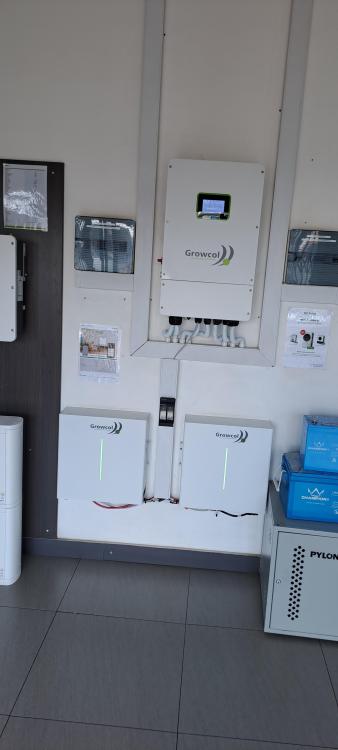
I was worried myself there for a while. I've seen those too, forgot to mention it in my long post. I just need to add another battery as one 5kw is not big enough for the whole night. I'm running a Deye inverter and in hindsight an 8kw would have been better with two 5kw batteries. Examples of what I've seen.

-
This is the comment I got. "Left DC, Right Ac.. split trunking as per Sans code." It was accompanied by a picture. I actually think that he was referring to the DB's in the image he sent and not pointing to SANS. The SANS was meant for the split trunking. It worked out well to my advantage in any event.
-
When I was doing my installation the Installer I was consulting said the DC must be on the left and AC on the right. I can't point you to any regulation as I followed his instruction. I have it somewhere in a message. I have seen the DB boxes mounted next to one another separated by an air gap, although 90% (not statisticaly proven) I have seen the DC DB is situated on the left. Even in the installs in the Suppliers I have been to have them done that way. I have no issue, I have my AC eishkom DB on the right in any event so it works for me that way. I just asked as I thought it was in the regs. I only read enough. Apparently I need to read it thoroughly. I have lots of labeling to still do and a plug to replace, including some other things before this is complete. Still, a nice install.
-
Thanks everyone for your input.
-
If I may ask, where can I get the Onesto ones?
-
If the fuse cover screws or clips into the front it would be an easy replacement. I have a few ideas. Thanks all for the feedback. I'll post what I come up with or use what is available. I guess it depends on the effort and if it's worth the time. Thanks again
-
Thank you. I will make a plan to get some. I was unable to complete my installation fully due to surgery. I hope to be back on my feet literally in the next 3 or 4 weeks. I'll order some of the Onesto ones in the mean time. While I wait, I'll do a mock up and see if I can make a 3d printed prototype one too with the holder for a replacable glass fuse. One doesn't need a big fuse for this circuit.
-
Thanks. I have not taken one of the led indicators apart to see what's inside yet, but from what I read they have to be fused. So the thought here was more on saving space. If the DIN LED requires the use of a fuse, why not build it into the device? I have to still get some of them and will take one apart to see how it's made. I have not yet found anything on the internet on how they are made.
-
Did I miss something, nice install and everything. Isn't the DC DB supposed to be on the left? Please correct me or help me out here. That is what I was told. Thanks
-
This may be something others have looked at. I am trying to find a way to integrate within the DIN LED AC pilot indicator, a protection fuse without having to add an external fuse holder. I'm sure it can be 3d printed, my question I guess is how does one get these SABS and SANS approved for use in installions. Space in a DB is quite limited already. I know there should be a fuse in line with the power leads. I just have not seen pictures or installations where this has actually been done. So my thoughts are an integrated approach. One device for a fuse or resetable fuse and LED circuitry. Preferrably in the 9mm DIN size. It is simple enough to do. It must also be able to work on a varying AC range to cater for the AC variance from main supplier. How is this currently done? Would an integrated solution be something you would use? Is this currently available?
-
Nice. I'm going to check those vids out. Someone indicated that R7 must be removed on the RS485>TTL adapter and some resistors need to be changed for other values when connecting to the ESP32, but I can't find the post. ESP32 works on 3.3V. RS485>TTL works on 3.3V or 5V? I'm still figuring this out. I was planning on a 5V PSU but I'm concerned about the power requirements of both boards. I don't mind building or soldering as a learning solution. How susceptible are these things to surges or spikes? How much of the ESP's 4Mb flash is used? Would it be possible to add say, a local small display or other sensors to the same ESP32? I want to tinker and an extra ESP32 is not a waste. As long as I don't damage it. I have not tinkered with these things for ages and have some Esp8266's and Arduino Uno and other Arduino boards lying around in a box. I should unpack and see what there is actually. Endless possibilities.
-
I would love to see an update and some photos of what you have done. Please share if you don't mind?
-
...
-
I was looking at the same fans. I'm sure they are not PWM type, but hey, at that price... Mine is in the garage and it gets quite warm in there. Open rafter IBR. My next plan is to fit an extraction powered vent to suck hot air out and add a few smaller vents to let air in. There are are enough gaps around the garage door so thats not too critical adding inlet vents. Thanks
-
Has anyone considdered using a temp probe clipped onto the heatsink to measure or do we just use HA to tell us it's time? I'm struggling to find fans that are affordable. I also don't find many 92mm fans about. @Stixx I like what you have done too. I'm thinking of ducted air to some degree as the air in garage is already quite warm.
-
I find the SPD topic fascinating. So I have two 2pole DC SPD's which I plan to replace due to wrong rated size in my DCDB where the four DC fuses are and two 2p DCCB's as I have 2in 2out from PV. I installed a 16mm earthing cable going from the Earth bus bar to an earthing rod outside about 4m away and 6mm earth from SPD's to earth bus which shares earth on the inverter. I am told I need to add another earth wire and rods for the ACDB on the right as I cannot use the same earth bus, wire and rods for the AC side. Is this correct? I have also included a single pole SPD on the AC out from the inverter connected to dedicated plug and light in the garage. I was told it isn't necessary. Is this correct? I then have a bit of confusion; my panels on the roof are also bonded to another set of earthing rods and 6mm earth cable, in addition to running to the DCDB in the garage. It is joined to this second earth along the way. The 6mm earth from the panels is running inside the same conduit as the + PV feed line. I don't understand why + is with earth cable in same conduit? Why the PV earth has been joined to the earth which was added for additional house protection and bonded to the Mains DB earth with 2pole AC SPD. Somewhere along the PV conduits there is a crossover or twist which I think is inducing voltage into one of my PV DC lines, but this I will look at another time as I get low DC voltage through the night when there really shouldn't be any production. I have more queations but I'll open a topic for that when I get a chance. I'll try to add an image of the layout and design later on.



