


Youda
Members
-
Joined
-
Last visited
Everything posted by Youda
-
Hmm, which operational mode is configured on this InfiniSolar 10K? Possible options are: grid-tie with backup grid-tie off-grid
-
@TomasCrespo MPP PIP Inverters are talking to Pylontech via RS485 port. But the white cable that is supplied with the batteries has a wrong pinout (it's a CAN cable for LG inverters I think). Therefore, you have to order a "PIP BMS Cable" directly from MPP Solar: RS485 pinout on the battery side is this: But the pinout for Inverter side is unknown Therefore, you have to experiment with those 3 wires, or order a proper cable directly from MPP Solar...

-
@plonkster how does this number change if you have a 20W constant draw, for example? I'm asking because I believe that 18W is for "load search" mode, but once there is even the slightest load, then the inverter has to generate a full sinewave. Therefore, I believe that the total consumption will be much higher than 18W+20W in that case. Am I wrong?
-
Oh my God! I'm going to tighten all these wires in my setup NOW. Thanks for the update!
-
@Elbow technically, RS485 is the BUS, not a point-to-point connection. Therefore, you should be able to put all the devices on a single bus, where the Infini will be the Master, while PI and ET112 will both act as the slave devices. Infini looks for a device with address "1", so the PI that is emulating SDM630 must have address "1". ET112 must have a different address....for example "2". Baudrate 19200, no parity, 1 stop bit But I get that having the two separate RS485 point-to-point connections (ET112-PI and PI-Infini) might be easier to configure.


-
It's not possible. The first switch is fot the RS485 baudrate selection, other three switches are for setting the address of the top brick of the group. Explained here: https://powerforum.co.za/topic/2734-axpert-settings-vir-pylontech-35-kw/?do=findComment&comment=52016
-
Oh, I was busted!!! 🤣 You are right - I wanted to say that you can discharge lithium much deeper than LFA. Discharge to 20% SoC (=80% DoD) is still okay for LFP cells.
-
Yes, you can go lesser, as 20% DoD is not a problem for lithium batteries. BTW: Please try to use the correct units when posting on the forum. kW vs kWh, Ah vs A,etc. When mismatched, there's a risk of confusion
-
-
Nice model! Shame, that it's not possible to use that solar panel as a source...that would move it to a completely another level Tell us some details about that gravity storage part, please: - How is "charging" controlled? End switch? ESP32? - Does it really generate the power for that night lights that are shining in the house? - How about to use that panel together with a halogen floodlight to emulate the Sun?
-
Looking at this old post, I just want to share how to correctly set the DIP ADD switches on Pylon low-voltage batteries: A ) If you have just one group of Pylon bricks, keep all the DIP switches in the default position: OFF = 0000 This applies to all the batteries that are in a single group. The battery on the top, with an empty "link port 0", will automatically become a master battery. This battery will control the whole group and it's BMS will talk to the inverter, etc. B ) ONLY if you have the multiple groups of Pylon bricks AND you have an external BMS box too (codename LV-HUB-A) then configure the ADD DIP on the upmost battery of the each group: - Top battery of the first stack will have DIP 0100 - Top battery of the second stack will have DIP 0010 - Top battery of the third stack will have DIP 0110 - ... The reason behind this is, that with 0000, the BMS of the top battery is the master BMS. With any other ADD DIP setting, the BMS of the top battery assumes that there's an external LV-HUB-A in the system, so it switches itselfs into a slave-mode, despite it's link port 0 is empty. Then the LV-HUB-A will become a central BMS. Keep in mind, that with multiple stacks of Pylons, if you set 0000 on the upmost battery of the first stack, it won't work, because the BMS of that battery will remain in master mode. Side note: a first DIP switch is just the baudrate selector, nothing else. For master/slave selection and address, only the remaining 3 switches are used. A picture is worth a thousand words:


-
Thanks a lot!
-
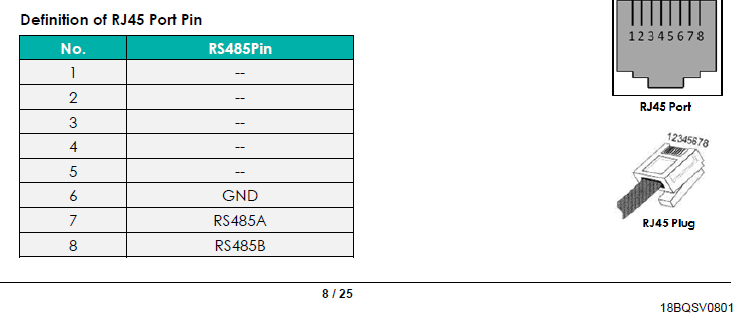
Yep. I used ethernet CAT5 cable too, since I'm keeping a box of Belden in my workshop In the US3000 manual, there's a nice pinout drawing included, so I crimped RS485 cable according to it. Excatly like @Elbow is saying: pin 6 GND pin 7 RS485 A pin 8 RS485 B Screenshot of the manual page included bellow. Anyway, I really had no luck talking to the batteries via RS485. Maybe that I'm missing terminator on one side of the bus, I don't know... So, I tried the RS232 serial console and RJ-11 port too. It was working, but still not really convinient for automatic parsing of the values. In the end, I connected Pylons to my PLC via CAN Bus and it worked like a charm. Pylons are broadcasting the most important values over CAN, so you don't have to actively "talk" to them. With just listening on the CAN interface I can now read SoC, SoH, Voltage, Amps and Temperature of the battery stack. The CAN protocol implementation in Pylons is not so rich as RS485 implementation is, but for me it's okay, as I don't really need to see individual cell's values in my home automation. (For this, I can still use the BatteryView.exe.) A complete manual with wiring of the other cables for Pylontech is here: https://solaradvice.co.za/wp-content/uploads/2018/12/US3000B-Plus-Product-Manual-20180717.pdf


-
Hi @Coulomb you're right, I messed-up two different HEX a and ASCII commands! This one is correct for the RS485 interface, to query analog values: HEX: 7E 32 30 30 32 34 36 34 32 45 30 30 32 30 32 46 44 33 33 0D ASCII: ~20024642E00202FD33 +0x0D But, it's not working for me, the RS485 interface is silent, not replying. I've set the port to 115200, 8 bit, no parity. Also, the strange is, that there's a voltage around 2-3V between the RS485 A/B pins on the PLC, while A/B pins on the battery are without any voltage.
-
Hi @Elbow I played with the batteries today, but had no luck: Connected to the RS485 port on the "master" battery and sent the command that is mentioned in the PDF as an example: HEX: 0x7E,0x32,0x30,0x30,0x31,0x34,0x36,0x34,0x32,0x45,0x30,0x30,0x32,0x30,0x31,0x46,0x44,0x33,0x35,0x0D ASCII: ~20024642E00202FD33 + 0x0D But the battery did not reply, not even a byte. How come that your battery is talking to you, while mine is silent? Is the RS485 port disabled by default and has to be enabled via some CLI command?
-
Looks good, I've been able to make a DB9 to RJ-11 cable and connect to the stack via BatteryView: Even the serial console looks promising: Looking at the available docs, it looks like the serial console will accept not only the text CLI, but also the same commands like RS485 interface. That will be great tool for debug, as I can connect laptop directly and try to send couple of commands and then examine the response codes. On the other hand, the protocol itself is terrible. SOI and EOI are fixed 1-byte characters 0x7E and 0x0D, while the other fields of the frame are ASCII characters that have to be grouped, then converted to the HEX and then converting again to DEC for display. And there are two recursive checksums! One 4bit checksum of 12bit LENID and then another 16bit checksum of the whole dataframe. What the hell is that!? A battery for the space shuttle?


-
Hmm, did I wrote "Mercedes"!? I was meaning "Huyndai"...of course
-
Is InfiniSolar higher quality than Axpert? The manufacturer is the same. Same is the "technical support"....that is basically non-existent. An OEM with the best reputation and a working technical support is the MPP Solar. So, buy the equipment from a trusted local reseller and if you want to buy direct, then go for MPP Solar, I would say. From a technical point of view, there's a couple of nice treats tied to Inifini when compared to Axpert: better cooling hybrid (vs off-grid) MC4 input connectors (instead of plain screw terminals that are on Axperts) built-in high-voltage DC switch for a safe disconnection of solar panels (instead of hardwiring that is used on Axperts) higher voltage MPPT Subjectively, it looks like InfiniSolar is a premium line, but I can't confirm whether the quality of the internal IGBTs or capacitors is fundamentally different. I would say that it's something like a difference between Mercedes C and E-classe: both cars can run 200 km/h, but when you're sitting in the E-classe, you feel better If I install a hybrid inverter without batteries - just using the solar and grid. Let's say grid is down and solar is nil or too little for the load? is this dangerous? Would it work. I am not concerned with load shedding at present. Yes, some of the Axperts and Infinis can run without battery, but there's a ton of limitations in this mode. For example, cannot parallel, grid must be online or the load has to be stable and WAY smaller then the solar power available. Everytime, you have to double-check the selected model and dig all it's limitations in the battery-less mode from the manual. Long story short, it's not a good idea. Put a small lithium pack, or a big old cheap Lead Acid battery to it, at least. Following the purchase, you can set the device to the battery-less mode and try it out, but be prepared that you won't be really satisfied with the results.
-
Yes, that's basically the only valid reason why to go for InfiniSolar and not for Axpert. But check the price difference and estimate whether it's acceptable for you. I personally went that way, but can't just blindly give the same advice to the others. At the end of the day, you are the only one who knows EXACTLY what situation you're in
-
Inverters type and rating have to be matched. Even the firmware version has to be the same. FW can be updated anytime, but you should start with a unit type that you will continue buying in the future.
-
Similar here in Europe Okay, so if that's the case then keep in mind that the problem with ALL hybrid inverters is, that they are feeding-in back to the grid. Some of the hybrids are able to limit this feed-in somehow, but none can achieve a true zero. As a limiting device a CT clamps are being used, sometimes a separate modbus meter like Eastron or Carlo Gavazzi. For a shame, some power spikes will eventually make it to the grid and your power meter will trip, or register this event. There's no 100% defense against that. Yes, you can run your hybrid electrically disconnected from the grid, but in that case you must have enormous batteries and truckload of solar panels. And - by running the hybrid disconnected, you are basically wasting half of the inverter's capabilites. Technically, you are making an Axpert from your InfiniSolar... I'm running my system disconnected from the grid and for 11 months of the year, it's perfect. But when the snowfall starts it's a pain-in-the-ass and I have to switch back to grid for a day or two, at least. 1) If you are okay with running the hybrid in the mentioned off-grid mode, go for 2x InfiniSolar Super 4KW or 2x InfiniSolar Plus 5KW. Both support single phase, have built-in MPPTs and you can parallel more units together. They are loud, and have a bit high self-consumption. 2) The best option (in SA) is to go for 2x Victron Multiplus 5000VA. Costly, but silent and parallelable. You will need to buy essentials like CCGX or VenusGX etc. Needs to buy a separate set of MPPT charge controllers, too. The self-consumption of Victron equipment is very low, so you will spare some money on batteries. 3) If you want to start in a cheapest way, then go for 2x Axpert MKS 5K. Cheap, parallelable, flexible but a pure off-grid inverter. 4) A special choice is 2x Axpert King 5KVA. Cheap, parallelable. It's an off-grid inverter, but can top-up batteries continuously from the grid. Because of that, you can mix the solar power with the grid power. It's a very interesting device, with it's philosophy totally different from all the other devices. If you are interested, just ask some of the owners on the forum. Based on my experience, and the needs that you've mentioned, the above options are the only ones that are making sense for you.
-
Best advice seems to be, to rather spend a little more now, than to have to replace sooner than anticipated? Good point. I have seen YOUTUBE vids, of guys using a software package called SOLARPOWER from voltronic, which seems to be an advanced version of WATCHPOWER? This I have not been able to confirm as yet? WatchPower is a PC software for Axpert product line. SolarPower is a PC software for InfiniSolar product line. Since InfiniSolar has much more options and operational modes than Axpert, the SolarPower software is more sophisticated. @Blinkwater9 Let me have a silly question - do you plan to undergo all the necessary procedures and want to have your system approved by authority, with the ability to feed-in to the grid? I got that you don't want to feed-in, but this does not rule-out that you might be formally allowed to do so.
-
@Blinkwater9 if you need to have 10kVA of power, then it will be a decent system with a bunch of solar panels and a truckload of batteries. In other words, such equipment will not be cheap at all and there's a risk of purchasing something that will not really suit your needs. Forum is great, but I would advice you to also visit some other solar owners from your area and have a face-to-face chat about their experiences. Speaking of InifiniSolar, I have two units in my off-grid system, together with 72 panels, 20kWp total: https://powerforum.co.za/topic/2322-youdas-off-grid-lab/ It works great and is really powerfull, but bear in mind that InfiniSolar has a much higher self-consumption than Victron, Studer or even Axpert inverters. Also the fans are pretty loud, so it's not a good candidate for a bedroom-installation
-
Hi @Elbow that would be great! I've checked both, the CAN and RS485 Pylon docs and they are quite messy (chinese-english mix, hexadecimal values transferred as ascii, etc...) therefore I'm pretty sure that I won't be able to write the procotol decoder from the scratch by myself. By the way, do you have a physical RS485 wire to the master battery only, or do you have a separate RS485 wire leading to every Pylon brick? Thanks!
-
Hey guys, I switched to the Pylontech batteries and they are running fine, withnout any data communication between them and the inverter. Now, I'd like to readout the operational values from Pylons using a CAN or RS-485 and my PLC. I know that couple of you were able to achieve this, so can you help me with the start, please? What's working the best for you? RS-485 or CAN? Do you have the BUS terminators in your wiring? Are you terminating both ends of the BUS, or is there a built-in terminator in the batteries? What protocol/library did you use as a template for your code? It there anything to take a special care of? Any directions greatly appreciated! Thanks, Youda


