system32
Members
-
Joined
-
Last visited
Everything posted by system32
-
I used RPI3b for SA and found the Web GUI to be a bit slow. The slowness does not affect SA-mqtt integration. Recently upgraded to RPI4 and the WEB GUI much better. Good news is that RPi4 is now back in stock.
-
@MdF, I found that RPI4 ZA wifi bands not same as OpenWrt ZA wifi bands and not same as Android ZA WiFi bands. I was using my Android 11 phone as a WiFi hotspot on the 5Ghz band - worked for Dell Laptop and other Android phones, but could not get RPI4 to see the hotspot. Android was broadcasting 5745MHz, band 149, but this was blocked on Raspbian RPI4 and I could not connect. /etc/default/crda REGDOMAIN=ZA /etc/wpa_supplicant/wpa_supplicant*conf country=ZA Not sure if this is the cause of your disconnects, but it's something to be aware of.
-
More info on the Automation has been published on solar-assistant.io website See https://solar-assistant.io/help/automation/table
-
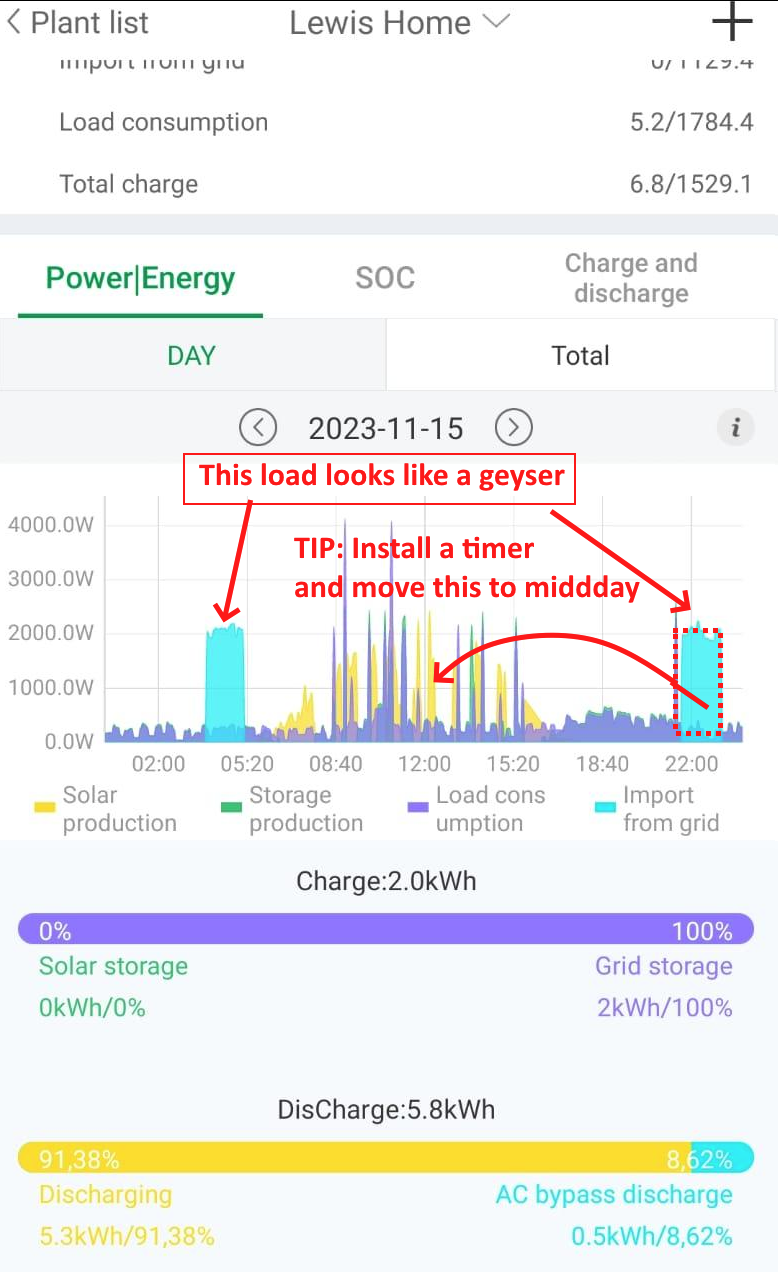
If you already have Solar PV, much cheaper to just install a timer on the geyser feed to "load shift" to daytime heating. I have excess PV, so I use a timer to heat the geyser from midday to 16:00pm. I have a Evacuated Tube Thermosiphon Solar Geyser that was installed 10 years prior. I have a 2nd normal geyser in the guest house that is on a timer (sonoff). On 11:30, off 16:30pm

-
I think this be done with external code. Try SA http://solar-assistant.lan/power -> Automations HA http://home-assistant.lan/config/automation/dashboard kellerza - https://github.com/kellerza/sunsynk
-
Please see my diagram https://powerforum.co.za/topic/10730-sunsynk-8k-hubble-am2-16x400w-pv/?do=findComment&comment=145810 SA -> local MQTT -> bridge MQTT -> HA (realtime). | +---> paho 1 min avg -> PostgreSQL -> grafana Setting up MQTT bridge is documented https://solar-assistant.io/help/integration/mqtt SA auto integrates into HA and you can display most of the data directly in HA. SA sends data to MQTT at a very high rate - up to 100 samples per minute. IMHO, every 5 seconds would be fine (12 samples per minute). I don't store all 100 samples, I just store the average and store that every minute for usage in Grafana. You could also use Grafana to query the HA SQLite database.
-
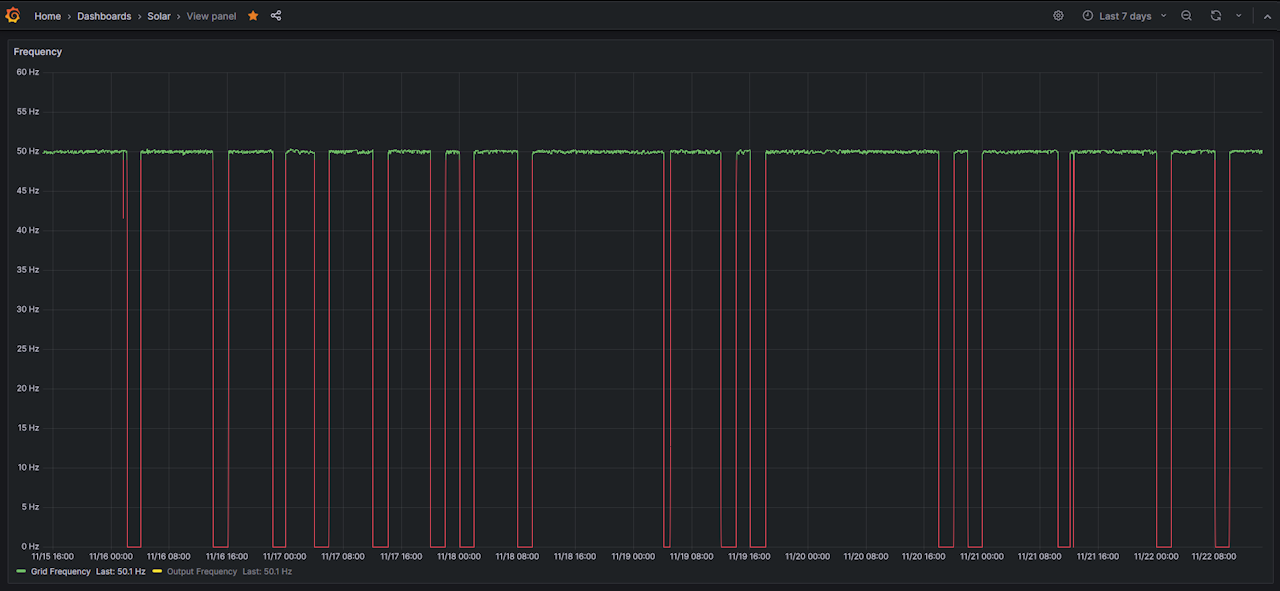
I use Solar-Assistant -> MQTT -> PostgreSQL database to record data once per minute. Once the data is in a database, it's relatively easy to use SQL to get the statistics or use Grafana to display charts. Eg if grid frequency is 0Hz, then we load shedding. SELECT tm AS "time", inverter_1_grid_frequency as "Grid Frequency", inverter_1_ac_output_frequency as "Output Frequency" FROM solar_assistant_v WHERE $__timeFilter(tm) The most important part is to store the sensor / inverter / meter data in a database. I use PostgreSQL as it's a great database (use it at work). Home-Assistant uses SQLite. Solar-Assistant uses InfluxDB. In my case, the sensor data is stored in jsonb and I use a view to access the columns. CREATE OR REPLACE VIEW public.solar_assistant_v AS SELECT solar_assistant.tm, solar_assistant.payload['total']['grid_energy_in']::numeric AS total_grid_energy_in, solar_assistant.payload['total']['pv_energy']::numeric AS total_pv_energy, solar_assistant.payload['total']['load_energy']::numeric AS total_load_energy, solar_assistant.payload['inverter_1']['grid_power']::numeric AS inverter_1_grid_power, solar_assistant.payload['inverter_1']['grid_frequency']::numeric AS inverter_1_grid_frequency, solar_assistant.payload['inverter_1']['grid_frequency']::numeric < 45.0 AS grid_off, solar_assistant.payload['inverter_1']['grid_voltage']::numeric AS inverter_1_grid_voltage, solar_assistant.payload['inverter_1']['pv_power']::numeric AS inverter_1_pv_power, -- SNIP - there are many columns solar_assistant.payload['grid']['stage']::numeric AS grid_stage FROM solar_assistant; GRANT SELECT ON TABLE public.solar_assistant_v TO grafanareader;

-
From 22 Nov 2022 to 21 Nov 2023: 658 outages (load shedding + power fails + me messing around) 1327 hours of darkness = 55 days and 7 hours of darkness for my neighbors but none for me The real number of outages (658) is probably closer to 550, as any period that goes past midnight counts as an additional outage in my logs. We were down once or twice during the year for a few minutes when we overloaded the 8kW inverter during load shedding (stove + geyser + Kettle...), just had to reduce the load. Longest Outages: 32h30m - 2022-12-05 - problem with substation - not affected 10h6m - 2023-10-22 - substation outage - not affected 7h12m - 2022-12-15 - substation outage - not affected Overall very happy to be load shedding free.
-
2 year update - Solar PV & batter were installed 21 Nov 2021. In 2023, 81.2% of my kWh came from Solar / Self generated. 18.8% comes from grid - mostly cloudy days and winter (where we use electric heaters) The grid meter readings from the CoJ Meter and the consumption is from a Hiking DDS238-2 WiFi meter. In hindsight - I should have gone with east-west installation and 600W panels (I have 400W)

-
CoJ should just publish the SSEG information on citypower.co.za! Has anyone emailed [email protected] and got any answers?
-
Which means that when the inverter SOC above setting (40%), the inverter will discharge from battery to load.
-
Not sure that "grid charging" works as you think. See this Deye video: https://www.youtube.com/watch?v=l4f4TGs1CgE (I made the 15:30 slot also 30% to make it simpler to explain) System Mode 1 settings works in conjunction with the Shutdown settings: Grid Checked (and use Timer and Grid ON) -- Charge battery until SOC reached Grid Unchecked (and use Timer and Grid ON) -- Discharge battery until SOC reached Below is a flow chart:


-
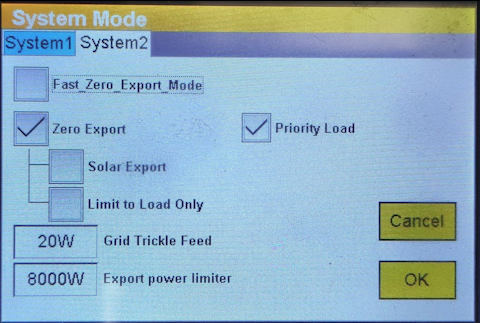
I had a similar problem with a SunSynk 8k where inverter was prioritizing batter over solar. Yours seems to be using grid instead of Solar or Battery. See https://powerforum.co.za/topic/12246-help-sunsynk-8k-prioritising-battery-over-solar Updated the inverter firmware fixed the problem. Below are the System Mode 1 & 2 settings:

-
You need to measure and record the municipal meter and the house consumption. Monthly I record the CoJ Pre-Paid meter and the total house consumption using a Hiking DDS238-2 meter. The Hiking DDS238-2 measures the consumption after the inverter. Instead of the Hiking DDS238-2 you can extract the consumption data from your inverter. I use Excel to record: Purple = CoJ Meter consumption kWh Green = DDS238-2 Meter (Total House Consumption) kWh Blue = Self Solar = House_Total-CoJ Meter. i.e. difference between CoJ and Total house consumption. This is what comes from the Sun aka SELF generated.

-
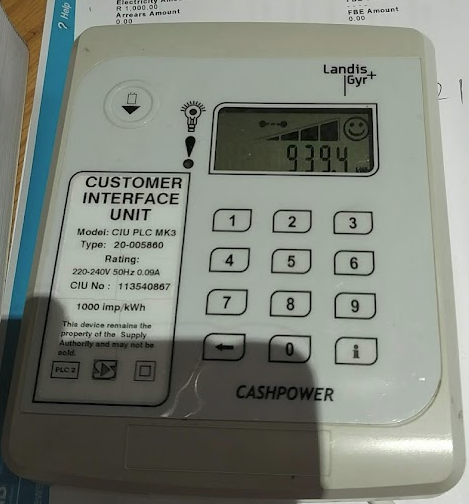
I have an old Landis+Gyr CityPower prepaid meter installed in ~2011. Last week the CityPower technician came by and just punched in two codes in to the keypad and all done. Took about 5 minutes. The technician used a cell phone app to get the TID fix codes based on the meter serial number. Once done, he stuck a sticker on the meter as a note that it had been "updated". Technician gave me a 10kWh voucher as a token of appreciation. My keypad is connected before the inverter. I had to put the SynSynk into bypass as the inverter interferes with power line communications to the meter. In bypass, the keypad has no issues communicating with the meter. As recommended, I buy a few kWh of pre-paid electricity monthly to prevent any with CoJ.
-
See this video showing SunSynk with Wind Turbine + Solar
-
When I changed to pre-paid (13 year's back) I had to go to CoJ in Reuven and hand in the installation form from the CoJ electrician showing that a pre-paid meter had been installed. Took a few visits to Reuven for CoJ accounts to remove the the post-paid electricity meter from my account. The form had the last reading and I also had photos of the old-post paid meter with the last reading.
-
CoJ: The first 350kWh on pre-paid are the cheapest. The bands for CoJ pre-paid: CoJ Reduced the bands about 4 years back - used to be the same bands as post-paid. Pre-paid with less bands still cheaper than post paid in CoJ.

-
TIP: Always buy a few kWh per month from CityPower or else they might disconnect you for non-usage.
-
Just checked, seems the CT coils are a separate purchase - 50A and 120A models.
-
Does the product at firstshop also include a CT-Coil or is that an add-on? According to HA forum, it seems the Shelly works well with HA. Efergy also does power monitoring.
-
The CBI range uses Tuya/Smart Life which is cloud based and has a clumsy integration to Home Assistant. AFAIK, all Tuya devices can integrate with Google Assistant/Alexa/SmartThings. The CBI ASC is only rated at 30A Resistive/10A Inductive loads and is normally used for geysers or such like. I suspect your home Eskom feed is above these limits - typically 80A, so I doubt this device will be adequate.

-
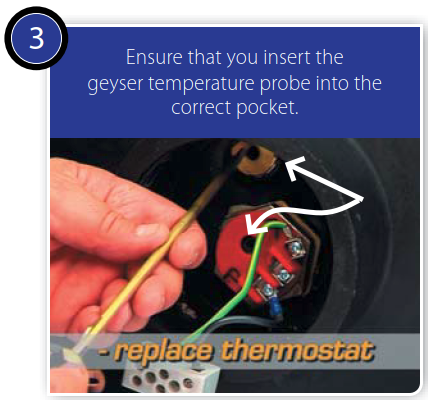
According to the GeyserWise documentation, there may be more than one pocket to insert the GeyserWise thermometer: See https://www.geyserwise.com/wp-content/uploads/2015/08/GeyserWise-Manual-TSE1.pdf
-
As @PowerUser indicated, you need to check if / how you going to connect to the meter to HA. If it's RS485 you will need additional kit to make the meter data available.
-
>any other ideas on devices that you have Home Assistant running on would be welcome. Try the RPI400 (if you can get on). I look for boards that support recent version of operating systems - eg Debian, ArchLinux, Ubuntu (minimal), Armbian, OpenWrt, etc. Android is mostly useless as a general purpose operating system for IoT/HA usage. I run HA as a docker container which simplifies things (also run MQTT in a container).