


Sc00bs
Members
-
Joined
-
Last visited
Everything posted by Sc00bs
-
Hi Was wondering if anyone knows if either the Growatt or Axpert inverters can be run as Grid tied inverters and if so which models. I am looking for an inverter to feed into my Sunsynk as I already have 10800w of panels and would like to put some more up. Thanks
-
Interesting short video demonstrating why you can't use AC breakers for a DC Current
-
Just an update, I have 3 x 1 Gang 1 x 2 Gang 1 x 3 Gang Left if anyone is interested.
-
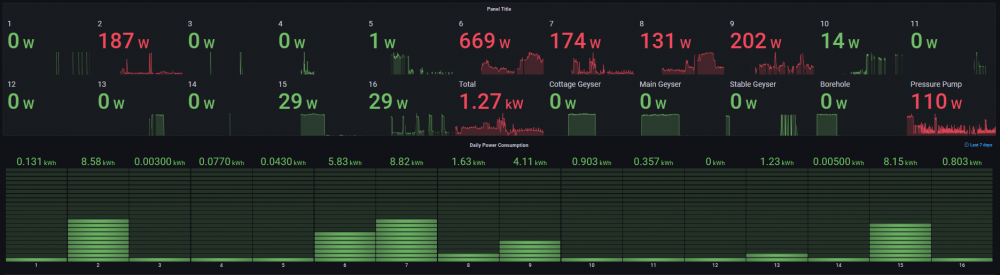
This is the panel I created in Grafana for the data, I am monitoring some eWelink breaker switches as well which also have power monitoring on them.
-
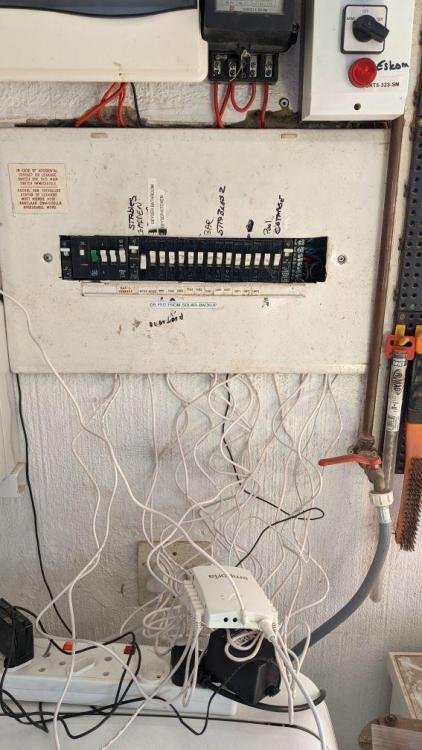
So, I bought one of Amazon, arrived two weeks after order and included all duties etc so rather painless. Price including shipping was R2,912.94 Experience so far is pretty good although cable management is an issue! 🙂 Has 16 x 50A and 2 x 200A CT clamps so there are LOADS of cables and clamps and space in the DB can be very cramped. Data is by minute, Hour & Day Integration with HASSIO is pretty good and have all the data getting pulled in so relatively happy. There is however no LAN option so all the data has to go to the cloud first.
-
Thought you guys might be interested, the latest version of Home Assistant includes a plug-in for Solar Forecasting. https://www.home-assistant.io/integrations/forecast_solar/
-
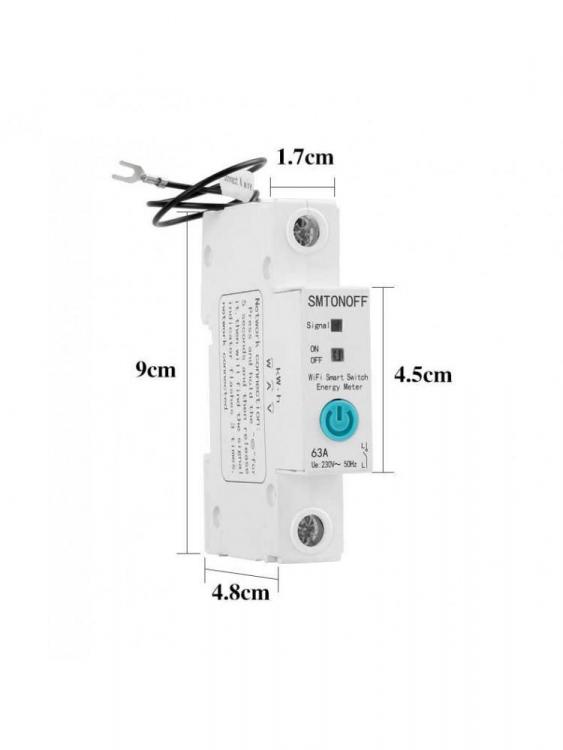
Don't think so, the switch looks different, that hacked one looks more like the MoesHouse switch in the photos he has
-
Don't think so, no easy way to take them apart, I have looked and the OTA flash doesn't seem to work
-
Thanks Achmat Thinking that a Solis 3kw Grid-Tie would do the job very nicely.
-
I think you could do it on Home Assistant using the Riemann sum integral https://www.home-assistant.io/integrations/integration
-
Or a micro-inverter would also work I suppose
-
Hi Guys I have a Sunsynk 8kw Inverter, 24 x JA 455w panels in 2 strings of 2P6S format in an East/West configuration 24 x 455 = 10 920W Max DC Power according to the spec sheet I have is 10,400W. I doubt very much I will get over that due to my North/South Split. Maximum Voltage/Amperage according to the spec is 500V & 18A+18A which equates to 9kw per MPPT or 18kw in total. I was thinking of adding another 8 x 455w panels to my setup as I am within the MPPT's range which would take me to 14 560W which is WELL over the max DC input power. Any other suggestions? I was thinking of maybe using a Grid-Tie Inverter and just connecting up some North facing panels, I assume that there must be a limit to the max amount of power I can feed in through the grid-tie port, anyone know what it is?
-
Best to use the updated Flows from the @jacauc github page
-
Hi I have some Sonoff Smart Light Switches for sale, all of them include the RF radio so they can be controlled by remote RF Switches as well. 1 Gang x 7 @ R 200each https://www.sonoffafrica.co.za/product/sonoff-t2us-us-wifirf433-touch-panel-switch-white-1-button/ 2 Gang x 3 @ R300 each https://www.sonoffafrica.co.za/product/sonoff-t2us-us-wifirf433-touch-panel-switch-white-2-button/ 3 Gang x 2 @ R330 each https://www.sonoffafrica.co.za/product/sonoff-t2us-us-wifirf433-touch-panel-switch-white-3-button/ Please note that these all need a neutral wire or you need to do the neutral hack to get it to work. Anyone interested please give me a shout 083 309 4066. I am in Beaulieu, Midrand but can courier if needed.
-
My understanding is that as long as you battery isn't fully charged, you should be pulling maximum possible power from the panels as the inverter will direct any excess power it has into charging the batteries. It is only when the batteries are fully charged and it can't feed back into the grid that it will start throttling the panels production
-
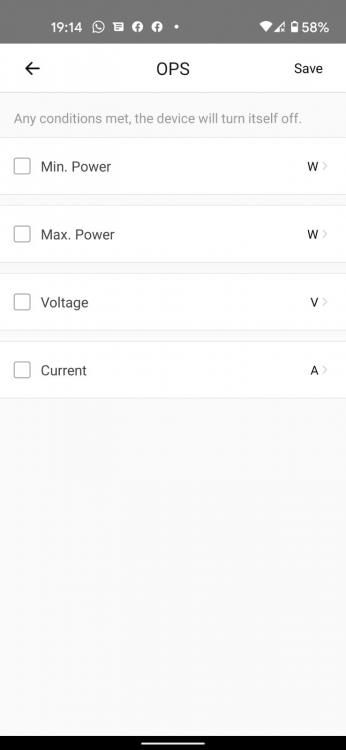
You can set the maximum amperage or power that you want the switch to carry before it cuts off, anything up to 63A You can also set Min/Max voltage
-
The had two issues with using the inverter to do the Smart loading - none-essential circuit. I would have to cycle through the loads using the Sonoff's as I wasn't able to have them all connected at the same time, my total load is 13kw. I also have a seperate DB at my stables that has essential and non-essential items on it that I couldn't seperate unless I ran another cable down there.
-
Hi I have a Sunsynk 8kw Inverter with 10,920w of solar panels I set up a flow in Node Red to manage this exact requirement in my home. I installed Sonoff compatible/Ewelink Smart Breakers which have power monitoring as well. Home Assistant manages all the devices and I used the Node Red flows created by @Bloubul7 to access the solar data from my inverter. The Node Red flow checks the time, at 09:00 it checks how much solar power is being produced, if production is more than 3000W, it checks the battery SOC and if that is more than 40% I switch my first geyser on. 60 Seconds later check how much power it is drawing, if it is drawing more than 100w, I wait another minute and check again, it keeps on doing this till the thermostat on the geyser kicks out and the load drops to 0. It then turns the sonoff switch off and cycles to the next geyser. Node red cycles through all my loads 1 by one and then sends me a Whatsapp at the end to tell me it is completed. I then have a timer set on the Sonoffs in the afternoon as a failsafe to switch the geysers on in case there is a problem with Home assistant for some reason.

-
I got am I5 slightly older version for R1500 on Facebook, is way faster than a Pi3 and loads more space, 16gb ram and a 256gbSSD
-
Hi TJ On the Modbus document that I have, it has the 417 Register marked as R/W so strange that it cannot be written to. Maybe someone else who has more experience with Modbus can comment, can only guess that there may be some other setting/value that needs to be changed to allow that value to be written. Good luck, keep us posted please. sunsynk_modbus - no chinese.docx
-
I have been thinking of trying out a Waveshare RS485-Ethernet converter for my connection to the Inverter as it would allow me to move my NUC from out of my garage next to my inverter. Has anyone else tried one of these out? https://www.waveshare.com/rs485-to-eth.htm I have one lying around so will give it a bash in any case and see if it works better than the USB - RS485 adapter
-
Hi Rhys It will all run on an Intel Nuc Box running HASS with the suplimentary apps installed. Home Assistant brings everything together and provides connections to most IOT devices, MQTT for direct current values in HA, Node Red for the Automations & linking to the Modbus connection on the inverter, Influx DB for storing all the time based data that it gathered by Node Red and Grafana for being able to format the data in a graphical way that is easy to understand and customise. The flows that Bloubul7 wrote have been updated and are being maintained by Jacauc on his Guthub page https://github.com/jacauc/SunSynk-NodeRed to include the feed from NR into the MQTT running on HA. It took a little time for an "average joe" like me, to wrap my head around, and a LOT of youtube videos on Node Red and Home Assistant, but in the end it is reasonably easy to understand the basics once you understand how everything links together. If you get stuck just give us a shout 🙂
-
Will change that as well, thank you for the suggestions, am still working out how this thing works so all appreciated.
-
Ok, so if I am understanding you correctly, by putting the names of the devices into the message parameters, I could cut out the 4 individual loops I have, one for each individual device, and replace it with one loop. Makes sense, thanks for pointing that out, that can be my next project 🙂
-
I have a Sunsynk Inverter linked to Home Assistant running on an Intel Nuc so I can get the Battery SOC and how much power I am getting from the sun etc into HA. I am using Bloubul7's Node Red Flows to get all the data from the Inverter I built a Node Red flow to cycle through all my geysers, once one has finished heating up it switches to the next one (have three geysers and a borehole pump so they can't all switch on at the same time) Geysers are controlled by Ewelink/Sonoff compatible breakers switches which give power draw as well (so I can tell when the thermostat kicks out) Checks the time, power production and battery SOC levels before starting the flow & heating the geysers and sends me a Whatsapp when it is finished. I still have the timers enabled on the Sonoffs in case the Node Red doesn't run for some reason (wifi issues etc)


