


Sc00bs
Members
-
Joined
-
Last visited
Everything posted by Sc00bs
-
I suspect you would have to set the Solis for Zero Power Export, not sure how the Axpert would feel about power being fed into it by the Solis.
-
Why don't you just use your AXPert as a UPS with it's batteries and let your Solis be grid tied between the Axpert and the loads? It will feed in any load that it can and the Axpert will provide it with the frequency to sync too. That way you don't have to swop any panels around.
-
I agree, I don't think that you are going to be able to connect to the inverter via the battery so removing the wifi stick seems like the easiest option. You may be able to split the RS485 port using a hub but I would get your connection tested and working before exploring that option. My suggestions would be to get either a Raspberry Pi or Intel Nuc and load Home Assistant / Node Red (to capture the data from the RS 485) / Influx DB (to store the captured data) / Grafana (To display the data from Influx). I suggest Home Assistant as it has a lot of other integrations into smart home devices such a Sonoff, Hosuse alarms, CCTV etc Get a USB - RS485 adapter to connect to the RS 485 port on your inverter, they aren't expensive. Watch videos on Youtube on how the connection works and start with getting Node Red to connect to your Inverter, you can use the flows I uploaded but you will need to change the modbus codes that it is requesting the data from the inverter with as the Solis codes are different to the Sunsynk codes. I would simplify the flow and just try and get one piece of data to start, you will be able to see the data returned in the debug part of Node Red, once you have the connection working you can decide what info you want from the inverter and add extra nodes for querying. Once you have the data coming in you need to store it somewhere, InfluxDB is very good for time based storage of data and lots of video's on yourtube on setting it up etc. You will need to give NodeRed the INfluxDB settings and you will be able to start storing your data in the database. Then it is just a matter of setting up Grafana to display the information in a suitable way. Good Luck 🙂
-
Hi Paul Greeff, intelligently moving power from night time use to daytime when my panels are powered up is my pet project at the moment! I recently installed a 8KW Sunsynk inverter with 24 x 455W panels, 2 x 6kw/hr Bull Batteries. The batteries usually last me until about 22:00 after which I run on Eskom power until the sun comes up and I switch back to solar. My batteries are usually fully charged by 11:00 and I have surplus power after that. I have an Intel Nuc which is connected to my Sunsynk via RS485 interface and collects live data regarding battery SOC, Inverter load and power from PV Panels, etc The NUC is running Home Assistant, Sonoff LAN, Node Red, Influx DB & Grafana. I have Sonoff switches on my lower power items and 63A eWelink Smart Breakers on my geysers, borehole, water heater etc I am currently trying to work out how to set up Flows in Node Red to manage my loads and switch on heavy load devices on when the PV power production allows. I was thinking of purchasing a 1000ltr wall water tank that I can heat up during the day with excess energy to provide radiant heat in my house at night.
-
I found the attached doc that is the modbus commands for the Solis Inverters You could try using my flows from my Sunsynk inverter and changing the addresses to the correct ones for the Solis inverter to get data into a INfluxDB database from where you can display it using Grafana. Will save you a bit of time. Would start of with by disconnecting all the nodes and then just setup one node in Node Red with the correct address settings for the Solis inverter and then see if you can see the data in Influx, from there it is just a matter of displaying it like you want in Grafana RS485_MODBUS-Hybrid-BACoghlan-201811228-1854 (1).pdf flows.json
-
bbjunkie & reklamos My understanding is that the Solis should be connecting to the Pylontech batteries using the Canbus connection, is that correct? If so you could use the RS485 port to connect with the inverter using a USB-RS485 converter and your Raspberry Pi running HA, Node Red, INflux DB & Grafana I use a similar setup to speak to my Sunsynk inverter. Do you have the Modbus command addresses for the Solis Inverter? JohnB
-
I am using a modified version of Bloubul7's flows and haven't had any timeout issues. I removed all the parts that were writing to the Inverter and only kept the query side, if you want the full set of flows he posted them online I added the addresses from the Sunsynk_Modbus document into the function node descriptions for reference. All Chinese characters were removed from the reference document to make it easier to read. flows.json sunsynk_modbus (3).docx
-
My latest Dashboard

-
My battery coms is done via the CANBUS connection, not the RS485 connection, what batteries do you have?
-
Not sure swazz99jhb I think it would depend on what the pinout for the interface is between the USB & RJ45, I don't think that all the RS485 connections are the same.
-
Hi Flip, I used a USB-RS485 connection, check out my post with wiring etc. You could use the serial connection but you will loose your Wifi Dongle.
-
Thanks Jason, just getting started on the Grafana dashboards so still watching lots of Youtube video's 🙂 Have also decided to just dump data older than 7 days so to keep the size of the database under control
-
Looks like down sampling the collected data is going to be the only way to keep the database manageable over time
-
I have an 8Kw Sunsynk inverter installed with 24 x 455W panels & 2 x 6kw/hr Bull batteries. Due to a number of my high load devices being connected to DB Boards in my cottage & stables, I was unable to make use of the essential/non-essential splits on the Sunnsynk Inverters and have been on a journey to connect to the inverter so I can control all my high load devices with Home Assistant & Sonoff eWelink connected breakers and switches. My connection to my Inverter is now up and running, thanks to Bloubul7's Flow's and all the information that everyone has posted, has been a huge help and I wouldn't have been able to get it working without all the information you guys have provided. I must admit that there has been a HUGE learning curve on Hassio/NodeRed/InfluxDB/Grafana and I probably have enough knowledge right now to be classified as dangerous, lol. I am only using the Modbus Read & Inverter Monitoring Flows but they were a great starting point to get everything up and running and relatively easy to add any extra data that you want to collect from the inverter to it. I did find that when I enabled all of Bloubul's flows, while I was figuring out how everything worked, some of the settings on my inverter changed to switch it to a "loadshedding" mode where the batteries stayed at 100% charge, not sure what was the cause or if it was even related to the flows but am only using the two flows mentioned earlier now. Perhaps something to do with the switching of the inverter when it detects load shedding on the Eskom website. In any case, not serious and was easy to just switch it back again. I am running everything on an Intel Nuc i5 which seems to be more than capable and have Hassio/MQTT/InfluxDB/NodeRed all running on it with other integrations for my Sonoff gear, my Paradox house alarm and my CCTV system. I am using a USB-RS485 connector which I purchased from https://www.robotics.org.za/RS485-MINI?search=rs485 for R38 Was pretty simple to connect up using a T-568B wired ethernet cable, I wired it orange/brwn&white - A, Orangewhite/brown - B, not sure if you need both connections going to A&B but it works so not going to worry about changing anything One thing that I am concerned about is the system slowing down over time due to the size of the database increasing at a rather rapid rate (sampling data every 3s). I did notice that Bloubul7 was saying that his original Raspberry Pi system came to a crawl after a week of use and suspect that this was probably as a result of the database getting to large for the Pi to handle comfortably. I understand that InfluxDB is able to rationalise it's data as time progresses and as it does not seem necessary to have per second data kept foreveer I am going to try and get the consolidation of the data, as it ages, on my box sorted out so as to keep it running snappily. Has anyone else had any experience with slimming down the influxDB database over time? My next challenge is going to be to set up some Flows in NodeRed to switch on/off my connected Sonoff devices based on the Grid Power connections status/Battery SOC/Solar incoming power. My first Dashboard in Grafana, still working on my Grafana skills These two threads have been hugely helpful in getting everything working. sunsynk_modbus - no chinese.docx


-
I agree with Tapemeasure, if you are paying top dollar for the batteries, you want ones that are going to be speaking to the Inverter. Relying on the BMS to keep control of things is not ideal, especially when the inverter has the ability to manage things.
-
Agreed Tariq, doesn't make sense to install R60k worth of batteries to save myself R600 a month's worth of electricity, better to just run of Eskom when my batteries are flat. My main focus at this point in time is making sure that I am not powering things like geysers and my borehole using battery power. Unfortunately my electrical system system does not allow me to have a split split supply so I have been linking up my inverter to Home Assistant and will be using HA to power off my high loads when their is a shortage of power.
-
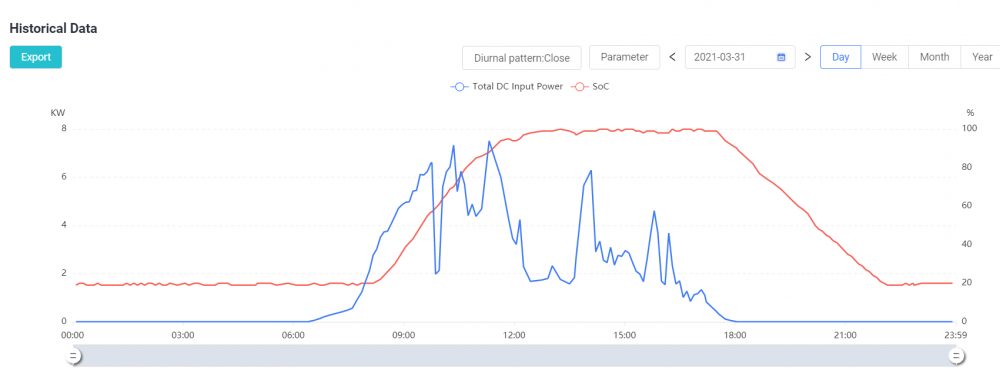
Thanks Guys, So that answers my question, no direct measurement of the power not used but you can make assumptions based on when you stopped charging etc. Here's my SOC vs DC Power graph so looks like I need some more batteries
-
Does anyone know if there is a data set parameter in Solarman for how much excess energy the panels/inverter is generating i.e. The energy that is not used for charging batteries (when they are full) or powering my house and is lost? Would like to be able to work out if my iverter is generating enough power to charge another battery or if I need to get more panels first.
-
Very tempted to get a Sense to work out what my "by device" consumption is, the only downside seems to be the time that it takes to work out what your loads are in the house. Can take weeks from the sounds of things https://sense.com/ I use the smart breakers from Robofactory for my heavy loads, they will handle up to 63A, show power consumption and use the Sonoff Ewelink software so are 100% compatible with Home Assistant. My end goal is to have my Sunsynk inverter linked up to home assistant so it can make intelligent choices as to when to switch my heavy loads such as geysers, borehole etc on, based on the power it is getting from the sun and the status of my batteries. Is a project that is still in process and am still looking for the "standard grade" solution 🙂 as it all seems to be above my pay grade at the moment.
-
Hi Guys I found smart breakers that run on the Sonoff ewelink software and work 100% with Home Assistant without flashing Tasmota using the Sonoff Plugin. I was running Sonoff's with SSR's wired up to them but these are much neater and the lower power one has a power meter built in as well. https://www.robofactory.co.za/home-automation/167-63a-1p-smart-circuit-breaker-with-monitoring-ewelink.html https://www.robofactory.co.za/home-automation/161-1p-smart-circuit-breaker-switch-ewelink-100a-.html Enjoy JohnB
-
Just thought I would let you guys know, I found 63A breakers on https://www.robofactory.co.za/home-automation/167-63a-1p-smart-circuit-breaker-with-monitoring-ewelink.html that connect into the eWelink software that controls the Sonoff products and as such works 100% with Home Assistant using the Sonoff plugin. They also measure energy consumption and I have them working on my geysers with no issues. There is also a 100A version with what looks like a better antennae, does measure energy consumption though. https://www.robofactory.co.za/home-automation/161-1p-smart-circuit-breaker-switch-ewelink-100a-.html
-
Found this presentation video on using a Raspberry Pi for Modbus with Node Red, pretty much what Bloubul has been doing
-
Found this presentation video on using a Raspberry Pi for Modbus with
-
@Solar Assistant When about do you anticipate having the RS485 connection available? I am assuming that if you use the RS232 interface you will loose the wifi connection to Solarman, is that correct? Does it integrate with Home Assistant at all, I think the biggest demand is to be able to control Sonoff type devices to be able to automatically switch high load devices off when there is not sufficient power?
-
Doesn't look like there is any connection to the inverter. Will be following Bloubul's post and hoping for an idjuts guide to connecting tomy inverter 🙂


