mzezman
Members
-
Joined
-
Last visited
Everything posted by mzezman
-
Nice one - congrats to the winner - show us how you use the items
-
-
GLWS
-
details on age and cycles please?
-
Very important - I might be in the market for these
-
Best wishes @TaliaB
-
Plan looks solid - if you can get 18 panels then go for it - panels are the cheapest upgrade and if you can max those as far as possible then go for it - it will help you even on a cloudy day.Spend an extra R600 and get a geyser smart switch installed - heating is the biggest draw on batteries so timing it for the day will go a long way.
-
https://www.solarwaysuppliers.co.za/shop?query=16kW%203%20phase
-
I'm currently running 2x5Kw Sunsynks with no issues. Manufacture dates of the inverters are over 1yr apart but they are on the same firmware and provide great functionality in parallel. It is true there is a bit more complexity but its also set and forget, You change the settings on one and they cascade to the other without you needing to do anything. Redundancy is key for me hence i got the 2x5 vs 1x8 / 10
-
Decent battery pack there - GLWS
-
Ygpm
-
Lovely - thank you! Will be on touch
-
Howzit - i'd be keen to do a deal next week if the items are still available?
-
All these devices run on the Tuya cloud platform - so yes any device you have in CBI can run in Smartlife. The CBI app is just a reskinned version of Smartlife / Tuya app as well. Once the devices are in Smartlife they cant be active as well in CBI (to my knowledge)
-
Sorry for the delayed reply - didn't see the notification In HA i get a number of entities using this MQTT integration - an example > or These are simple because they come in already setup as switches so i can use a card to toggle them on or off quite easily. >> Other entities come through as number values so a slider card might work best, e.g. setting the rate of charge


-
This is what i use through Home Assistant but can also use MQTT Explorer to send / change settings - works flawlesly
-
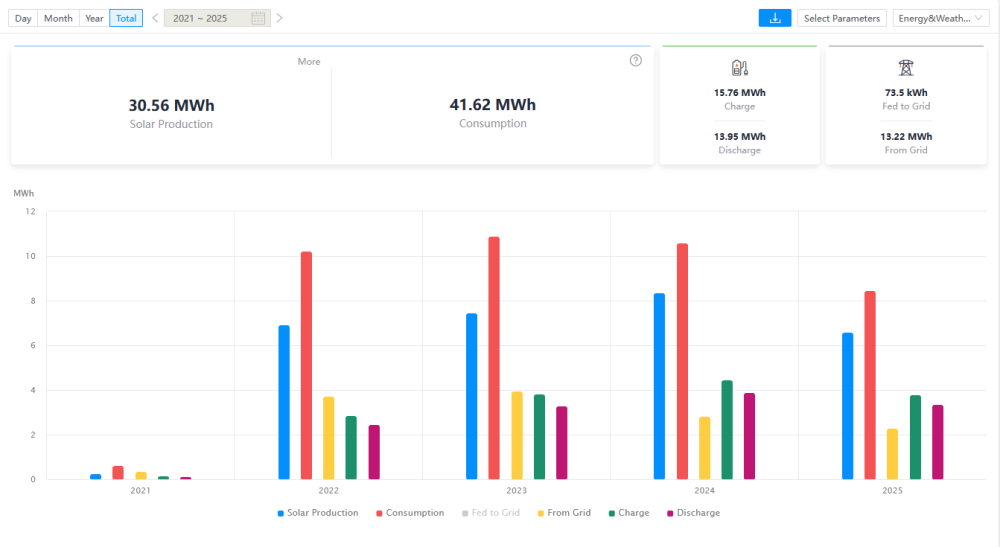
Year 4 Update - running swimmingly
-
Nice review - i think you have a perfectly sized system. Normal geyser or a heat-pump system?
-
Its not as simple as that - unless you are 100% certain that your panels and neighbours' panels are facing the same direction (to the degree) and are the same spec - its difficult to compare apples to apples. The charge rates / load / inverter efficiencies etc all play into it.
-
How many panels are connected to that inverter? what type and rating are they? How are they connected (series / parrallel etc)
-
You should ideally cycle them if possible - if you have PV let them work, set a min discharge to perhaps 40 or 50% then let the panels top up and balance for you
-
Have been noticing this odd PV behaviour from one of my strings. At a point in the day the voltage on my MPPT goes up, current goes way down and correspondingly the production tanks as well. There is 1 string connected ot each inverter and in the images below you can see the difference between Inverter 1 (yellow) and Inverter 2 (green). Inverter 1 MPPT does not have this odd fluctuation. Panels are 335w CNBM - 8 panels per string with each string going into a 5kw Sunsynk What could be causing this? MPPT Voltage MPPT Current MPPT Power


-
Always a relevant topic and it such a fine balance between convenience and security. Most people will just have the inverter on their main network - which is a huge risk already. You effectively have a backdoor into your home via one of the most critical devices you have. Effective isolation will mitigate some of the issues and adds some complexity.
-
Also just got an F34 AC Overcurrent error and this time the whole house went down
-
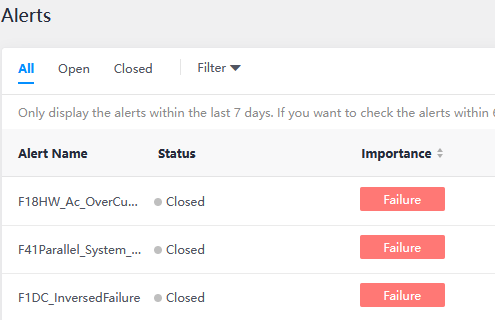
Around 12:20 I noticed that my PV output was down from almost 5kw to 2.2kw - one of my strings was only producing 300w. Everything else in the house was still working (whole home is on Inverter) - so i ended up restarting both inverters and only after the 3rd restart did the PV string come up normally. I also got these errors from solarman Normally if i get a HW AV Overcurrent the inverters trip and the whole house goes down but this time nothing happened. I then also saw that F01 DC Inversed failure - which is odd because i haven't touched the PV strings since install. Shut everything down completely and its now working fine. Checking my SolarAssistant data and no values seemed out of range - was this just one of those things? Thinking of checking my PV fuses on both strings - any other checks i can do or do i need to bring in an expert? Edit: We are also having insanely high grid voltage after a stolen cable was repaired - reading between 255 and 268Vac