


-cK-
Members
-
Joined
-
Last visited
Everything posted by -cK-
-
Thanks @Denns Yea that helps a lot so in short the geyser will get heated with whatever PV there is from sunrise until you switch on the AC side and AC will only pull power if still below the thermostat cut off. Same goes for when AC is turned off to sunset, as temps drop below the thermostat setting it will heat up again from PV as long as AC is off. As I have a smart switch and temp sensor already on my geyser link to HA this opens some interesting avenues to explore with automations to optimize avoiding grid usage.
-
@Denns the Geysertech PI2R controller you got, can you just clarify how it works as it mention a timer on the AC side. Am I correct in assuming that the DC is "converted" to AC and then fed to the geyser and the output is a combination of AC and DC input reducing AC side by the available DC input. This makes sense when AC is on but if AC is off how does the system work. Does it feed DC input "converted" to AC to the element irrespective as long as the temp is below the set value. E.G. the AC is off and DC is only producing 1000w and the element is a 2kw unit will it run the element at 1000w or is it only operating when the elements required draw is reached? From my limited knowledge the element in a geyser is standard resistive heating element and will try and pull the required 2kw or is it a case of 1000w in 1000w heat out (kind of like a passive system until AC is turned on and if DC is more than the 2kw or temp is above set value now AC is used)
-
Moved my question to the more relevant thread...
-
That will come in handy as I'm in the market to add another 3 gang switch to my one room 😁
-
That would be a negative.
-
Apologies, I've re-uploaded the zip file. I was pulling it remotely from my neighbor's pc to my onedrive and think the onedrive wasn't fully synced yet when I downloaded the zip. The download file should now be "BMS Tools V3.31 [ZWN]-20260731T110729Z-1-001.zip" and the files should now be in the folders that was empty. Please check if it is working now, if not just let me know otherwise I'll need to re-pull it from his pc again.
-
Unfortunately no I do not have the password to be able to edit the BMS.
-
-
https://powerforum.co.za/files/file/230-bms-tools-v331/ Here is the one that my neighbor uses, hope this is the one you are looking for.
-
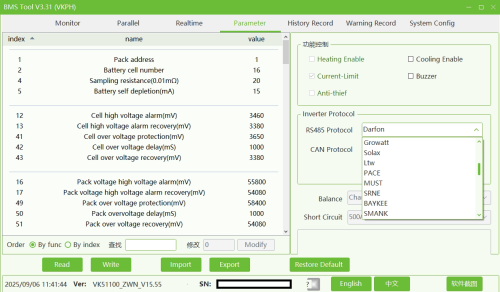 BMS Tools V3.31 Used for Hubble AM5 batteries to read BMS information
 -
I'm curious about this setup of a micro inverter to the aux in port. I know it is tied to the battery charge state when to kick in and off but what I would like to get more info on is how the power is split. E.G. on a 5kw Sunsynk on a sunny day the sunsynk hits its max 6500w and the micro can hit say 2300w (I understand you should not exceed 50% of the inverter size) will the system then utilize the full 8800w splitting the micro to the batteries (2300(micro)+2800(ss)=5000w Max charge rate on battery from DC) and the 3700w goes to load or is it going to still throttle down to the inverter max input of 6500w for the combined input? I know the home load side has about a 5500w limit on draw but that is on the load side so I do get you will not be able to exceed that. My shortfall is in the winter when overcast as the batteries cant reach 100% so just exploring options that will be most cost effective besides just using grid to top up when really needed.
-
I'm using sonoff/ewelink devices. If you are looking for breaker specific model I have a PSF-X67. Their wifi range is pretty weak so the Wifi access point needs to be pretty close. Make sure it is the ewelink model, I see searching it tuya models pop up as well 🤷♂️. These can be flashed to esphome or tasmoto but will require drilling out the fastner. There was recently a major shift from ewelink with blocking power data over the cloud to home assistant breaking stuff relying on power readings etc but the guy behind the integration in Home assistant has resolved this to push this data where possible via lan and not cloud on a 5s interval but not all devices support local power data. So it is working in Home Assistant via the Sonofflan integration but the option is there down the road if need be to flash these devices should the ewelink overlords truly turn to the dark side. There is also a POWR320D device from sonoff but those are 20a and bit bulkier so depends on your needs but will fit on a DB board but takes 2-3 slots.
-
You will need to determine what BMS the batteries are using and then look into a third party option to access that BMS data. EG. My batteries uses the Pace BMS and I have an addon in Home Assistant that can pull the Pace BMS data from the batteries using an ESP32 bridge to the master battery's RS232 port.
-
I need to just state that here I was going on about Sonoff readings being virtually live on power readings and low and behold this feature just broke last week just before the weekend ☹️ Needless to say a crap ton of automations is now broken in my HA setup that was dependent on these live readings as it seems something on Sonoff/Ewelink side was changed or broke as now the readings only update if you open the app and that device power reading section and as soon as you close it it stops again. Waiting to see if they will resolve this or if the integration developer on HA can maybe find a bypass.
-
Maybe a stupid question but have you checked that the sensor names are still the same that v3 populates vs v2. The config is mapped to the sensors and perhaps it just a matter of sensor names on the v3 differ slightly or because there was remnants of v2 it added a _2 to the sensors of v3 at the end. I don't use the solarsynk integration but had to alter some template sensors recently had duplicate sensors that got created so I just had to purge the old ones and rename some sensors back and that solved my problem. Maybe it is something similar?
-
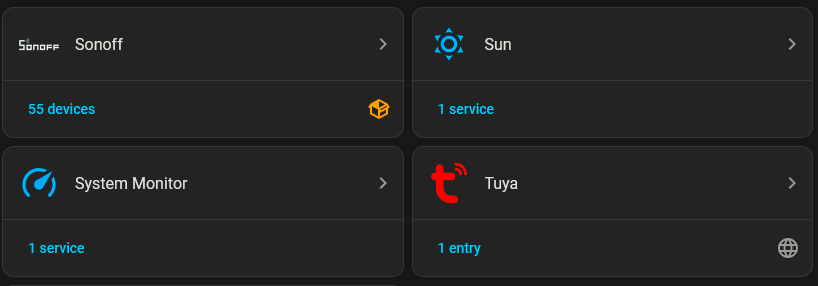
Yes Tuya works with Smartlife/Tuya app and Sonoff with the Ewelink app. Both have their own integration in HA.
-
Yes the instruction will still go through the cloud. I think it has something to do with their API polling rate for the integration in HA itself. You will switch on the the switch and it will power up but then the sensor giving you the power reading from the same device will take up to 5 seconds to provide the power reading and the reading thereafter also seems intermittent kind of like there is a refresh rate limit. I'll try and log in on my neighbors setup tonight see how his is performing currently but last time I setup 'n dashboard for him it was still sluggish with the readings.
-
Yes everyone in my home also knew until that one day they didn't and tripped the inverter, hence this rule in my setup exist. 😅 @Bobster. The next problem I have to solve is one of those lights on a stairwell that has two switches controlling it. I think it can be done with the smart switches, but I need to experiment with the two that I'm about to fit to see what methods and properties they expose to Tuya. This job is not strictly necessary. I am justifying it on the grounds that I will have the same style of switch throughout the house. Depending on the unit you are looking at usually these mini tuya/sonoff should be capable of doing 2 way switching as the light switches itself is wired to control the 2 way function, you are just intercepting the live wire and sending that to the light from the smart switch and a signal wire to the switches and the smart switch then detects whether or not to turn on the light. Have one in my hallway configured like this.


-
@Bobster. Yes Tuya still needs to go through the cloud, there was a tuya local integration but seeing how my setup has my IOT on a VLAN and my HA on my main network and due to initial configurations with the solar setup and the fact I never could get the main network to bridge to the vlan without breaking my whole network setup all my IOT must go through cloud at this point so I never fiddled with that and I think it might no longer be working as it is unmaintained it think but don't quote me on that. So initial pairing is still via the app for which ever route you go but once pulled into HA everything else is done from HA on my setup. @Denns The lag is only present on HA as far as I recall the app itself works fine. Where this became a deal breaker for me was with my cascade shutdown rules as everything on my home is on the 5kW inverter and if the Geyser, stove, 2x AC's and microwave is all on at the same time this can trip the inverter and if that load persist beyond the 10s buffer of the inverter has for spikes like this it becomes important to not have 5-10s delays in power readings. With my sonoff's I get near instant power readings when turning on the device with live reading updates where tuya seems to be on 5s+ refresh updates. As I knew I was going the HA route this was an important factor to consider given the scope of my setup with about 55 sonoff's deployed at this point in time.
-
Just a personal opinion and note if you plan to use HA: I've removed all tuya devices from my setup and moved to sonoff for everything. I ran into a problem with tuya in the early days integrating it into HA where it would become unresponsive or flaky when the cluster of devices became to big. My personal observation is also the power readings are also more delayed on tuya in HA when the device supports it. I found sonoff to be more responsive in the power readings with no delays just the normal internet lag you get. If you plan to use the app only this is less of a issue but but having to deal with multiple apps to control your smart devices becomes a hassle which is where HA usually comes in where you can consolidate all IOT devices and if you are locked into an eco system already it becomes expensive to switch. Luckily I found this out early on and opted to switch over. My neighbor has some tuya devices in his setup and I still see the same observation as above in his setup.
-
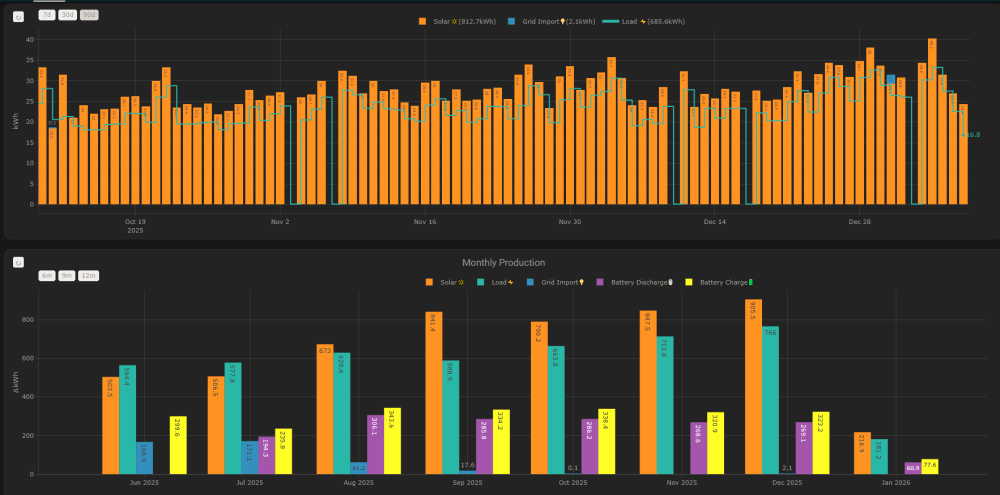
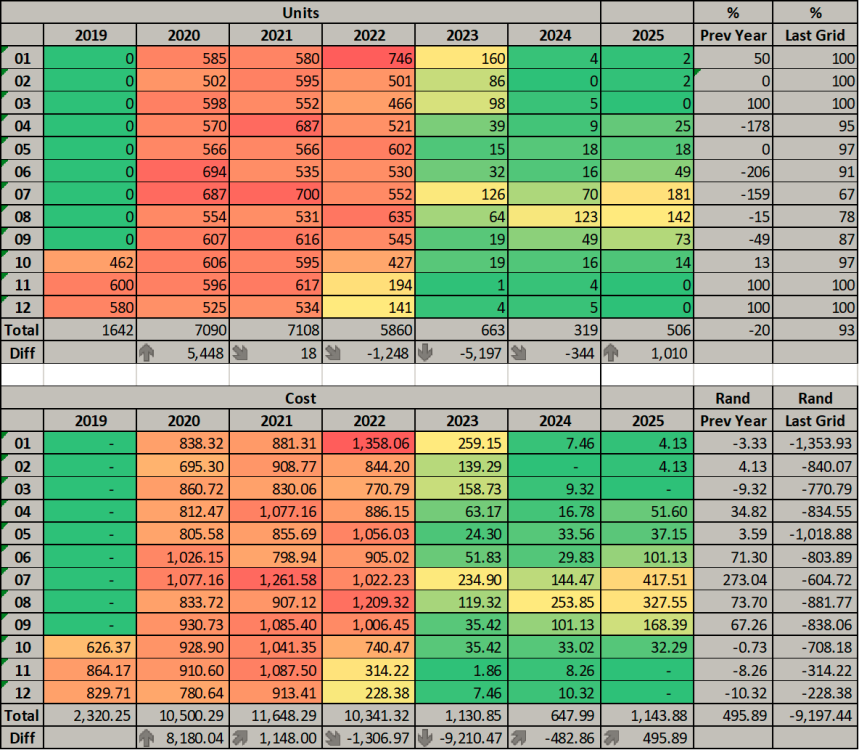
December 2025 was my highest yet in production. 0 Grid from Oct 2025 (the Dec 2025 2.1 was to correct the reading on the meter due to accumulated micro feedback over time so a nett 0 still on the account). Usually I only start using grid round about Apr-May. Had a little speed bump in the middle of the year when 2 batteries had to go back to get them fixed hence the higher units during 2025 but below is a broader scope of my solar journey.
-
@Skyden if you want to you can check the previous page for what I've done, not sure if this will work for you as I just added a separate card for my batteries below slipx's card. https://powerforum.co.za/topic/17970-home-assistant-sunsynk-power-flow-card-and-dashboard/page/23/#findComment-221673 https://powerforum.co.za/topic/17970-home-assistant-sunsynk-power-flow-card-and-dashboard/page/23/#findComment-221786
-
I take it you want to setup the kellerza addon? Think I used this videos on Scoobs youtube channel: Note your inverter's modbus is usually set to 0 but needs to be set to 1 and if you have to change this in my experience this will trip the inverter just give it a few minutes to clear the alarm.
-
In my opinion it is worth the effort to go direct, I only rely on this for the event notifications like faults etc. the rest is via a direct RS485 pull. Shortcut if you ever consider the move and what I did was I kept the config and just mapped the corresponding sensors in the config to the direct sensors instead of the consolidated node-red source then you don't need to redo any cards and automation's as the sensors stays the same just the data source is replaced. The event notifications was a nice to have but I can life without it in HA.
-
Thanks @Sc00bs Yea that doesn't leave us with any great options. So unless Hubble lightens up on their restrictive warranty clause listing both RS232 and RS485 (which they will not) the only option will be to fiddle on the RS485 and protocol settings but that risks voiding the warranty if Hubble has a method to see that on the BMS logs or something so doubtful my neighbor will do that for obvious reasons as he just had to have the batteries fixed under warranty. So perhaps if there is someone willing to take that risk or have a AM5 out of warranty that feels comfortable to fiddle with the connection via RS485 and confirm a method we will be left in the hands of hubble and their cloudlink device/app to see if they might open that up to HA but doubtful on that front as well as even in cloudlink app there is no individual cell or battery data to pull either. However my neighbor have given this request/suggestion through to them for their app development team and the relevant data we would like to be able to access so who knows 🤷♂️.


