


Gerlach
Members
-
Joined
-
Last visited
Everything posted by Gerlach
-
Aaaa Plumstead. MLT is just down the road. There office/factory is in Kenilworth. There is info floating arround, just need to check at the rite spots.
-
@Bruce Hill I'm going to post on your post to shine some light and give more info for future users. The one you got is a 2011 model. We did a check on it via the serial number at MLT. MLT factory is in Cape Town so if you get any problem, they can repair it. They call this range inverter the 2 Gen powerstar. You can get all the info on there website with manuals and tests. https://www.mltinverters.com/resources.html . This inverters was still on the City of cape town NSR097 list till 2017. You must run it as a standby sseg now or off grid. This is real hybrid inverter, it can import and export power, it mix grid with solar and battery and generator. You can adjust it all in it's settings. You can even run a gridtie solar inverter on the output part of the inverter so it will supply power to that inverter to keep it running. They super rebust inverters and can take a punch. This inverter is 6kVa rated but is actually 8kw. It can 8kw for 30min anr 12kw for 30sec. It can pull 150amp DC easy. On the battery and coms part. Lets start with the coms part. You will see on the side of the inverter is plugs and rs232 connectors. The inverter got smart controls that can ryn via contactors so you can run the geyser and Aircone and what you want to control. It's got a control that you can use to control lithium batteries when it's full to stop charge but stress on that part. There is rs232 output. You can buy a Bridge from MLT that plugs into rs232, this sends info to MLT portal where you can see all your details of your inverter. It's basically a raspberry Pi with a rs232 converter. Some of the later models came out with pi build into the inverter. You vam find scuda software on there site and you can use a computer to log onto the inverter. FreedomWon and Bluenova design a small device that connects to the inverter and that will inform the inverter what to do. The inverter got it's own build in shunt so it can see when you charge and discharge so it can worked out and build it's own algorithm to show how much power is left in the batteries. You can put in the AH size in the inverter. There is more info arround all this stuff. Arround batteries and size. Stay clear of Pylontech. They 15s configuration and can only charge max at 53v and the C rating is to low. You will need a bunch of pylons to keep iy happy. This inverters is design to work with 2v lead acid sells 500ah and up. This inverters is power hungry and wants allot of amps. It can pull 150amp plus and you must run 50mm2 dc cable plus. This inverters can charge up to 62v plus so check if you can get lifepo4/lithium battery that 16series configuration inside. There is some brands that you can check for. I'm running a 35kwh DIY setup, one unit is 280ah with it's own bms, and 2 units that is 200ah a unit with each there own bms. They not communicating with each other but there is ways you can do it with some python scripts and pi and more. You will see in my photo that I'm running some Victron stuff to. I'm running smart shunt with a Cerbo and victron smart mppts. We will get to that part now. You don't need coms between the battery and inverters. It's got a 4 stage charging and that you vam adjust in the invertet settings. You basically switch of the equilize. It was design to equilize acid base batteries in pre set time that you can pick. It runs a sd card in the bard and super cap to keep settings and data and time and date and got some interesting things on the board. You basically adjust the inverter to the specs what the manufacture is giving and stay in that specs. When the inverter pics up that the battery is getting fuller, then it will start pulling back in bulk charge and go into stage 2 and 3 and then 4 that is float. The inverter can adjust 0.00v increments. Don't adjust the cell count in the inverter because it was design to run 2v cells. So when you work out charge and pre volts settings then you will do it 0.00v × 24cells. "2v × 24cells = 48v". Im running mine 54.6v bulk charge and 54v float. Close to 4 years and still going. I started out with my first setup with Micrcare mppts and micrcare battery monitor setup with the shunts just to check the solar production. This you run on the back side of the inverter via the mppy input. It's got a 100ah shunt so it can see the solar going in an going to the battery. This way it can see if it needs to add grid power to assist with supplying the ac output and charging. On this setup i ran 3kw array with 14.4kwh storage. That kept us going for summer daya and winter i sometime had to drop in the grid for hybrid mode to assist with supply. The inverter runs 2 contactors inside it, so basically isolate it self from the grid when the grid drops our if it the volts of thr grid go to high or low the Hz flex is to big. It will reconnect back to grid after 45sec following to NSR and sans rules. This can be adjust if you got the password. With my setup now I'm running 10kw array with 250/100 and 150/100 victron mppt with smart shunt between the 35kwh lifepo4 storage and inverter and Cerbo GX and Et122 per inverter so that i can see the inverters AC output on the VRM portal. I'm running my setup standby sseg with a 3 way change over. Setup was commissioned begin of the year and registed and not ones we used grid power so far. Stove is gas.
-
@Bruce Hillgot your msg from 4x4forum side. Will send msg when i get time. I guess you Cape town side. You can come check my setup I'm running 2 of this inverters. H8.0 and H10.0. Bargin that you scored there. I was eyeing it. The replacement value on that inverter is R65k.

-
hi @owl I send jou a msg. @Gandalfgot first option and his waiting for a client to see if they will take it. so lets check by the end of the this month.
-
@Gandalf did you find a Microcare mppt? I upgraded my stuff and got spare 60a mppt's, just need to check software but the unit isn't so old. Got the Microcare battery/solar monitor setup to. Let me know if you still looking, I'm willing te sell them.
-
Jip a nother set is coming in between the bus bars and the 2 Multi II 5kw inverters. Work in progress. I help him out with the battery build quickly because I got my hands full in my side building my own setup at my house to.
-
Friend of mine setup that we are busy with with 280ah grade A match sells and JBD bms's.


-
If you guys are looking for 280ah lifpo4 sells and JBD bms, I got someone that imports local. Jaco is importing direct from the manufacturer. 2nd shipment is on it's way. There is already a bunch of this bms floating around in SA that he have imported and sells.
-
@Gnome thanks for the feedback. I waiting for your feedback in the few weeks when you got your setup up and running. Ooooooo yes. Just to add, I got a 35kwh lifepo4 diy storage storage and in the diy lifepo4 game more then 3 years, so I know my way arround the stuff and how it work. Watching videos and playing with the real stuff is two different games 😉 Enjoy the adventure.
-
@Gnome quick question, on what brand inverter/mppts are you planning to run the bms? I got 4 it's way with someone shipping order that order more and lifepo4 batteries. I had one on a test setup, they work really nice, but when the contactor opens because the safery, say a sell hits the 3.65v, it can cose a bit of a problem. Louis written a script so that it can work witj Victron equipment.
-
@NoordSolar i will drop you a PM. I see you in Cape town side. I got someone that importing 280ah Grade A cells that is matching and comes with test report.
-
Then you need to check with n multi meter on that sells to see if they not under charge. It can happend if you got sells that was standing for a while and they lost a bit off power in them. So far no problems. I only got one that sontimes drop a bit. Then i top that sell up with a lifepo4 charger juat to get it back to it's normal level.
-
@Jaco Venter ek drop jou 'n Pm.
-
@Powerforum Store any good/special prices on 330w pannels? 😁
-
Draw.io I used it for mine. Takes a bit of time to catch how it works but after that it works super nice.
-
The bmv is design actually to be use with lead acid based batteries by using the Peukert's law to work the state of charge of battery and discharge. With the lithium and lifepo4s busy taking over the market slowly, Peukert's law don't really work with them. A bms is Battery Management System that actually keeps a eye on every sell in you lithium / Lifep4 setup and works out the stage of charge and deside if it needs to shift volts over to other cells "active ballancing" or if there cell run away that it stop the sell from run away by stopping the charge toe the batteries and start moving the extra of the over charge cell to the other cells. Now if you bms got comms, it will inform the inverter to say to it "Hi , stop charging, we got some problems that we need to sort out, we will inform you to start charge again" . So the inverter will wait for the responds back. Now some bms don't have comms so the guys use bmv to help with charging and discharging info. There is fine line of working this out with the guessing game of the Peukert's law. We use between 1.00 and 1.05 for this in lithiums.
-
If planning to 10kw, then look at the new design MLT powerstar. There is plans of it be in the CoCT new list. Just need to dubble check with @Stanley
-
Yes, my MLT gives that info and they really close. I use say about 98% the shelly EM info if i need to check. My day to day use lines up with my PV kwh and Battery kwh use. Best is to check here : https://shop.shelly.cloud/shelly-em-50a-clamp-wifi-smart-home-automation-1#139 The SA one you mail got a bit of story behind them, you can check on mybroadband. I see takealot stocks the Shelly 2.5 but it's way over price. You can import 2 for that price. SHELLY EU got n fix rate of €35 with DHL and then you stack the box full of shelly stuff. Maybe check on the forum if some poeple want and do a batch order then. So far I'm happy with mine and Energy and the other person that i imported with.
-
I'm running mine in my inverter DB that supply the house. It uses the L and N from your supply to give it power, so it keeps eye on AC volts and Power Factor. Clamp 1 I'm running in Main AC Breaker to my change over switches and Clamp 2 I'm running on my geyser to keep a eye there. I got my geyser interlock between eskom and the inverter so dump all my extra solar to the geyser then. What nice about the shelly EM is, it's got n relay/contactor control so jy kan switch stuff on via the Shelly EM. In the settings you can adjust so if you got n load on clamp one of say 3000w, and your inverter can only supply say 5000w, and a load of 3000w on clamp 2 starts up, then it will switch off the load on clamp 1 via the relay control and only switch on the load if the load on clamp 2 is gone again.


-
@Energy mine was in the same DHL box in lockdown with yours😉
-
Other option is the Shelly EM. It runs wifi, upload via cloud so you van connect to it via app, website or log into the IP. Keeps log , hour, days Nd months and year and you export data. You can connect it with Grafana to. It runs 2 clamps and gets it's power from AC in your DB so it works Power Factor in to.


-
Hahahahahah. Your OCD is working overtime with my posts. Jammer!!! 😁😁😁😁😁
-
To add what JJS where posting about, we were talking off forum allot, I had the same problem with my Microcare MPPT. When I started with my first lifepo4 bank, It will charge it full, go in float and stay on float then. If there is demand from the inverter, it will start taking from the lifepo4 bank, and a bit from the the MPPT where the MPPT must have supply the full load. It will idol like this and put a bit back in to the lifepo4 in float mode and then will idol in low volts again, till you switch it over in Boost mode again and then it will charge at full. Same story in Float it will not supply "full" solar array power. Got my second Lifepo4 bank, first bank will charge full, second one will charge till there is 20ah still to go, then it will go in float. If you switch it over to boost again it will charge it full then. Bit off a problem when you not at home to check this. In lockdown I did a test, I connect my second MPPT and pulled one of the strings out of the first mppt combiner and moved it over to the second MPPT. Same settings then number 1 MPPT so that it can trail it. Now it works better, one will go in float and then the other one will keep running in boost till the 2 banks are full. The Microacare stuff work nice, but they got this small stuff that is a bit of problem. I even got the Battery and solar monitor stuff for mine and pain in the rear end just to get the RS converter working so that the MPPT's can connect to the monitor. I think more and more to sell the Microcare mppt's off and get a MLT Nomad MPPT or Victron MPPT.
-
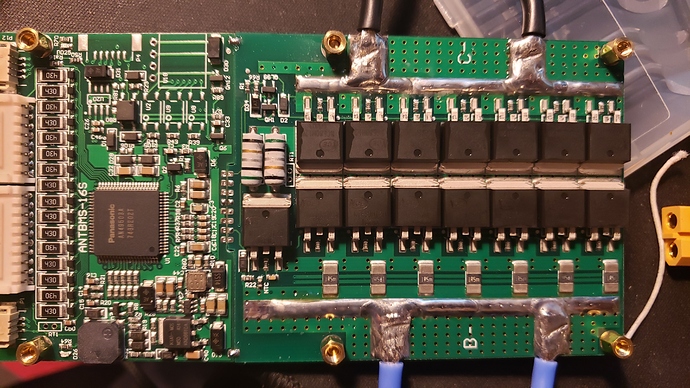
Here some better photos of one of them. I think this is a lower amp version. My got FIT's on both side. @plonkster Jip. Looks like a ESP. I got the 3de bms on it's way, slooooowwwwllllyyyyy. I will open that one and take some close photos.


-
@Louisvdw no problem. Here it is You will see there is n google drive file and everything is in there. He explains how to upload and setup all the stuff. Keep us posted if you get something running.


