WannabeSolarSparky
Members
-
Joined
-
Last visited
Everything posted by WannabeSolarSparky
-
Absolutely will save you money, especially if correctly installed and appropriately spec'd for your requirements. @Tariq mentions his power purchases, I have about the same result my side summer about 1Unit per day(feedback prevention) and winter about 3Units per day(battery top-up). Also as @Jacques Ester mentions as the price of power goes up your payback time decreases 🤩
-
in your inverter box should be the manual, the diagrams are in there. Or go here: Image Search I do not think those diagrams are suitable for SSEG applications. I may be wrong, I am sure some of the installers here on the forum could guide you on that.
-
why not get your data direct from the inverter?
-
Usually pointing to the grid(That's how mine is connected), and definitely placed before the incoming main breaker on the LIVE(Brown or red usually) line. If after installing the ct your readings look wrong then swap the ct coil wires at the inverter or check and make sure your settings are correct.

-
Has anyone on the forum who use Home Assistant tried using local hosted Ai to control things on Home Assistant? I have a local ollama server and tried this today Next will be to try setting up an esp32 with a speaker and mic to see if it will talk and listen 🤣

-
For small household with average to low consumption then I truly believe nothing beats the 5.5k sunsynk/deye/solis with at least 8 500watt+ solar panels. For larger consumption look at the 8k versions of the same brands. Running mine now for over 4 years without any issues and saving a ton of cash. Run ALL my loads off solar and only have eskom as backup. As for batteries, in my opinion go for what your budget allows on the lifepo4 type batteries, for maximum savings aim for a 10kWh system. Pay back time for a system like this is less than 7 years with the cash you will save from reducing eskom

-
Perfecto That did the trick Thanks @-cK- now I need to go fix the fan controller

-
🙃 I am new to HA so have no idea where that is inside HA... Maybe give me a hint in the right direction Nevermind I found it Thanks for pointing me in the right direction, gonna test quick and see if those readings are coming in
-
@slipx and @kellerza Great work on this, I have previously only used thingsboard and nodered but now I am almost convinced HA is easier after all the new HA updates. I have one small query/issue about the readings from the inverter that are used on the flows. It looks like you have deprecated the dc and ac temperature readings? Am I correct with that statement or am I maybe doing something wrong my side? Sunsynk/Deye Inverter Add-on (multi) - Current version: 0.8.2 and these are the measurements I am getting (Missing The Temperatures) 07:09:07 INFO Read every (inverter 1) +-----+----------------------------------------------------------------------------------+ | s | Sensors | +-----+----------------------------------------------------------------------------------+ | 3 | essential_power, grid_l2_power, grid_power, load_l1_power, pv2_power, | | | load_l2_power, pv1_power, rated_power, load_power, grid_ct_power, | | | inverter_power, non_essential_power, aux_power, battery_power | | 5 | prog6_capacity, grid_charge_battery_current, prog3_capacity, prog6_power, | | | prog5_capacity, load_limit, prog1_power, prog4_power, prog4_capacity, | | | prog1_capacity, prog4_charge, prog2_power, prog1_time, solar_export, prog5_time, | | | grid_charge_enabled, prog3_charge, battery_max_charge_current, priority_load, | | | prog2_time, battery_low_capacity, prog6_charge, prog3_time, | | | battery_restart_capacity, prog2_capacity, use_timer, device_type, prog2_charge, | | | prog5_power, prog3_power, prog4_time, prog5_charge, | | | battery_max_discharge_current, prog1_charge, battery_shutdown_capacity, | | | prog6_time | | 15 | grid_voltage, battery_current, pv1_voltage, serial, grid_frequency, | | | battery_voltage, protocol, overall_state, grid_connected, pv2_voltage, | | | battery_soc, pv1_current, pv2_current, inverter_current, load_frequency | | 60 | date_time | | 300 | total_battery_charge, total_battery_discharge, day_load_energy, total_pv_energy, | | | day_battery_charge, total_grid_import, day_grid_export, day_grid_import, | | | day_pv_energy, total_grid_export, day_battery_discharge | +-----+----------------------------------------------------------------------------------+ 07:09:07 INFO Report every (inverter 1) +-----+----------------------------------------------------------------------------------+ | s | Sensors | +-----+----------------------------------------------------------------------------------+ | 60 | essential_power, grid_l2_power, grid_power, load_l1_power, pv2_power, | | | load_l2_power, pv1_power, load_power, grid_ct_power, inverter_power, | | | non_essential_power, date_time, aux_power, battery_power | | 300 | grid_voltage, prog6_capacity, grid_charge_battery_current, day_load_energy, | | | prog3_capacity, prog6_power, total_grid_import, prog5_capacity, load_limit, | | | prog1_power, prog4_power, battery_current, total_battery_discharge, pv1_voltage, | | | prog4_capacity, total_pv_energy, day_grid_export, prog1_capacity, | | | day_grid_import, prog4_charge, battery_soc, day_pv_energy, prog2_power, | | | prog1_time, solar_export, prog5_time, grid_charge_enabled, prog3_charge, | | | battery_max_charge_current, battery_voltage, priority_load, prog2_time, | | | pv2_voltage, pv1_current, prog6_charge, total_grid_export, | | | day_battery_discharge, pv2_current, battery_low_capacity, prog3_time, | | | load_frequency, battery_restart_capacity, prog2_capacity, total_battery_charge, | | | use_timer, prog2_charge, prog5_power, grid_frequency, day_battery_charge, | | | prog3_power, prog4_time, overall_state, grid_connected, prog5_charge, | | | battery_max_discharge_current, prog1_charge, battery_shutdown_capacity, | | | inverter_current, prog6_time | +-----+----------------------------------------------------------------------------------+
-
Still need to learn how the coding on esphome works, currently the fan rpm's are a bit wonky, but that may also be my "great soldering skills" with the resistor on the speed sensor of the fan 🤣 At least I have figured out how to setup the automation to adjust the fan speeds based on the temperature readings

-
So this is evolving quite quickly into my new favorite tool for managing everything Remember to like and subscribe on the video if you want to see all the weird gadgety/coding things I get up to when I am bored. Shout out to @kellerza @Sc00bs @slipx and everyone else contributing to make all these things work nicely with my gadgets and solar stuff.
-
That would depend on the requirements of your setup. Providing more detailed info would help the forum clever people give more accurate answers
-
I have 2 of these (single phase version) on my new db, one for the stove to switch between grid and solar and one still unused/undecided. They seem a bit better than the big bulky ones from the same brand, time will tell what the quality is like 🙃
-
Since solar is not very constant (especially cloudy days) you would need to include an averaging check say over a period of a minute or 2 to get a steady reading which could then be used for the automation side. And maybe add in the weather condition to the mix since scattered clouds or other cloudy conditions could have the watts jumping all over the place.
-
Using stove(Grill and bake on at same time) on essential loads late in the afternoon in CPT 😁 Just have to love the Cape afternoon summer sun to get some free cooking time.

-
Really cool feature in Home Assistant for tasmota devices You can manage them all from inside and automatically keep the firmwares updated.

-
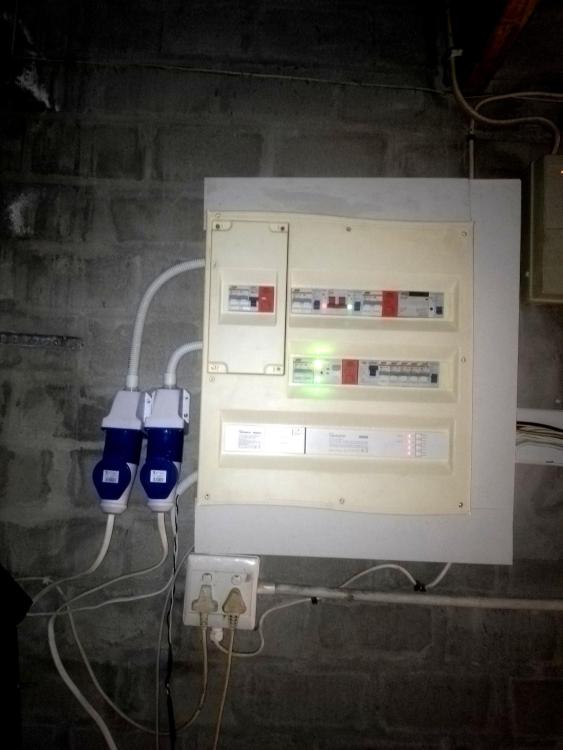
Still awaiting 2 nvme drives to add to the pi5 nvme dual hat. Then I can put it into the db for photoshoot 😁 Here is the main db with the tasmotized SPM modules that feed data to the home assistant sunsynk flows on the essentials side.
-
Finally got around to setting up the new gadgets Trying out Home Assistant for the 1st time in over 3 years, must say, they have done a good job on making it more user friendly, now at last I can try out the Sunsynk flows. And all my sensors and smart switches and power meters. Needed some tweaking to make it work with all my sensors, so far working ok Looking good so far. HomeAssistant picked up ALL my tasmotized devices automatically. No need to configure anything in yaml's That was the easiest setup ever 😁 and creating customised entities was a breeze. 3 years ago with HA I gave up trying to get all my devices and their entities loaded.


-
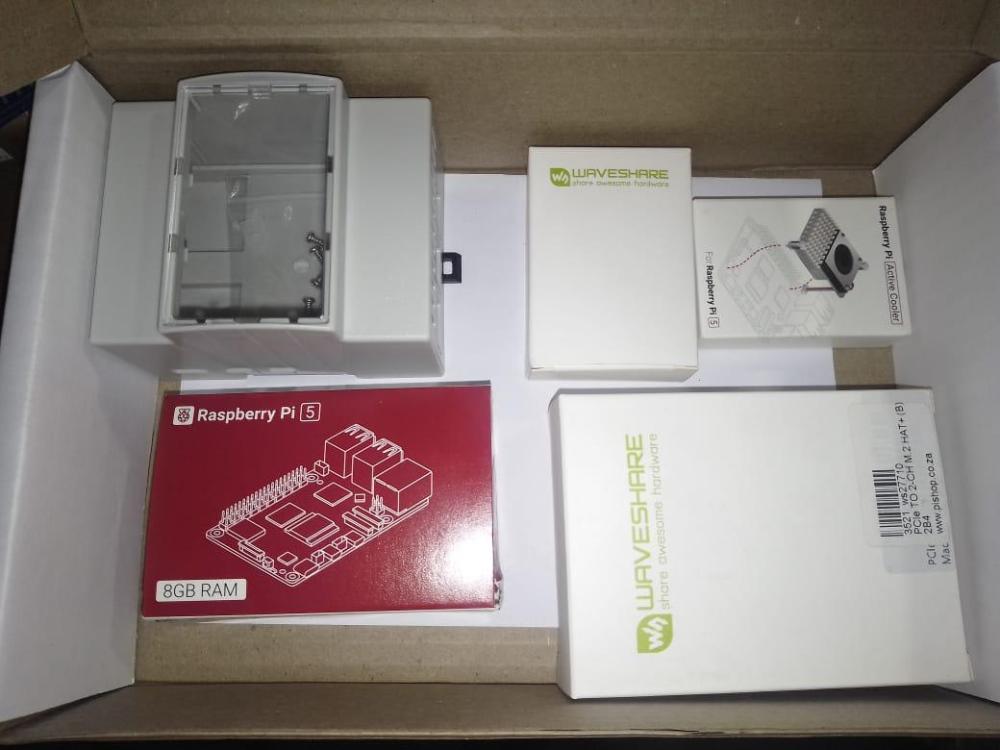
Santa got here early this year Time to up my monitoring and data collection game and add full backup with a small nvme raid. And tidy it all up nicely into a dedicated DB
-
As far as I know if you added ct coils you do not need an amended COC, as for the surge protection, that is a change in the installation and would definitely need an amended COC. Many electricians on here will give you a more valid answer
-
Even a small 900w generator like I have helps for those cloudy days. I have been semi off-grid for almost 4 months now, during the 4 months I had to connect to the grid for 6 hours just to boost up the batteries when we had a few cloudy days here in cpt. I was too lazy to start up my generator 🤣 That said, when/if eskom comes knocking and enforcing their rules, it will be a breeze/pleasure to stop the laziness In the meantime I am also busy installing another 12 panels and am halfway saving for 2 extra batteries, that will bring me to a point where I can comfortably tell eskom where to get off.
-
All working great, just need to finish labeling everything.

-
Sonoff Ring POW CT tasmotised now measure import AND export power


-
why not just add the new battery? You can put different AH size batteries onto one bank without issues especially if they the same voltage and chemistry. Just put the newer one as the master.
-
Correct as it shows on the fuse that it is an AC fuse (~), it can work if there is no or low amp load when it breaks, but if under heavy amp load it could arc like crazy before breaking, best is to replace with a DC rated fuse in the same format.