


branderplank
Members
-
Joined
-
Last visited
Everything posted by branderplank
-
Hi Guys Looking through these pics again and the manual, I just need to clarify the approach on: 1) Number of batteries; 2) Max consistent current draw 3) Setting on Sunsynk system screen I know the max sell power should be set to your PV array size power however I see in most pics that the POWER COLUMN remains at either 5000 or 8000 depending on whether the person has 5.5kw or 8.8kw model. Has anyone limited the power in the power column to say 3500 watt? For example if you have two Pylon 3000C batteries with max consistent current draw of 74A combined, that means you can safely draw circa 3552 watts (74A x 48V). From what I can see on the help screen, the Power column limits the power from the battery. I assume that in daytime you would still be able to use full available power from the PV array and that this will not be limited by the settings in the Power Column. Should a cloud pass by and the PV drops it could supplement from Battery or Grid (dependent on settings) Has anyone tested this? @Tariq - you only have 2 pylon 2000's? How do you ensure that you don't accidently push your batteries beyond the limit (25A per battery) Thanks
-
Strange that you could not find a 405 watt. Have you checked with the major distributors?
-
There is a training manual that could maybe shed some further light. Not sure what you are struggling with specifically
-
Just a wild guess here from what i have read it sounds like a floating neutral. Have you tested the voltage between earth and neutral?
-
Look at the training manual
-
Which meter is? (type) Can't you set it to minimise the export power?
-
Nice Now you just need a battery cabinet for those pylon's. Is that small DB for your solar protection breakers/surge arrestors/fuses?
-
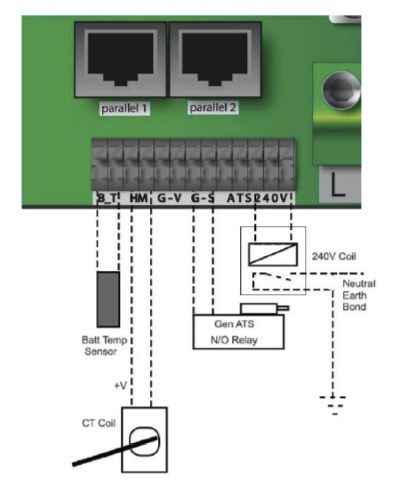
1. Mine is wired to get power from Mains before RCD and from a "clean neutral". 2. Most guys just use a single NO/NC relay (240v coil). The coil will be connected to the live and neutral outputs of ATS240 pins on the inverter. Once you open the inverter you will clearly see these markings. The neutral (from the inverter output) or earth can be linked to the COM pole (common) and the remaining wire (neutral or earth - depends on which was connected to COM) can be connected on the NO pole. Nothing should be connected on the NC pole.
-
Hi Guys Many different topics discussed on this thread and very interesting. The manual however does not state the rating of the relay required but just that the ATS pins should be connected to the relay. So why would you need a 40Amp relay if there is going to be no (or minimal) current flowing through the relay - i.e. you don't expect to have 40 amps flowing between N and E? If I understand the function of the neutral - earth bond correctly, this bond is required in order to give the RCD/EL breaker the ability to detect if there is a fault and accordingly, any such variance detected (less than 30mA if I understood it right) will cause the RCD to trip and "break" the current that is being leaked? Hope I explained this correctly. As a side note, we should convert the latest copy of the PDF manual and make some track changes with all the learnings/additional Q&A and fix up some of the obvious grammar and other errors. Should we start a thread for this?
-
The nice about the CT clamp just after the meter (so to speak) is that you start getting stats on your entire household use from the inverter. You see the peaks and the base level of use. From my perspective it was good to see this
-
Some interesting discussion here It seems the writing is on the wall i will have to change my installation 🤔 Did not know about the metal trunking - if you look at the gallery of the power forum store it all looks like plastic trunking and in some instances ac and dc in the same conduit? Question, does SANS 10142-1:2017 Edition 2 prescribe the minimum or is it a "good practice" guide. Who regulates the wiring code? Is it not an NRS function? I.e. NRS 097-2-1:2010 Edition 1 (Not my pictures - just copied from the website)
-
Hi Guys Looked around a bit on the forum but did not see a specific section on this (sorry if I missed it). From a CoC perspective, I was told that AC and DC wires are not allowed to run next to one another in the same conduit (trunking). Is this correct? If you look at the layout of the ports of most inverters you are bond to have AC and DC lines crossing one another depending on layout restrictions. What is the correct approach here? Thanks
-
The funny thing is that the plug circuit on which my keypad is connected, is the non-essential circuit which does not run through the inverter. Will play around with this one a bit more. Read somewhere on another thread about inverters "injecting" some king of frequency that could interfere with communication of the keypad.
-
Managed to figure out the problem on the CT clamp Really simple. I have three phases coming in but only use one. Seems that the colour coding inside did not match up with the colours coming in. First tested it on neutral and got a reading, then tested other phases. CT clamp now reading perfectly
-
To add to this, it seems my Empire Hexing keypad won't connect to my smart meter unless I fully turn off the inverter. The moment the inverter is running, even just in UPS mode, I get a COMMs failure message when entering any type of code. (Also have an alarm light flashing on my meter outside - not sure if this is related though) Anyone else experience this?
-
Hi Guys Not to hijack the thread but I installed my 5kw sunsynk today and connected the white and black wires to the HM ports as per the manual. However it does not seem to see the CT coil as there is no reading (CT: 0 Watts) nor anything displayed in the system flow diagram. Currently just running in UPS mode. Any advice? Could be a faulty sensor? Thanks
-
I have read the manuals and could not see such instructions. Is it a function of cable thickness and amps that you had to do this? Or is there some guidance on this matter? Thanks
-
Good day I have also purchased the 5kw inverter. Can you please share the link or file with this latest manual? Many thanks
-
Please help then with this from their product data sheet: Max apparent output of 9200 VA?

-
@Jaco de Jongh I must admit I don't fully understand the capabilities of the easy solar. The GoodWe makes it clear that is can supply 4.6kw to the non-essentials and 4.6kw to the essentials at the same time (provided the batteries and panels etc are specked correctly). It can blend the PV output to essentials and non-essentials as required and limited by the chosen settings/profile of the unit. The MPPT range is also much higher than the Victron? With the victron, depending on the number of panels, you would need to add combiner boxes as well whereas with the Goodwe you can have a big series string and use less cable/thinner cable if the array is far away? With the easy solar, it seems you have to split your essential loads according to the 4 breakers' limitations. So if you already split your DB between essentials and non essentials, do you know have to split it even further per breaker? If for example, your Inverter is far away from your DB would that then not be impractical? Maybe I am missing something obvious. Still learning about all the options.
