


Mark
Members
-
Joined
-
Last visited
Everything posted by Mark
-
I use the HA02 and I think it does. My MP never goes out by more than 1% under heavy charge or load. Normally averages around 0.1% variation. Sent from my SM-G800F using Tapatalk
-
-
Thanks Jaco - I have edited my post. Agree with EmonCMS and would use it but have a very slow internet connection so real time is not for me.
-
In the context of PVO Manie (edited) - not all the other features. Therefore the PVO focus on the post - there is enough very good info and video on AICC for all the other features. AICC Windows Version does not populate the extended data on PVO which was my focus above.
-
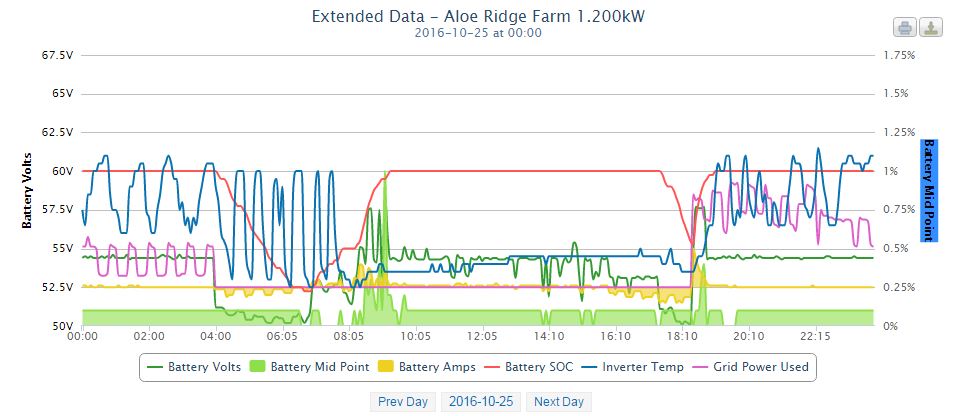
Hi Marie Don't want to lump you with more work but as an aside you could get the software to upload to PVOutput. It could then be visible to us to a degree. We can then look at the data as well. If its AICC then that works well for the basic stuff. SolMon will do the SOC and the MidPoint a well as battery volts and amps in and out, and Inverter Temp (As PVO extended data). http://www.pvoutput.org (see my signature for a link to my site) Not needed but could be useful. Regards Mark Thread here:
-
B1 needs to be on the positive busbar assuming that is now installed. Don't cut any of the cables in the BMV setup even if they are very long - another debate was had about this and the calibration of the BMV. Cable tie them up and hide them. Just make sure you plug the correct cable B1 into the B1 slot on the shunt.
-
Leave out the mid point for the moment if you are unsure. With your multiple strings it can get very tricky. And you dont need it for the moment. Avoid the extra complication. There is also a debate about joining all the string midpoints together. I have done mine but others here may disagree. A healthy disagree I should add.[emoji2] Sent from my SM-G800F using Tapatalk
-
You set the max charging rate as a % of size of MPPT. I have set it to 50% of 40A ie: 20A for my battery bank of 200aH.
-
The only 3 things I would do is: Set Battery Ah - already done Zero the BMV with zero load on the batteries (ie Inverter/etc off) - Batteries must be full and settled. The mid point will need to be enabled as you have 3 choices (Temp/MPoint/?) - It calculates itself. Sound like you are almost there!! All the best. Mark
-
My mc stays off until the battery voltage drops as the sun moves past the first string and then feeds in as needed until to starts taking over. I have also set the bulk lower as well. The axpert falls over if I try and equalise with the mc. Obvious really as 60v equalise is to high for the axpert. I knew that going with the change. Sent from my SM-G800F using Tapatalk
-
Hi Chris I am currently running my MC 40A on a small 600w array facing NW. I have set the MC to float at a lower voltage than the Axpert (facing NE @ 1200W) so it doesn't argue. Going well so far! No major issues noticed so far. Extended the charging day a lot now. All the MC sees is the battery voltage so don't expect any issues. Regards Mark
-
Hi All Does anyone have a second hand BMV 600 they are keen to part with. I am looking to monitor a cheap battery bank (old T105 bank) so don't want to spend alot on the BMV 702. Thanks M
-
Hi Marie https://www.powerforum-store.co.za/collections/accessories/products/copy-of-bmv-702-battery-monitor I think this would be a great option as it also does Mid Point Monitoring. Regards Mark
-
I think the inverter is charging the batteries. Can you measure the amps going into the batteries with a clamp meter? Another question: Are all the settings correct for the new set of batteries on the Axpert (ie Float, etc) Regards Mark
-
Thanks Mike Sent from my SM-G800F using Tapatalk
-
Hi Mike. So the Dec 2015 version has been update to .60. Have you made changes to the Lead Acid from 2015. I dont see a new version on Page 1 of the AEVA thread. Thanks Mark Sent from my SM-G800F using Tapatalk
-
I'm running this patch (The Lead Acid version) with no issues. OK I don't have a Gennie and only a 200ah bank. Coulomb can correct me but its from December 2015 - don't know of any new versions.
-
I have seen solar flex (twin wire - black and red in flex) on the Rubicon catalogue. Looks like it would be great when pulling a string, etc. That would be nice in the various sizes. TwinSolar PV1-F is there product name.
-
Hi Daniel See this image... For 5 banks but yours needs to be for 2 obviously. All banks need to have the same length cables. Note the single points for connection to the inverter (red on right and black on left). Hope this helps!!
-
Will do... Sent from my SM-G800F using Tapatalk Need to get to a pc...
-
I would rather you joined the 2 positives to one point and same for negatives... ie a busbar. That way your left bank is not daisy chaining off the right bank... Hope this makes sense... shout and I can draw a diag. Not easy on the phone...
-
Not normal at all... are you sure the 12.17v bank is connected correctly or that one of the cables doesn't have a loose lug etc.
-
Do it ... Do it...
-
I have this as well even though I only have one inverter. No visible issues so far. I think it may be that the inverter was tested in the factory in a parallel setup...?
-
http://www.teslarati.com/tesla-hacker-off-grid-solar-home-batteries/
