Douw G. Gerber
Members
-
Joined
-
Last visited
Everything posted by Douw G. Gerber
-
You could also just configure it using voltages. Can you provide some more info on the battery?
-
Besides savings in my electricity bill...last night we had a 5 hour outage in large parts of the south of JHB due to 2 x 88Kva breakers tripping. Our household could carry on without any interruption. Going solar is about energy independance, not just about loadshedding. Same goes for installing water backup...
-
So this nonsense of sending people out to do this...they came to me to do the upgrade, I smell another tenderpreneur who scored big time.
-
I have two BX51100 Dyness batteries that have been running flawlessly for almost 2 years. Apparently the new ones now also support 1C discharge. Cheers Douw
-
Hi all I am enquiring whether there is anyone doing repairs of Axpert Inverters on the group. Not just part replacement, component level repairs. I did reach out to @BritishRacingGreen - no answer there yet 🙂 Cheers Douw
-
What is a BMAC?
-
Great work here! For the Axpert guys I have it working like this Let me know and I can share the config

-
Tru dat
-
Agreed, if you don't like your data going to the cloud then Tuya might not be for you. I personally don't care if the chinese know how many times a day my lights go on and off and such - nothing of reall personal importance runs on Tuya for me. The Tuya integration is indeed not new - but was a ball ache in the past with developer accounts required etc. In the past your devices would only work for six months then you would have to go and ask for a license renewal and such on their site.
-
https://www.home-assistant.io/integrations/tuya/Hi there all - interesting toppic here - just a headsup that HomeAssistant now support Tuya devices natively via the Smart Life App. No more clunky integration.Hi there peeps Just thought I'd mention that Home Assistant now supports Tuya devices natively - no more need for dveloper accounts and all that nonsense to use MyTuya. If you have the device enrolled in the Smart Life App it is now immidiately available in HA using the standard Tuya integration.I have been running two of these no since August 2022 - no issues to date....touch wood 🙂I could also never figure out how these things work...pictures of it installed would be great 🙂Final layout is as follows - I will post a pic of the DB when I am done with labeling.
 The Victron will need a seperate MPPT AFAIK when you want to add solar. The Sunsynk has MPPT built in. Pro's and Cons to both. 48v vs 24v - I'll take a stab at it - thinner cables required due to higher voltage and less amps for the same watts through the cable. Almost all 5Kwh or bigger LiFePO4 batteries on the market are 48v/51.2v now so your inverter would have to support that. I wouln't go for a battery smaller than 5Kwh. Cheers DouwHi all After having my change over switch fail on Friday (it only worked on the eskom input - fortunately) and replacing it I realised that my earth leackage after the inverter is wired as follows: PS - I have three phase - so 2 phases are not backed up and one phase is used for the backed up loads. My question is shouldn't the backed up load E/L rather be wired on the OUT of the change-over switch? As it stands now it doesn't look like my backed up loads have any E/L protection when the change over switch is set to eskom/bypass? The plug on the diagram is just an additional surface mount plug I had put in near the inverter. This plug is obviously also not working when in bypass/eskom. ie. should it rather look like this? Also, should I perhaps have another 32A breaker between the inverter AC out and C/O switch?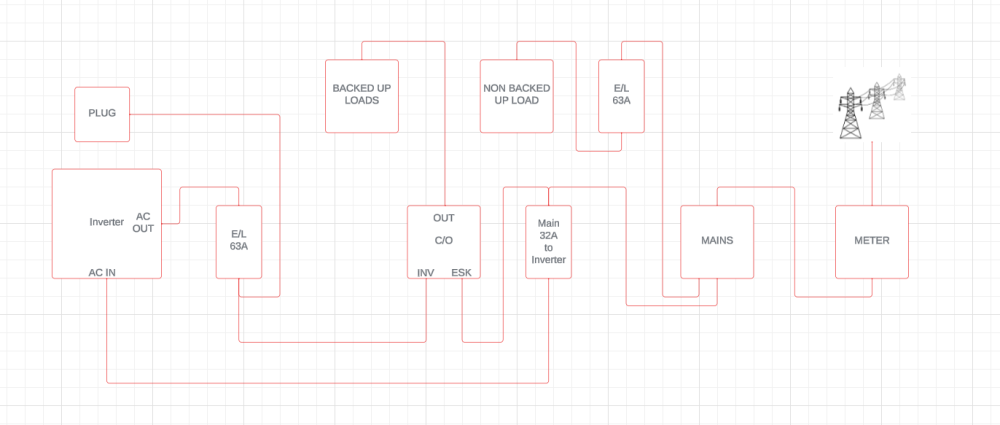
 howzit mate - i reckon start a new topic under the inverters section rather.I can confirm it is this one, she has in fact told me that this unit is much quieter than the previous Mecer unit they were using. Only makes noise when chargingI'll get my mom to take a pic of theirsThanks for the info re PYL protocol - will keep that in mind.https://www.takealot.com/mecer-1200va-1000w-12v-dc-ac-inverter-with-lcd-display-mppt-buil/PLID91165653?gad_source=1&gclid=Cj0KCQiAqsitBhDlARIsAGMR1Rjanwo9hGhlBzwZVxr2ronDvhCd-bAQXfO4P9gZsqN44cRgkgM8nZ0aAi3KEALw_wcB&gclsrc=aw.ds This is the inverter.My mom was also using the Mecer unit and it worked very well for a good couple of years. They have now via a supplier in CPT upgraded the system to a Mecer 1.5kva with a 12v 100AH LiFePO4 They used the old metal battery box and just bolted the new inverter to it. Happy as can be and they easily run for thr 4 hour loadshedding sessions. The above option is WAY WAY WAY cheaper than the EcoFlow type solutions out there. And it is way more power for the price. I can put you in touch with these guys if you want - they in CPT though. Cheers DouwFrom the battery manual above you can try the following pinouts - not saying it will work but worth a try INVERTER SIDE BATTERY SIDE PIN 6 CAN H PIN 4 CAN H PIN 7 CAN L PIN 5 CAN L PIN 8 - GND PIN 6 GND Pinouts for MK4 Even if the above is correct - not sure which protocol to use but you can try PYL, LIB and LIC - give it at least 2 minutes - if it starts flashing red with error 61 then it cannot communicate. U can also just continue using USE and setting the voltages for Bulk/Float/Cut-off and just ignore SOC value on the inverter - the battery has LED's showing SOC. Cheers Douw