


PowerUser
Members
-
Joined
-
Last visited
Everything posted by PowerUser
-
Thank you for the clarification @Leshen!
-
Well according to this guide: https://www.solaris-shop.com/blog/grounding-techniques-to-prevent-inverter-damage/ it shows the battery grounded as well. That’s why I thought, I need that. The battery can’t be an old model. Got it only couple of weeks ago and still busy mounting and connecting everything. Haven’t even switched it on yet. @87 Dream, those mounting bolts don’t even make contact with the chassis on the Hubble. There is a very thick layer of baked paint in between.
-
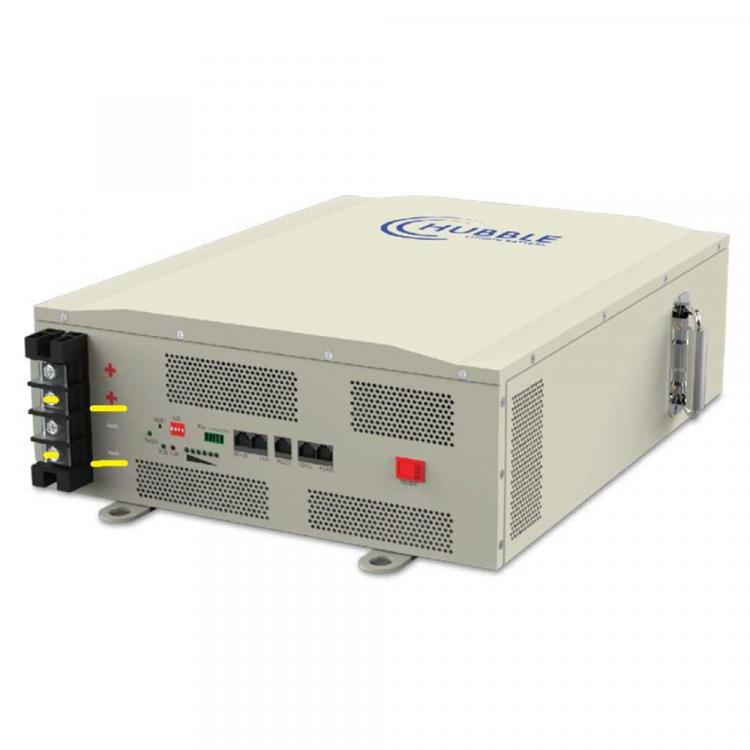
Looks like I need to do a bit of research on the topic then. Do you happen to know where is that grounding terminal on the battery? It’s not marked anywhere I can see.
-
Thank you @Leshen! Could you please tell me, where is best to connect the ground to the chassis of this battery as well?
-
I'm sorry to say but the documentation for the Hubble Lithium batteries is so bad! I'm looking for the correct info on which terminal to use when only a single battery is connected to an inverter. Can someone who knows, please confirm, the terminals marked in yellow are the correct one for a single battery? I'm just guessing at the moment based on their parallel connectivity diagram. And also, where is the ground/earth terminal on this battery?

-
Does anyone know the answer to the above question?
-
Hubble is NMC chemistry, while the others are LiFePO4. Mixing Hubble batteries with any other brand voids the warranty, according to Hubble. You need to check with the other manufacturers as well. There is a great chance, they will also invalidate the warranty, if you mix with other brands.
-
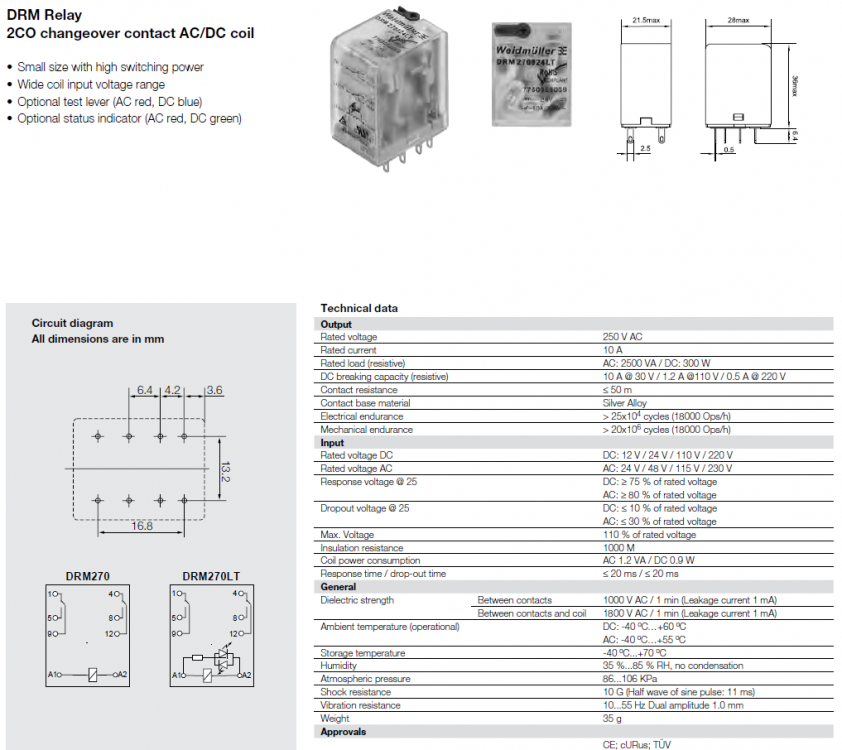
Thank you @abeetude! Looking at the datasheet and diagram for the relay, am I correct in saying, if there is no voltage applied to A1-A2 coil, 1 and 9 plus 4 and 12 are closed. When voltage is applied to the coil, 1 and 9 plus 4 and 12 open, however 1 and 5 plus 4 and 8 get closed?
-
Reviving this old thread but couldn't find the answer anywhere. Can anyone explain where the ATS 240 from the SunSynk inverter needs to be connected to the above relay?
-
For the Sun, you have to follow True North. Usually, there is a setting in your phone compass to show True North instead of Magnetic North.
-
I hope, I’m wrong but this battery looks very fake. The website from the label does not exist. Searching the model number on Google does not produce any results. Who knows what’s inside that box…
-
If you don’t come right, you can measure the cables and these guys can do the crimping for you for a small charge: Battery Orbit 011 679 4229 https://goo.gl/maps/7b7LTpGZmgGrpRK7A
-
@Energy-Jason, can we please have a sticky in the general section for a scam sites tread for everyone to see and find easy!
-
If you check, the price is excl. VAT. That’s why it sounds cheap.
-
This site is legitimate. I have personally been to their shop in Centurion. If you don’t want to order online, just go to the shop in person. Search for GCSolar on Google maps and it will show you the location. But anyway, the site shows - No stock at the moment
-
Ok, thanks! I understand better now what's going on there. There is a separate DB for the isolators.
-
Yes 87, I was just correcting a blanket statement "SunSink can not run without battery", for the same of not spreading false information on the forum. Someone new can come across this thread and just read that statement without understanding the context. But in this case, for off-grid system, I fully agree with you. SunSynk is not the best option for such scenario and I wouldn't use it myself either, if I was planning to go completely off-grid.
-
Here you go 87:
-
I was asking nicely. Didn't mean my question to be taken in a bad way. No need to overreact either. I was referring to this particular diagram from SunSynk. You can see the isolator switches (in yellow) clearly outside the DBs. I thought maybe, there is requirement for them to be installed separate and independent from the DBs. by some standard. Then again, is there an isolator switch between the batteries and the inverter in the above picture somewhere? I only see the fuse box. @Leshen, sorry please don't take my questions in a bad way!

-
Let's not start spreading false information on the forum. SunSynk CAN work without battery. There is a video from Keith on YouTube, which explains that configuration.
-
Nope, sorry. I only see the battery DC fuse box and the earth to neutral bonding box. Am I not looking at the right place?
-
The Sunsynk manual shows dedicated isolation switches between the inverter and the load, batteries and PV. I don’t see those anywhere. Are they not required by the SA standards?
-
I started this tread with the intention of finding reliable working solution and not just a proof of concept. A simple capacitor, might work with the AC element but this is not something which should be installed in a properly designed electrical system. The solution should be fully compliant to the standards and be able to pass official CoC. I'm all for DIY because I'm willing to do the work and save on cost and not because I cut corners on safety.
-
I really can't help you with another battery but do you mind sharing the age of the failed battery?
-
@Abe53, do you have a picture or a diagram of your setup? What happens if the capacitor fails?




