mzezman
Members
-
Joined
-
Last visited
Everything posted by mzezman
-
The basis of this does use the voltage / frequency. The output is then On of Off that you can use. Its just another way of achieving the same
-
What will happen in the following situations: 1. Grid is up - Essentials plus non-essentials shows AC Load is 7KW? Exceeds 5.5KW. - 7kw is at the limit of the passthrough (35A), anything above will trip inverter and house if the 7kw is on the essentials. Non-essentials do not pass through the inverter 2. Grid is up - Non Essentials exceeds 5.5kw? - no issue 3. Grid is down - Non-Essentials exceeds 5.5KW? - if grid is down then non-essentials are unavailable - there will be no non-ess load
-
You could also create a threshold sensor that will then give you a binary sensor with ON / Off based on the grid frequency / voltage

-
Luxpower SNA ia also very loud for an inside install
-
Got one installed at my mom-in-laws place at the end of November last year
-
To further prove this - try push your load to later in the day on a fully sunny day and see how that stacks up
-
Or have your geyser run from 7-9 then again after 11 / 12? Try spread the load a bit? Washing machines? Dishwashers? Aircons? Start baking / cryptomining?
-
The Luxpower has 2 MPPTs and can take up to 6kw of solar. I think the Growatt only has 1 MPPT. Not sure about the Axpert tbh
-
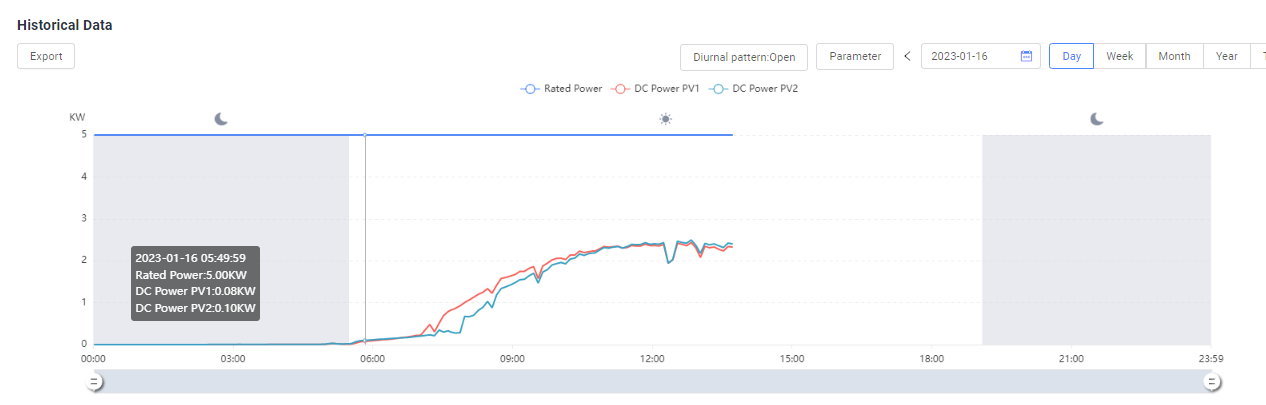
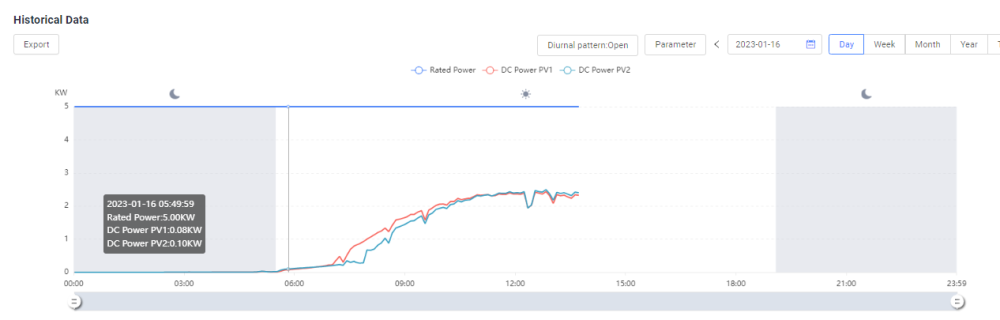
4.5 kw peak seems about right, esp with that string orientation. The heat (if you are in GP) will also cause some efficiency loss. The PV throttling down to meet demand is a feature not a bug - the only way you can change this is to have more load at those times OR export that excess PV either to the grid or to non-essential items. I am guessing that your batteries are topped up and 100% by 12pm? On solarman you cant view the DC split on the main screen / graph. Navigate to Device > Inverter>Statistics. Select your time frame then click the graph and select Parameter Selection. Select DC Power for MPPT 1 and 2 and it should give you the required view. This is on mobile app and Solarman Home. On the web once you get to Device then scroll all the way down and you';ll find the same graph that you can then change
-
Glad its resolved
-
Ok so that's correct then. what is the BMS limiting the discharge to on this screen>>

-
It looks like you are covered - obviously having another panel always helps but if your battery is fully charged by 10/11 then the rest of the day your solar is matching your usage - check your utilisation times - it looks like the extra usage is at night? You should be able to use the aircon even before battery is full as well. 5*455 should give you approx 2.3kw peak in ideal conditions. this is impacted by environmental factors - heat, shade etc
-
What value is set in this field? and on your inverter what are the settings under Menu 3?

-
The SNA is the cheaper one - its also the loud one. But it works - it has 2 MPPTs in case you DO find someway of getting panels. Also has a decent app / web portal for management.
-
News spreads SO FAST in a complex..hahah. Put in a solar system for MIL and for days after people were talking and looking etc - yet the unit next to hers got solar years ago and no one batted an eyelid
-
If only for backup then you don't need to pay an arm and a leg. Look at the Axpert / Voltronic based systems as well as Luxpower SNA
-
Untick Solar Export You say your batteries never go above 32% - where are you located? Are you also able to share the last 2 or 3 days PV production from the app?
-
Any reason you are going through a micro-inverter as opposed to plugging the panels directly into the deye?
-
Arrow should point to the inverter, not the grid. The CT should be on the main incoming eskom feed. The circuits between the CT and the inverter will then be 'non-essential' and then you can export to them because the CT will. Block exporting to the actual grid
-
Once you get your Home Assistant and Solar Assistant talking then you can give me a shout and we can work through the steps. It's not too complex
-
What is your budget? A 5kw could work but then you'd have to manage what's running at the sametime. Safest bet would be to get an 8kw if you can afford it. Difference in inverter price is down to functionality provided, some inverters can feed excess power to non-essential circuits while others cannot as an example. So your specific usage requirements will guide this
-
Pretty much, the current is clipped if it exceeds the MPPT but voltage will cause the MPPT to get damaged
-
10 panels on one MPPT in series might be too much and you may go over the MPPT voltage - which is not good. 8 or 9 is the sweet spot. In terms of wattage its up to you, your budget and what you can get your hands on
-
As far as i know there aren't zigbee devices that match those ones you listed. An alternative would be to get Shelly devices (im not too clued up on them) but they also function locally - you cand ecide for fully local or via the web IIRC If you use HomeAssistant then you can mix and match Tuya and Sonoff with no issues. On your phone though you would need the eWeLink app for Sonoff and Smart Home for Tuya - but HomeAssistant just works and once setup you don't even need to go back into those phone apps. SonoffLan and LocalTuya are just plugins - no additional gateway required. The Tuya devices do have to be connected via cloud first THEN you can port them to LocalTuya - there is a key you need from the Tuya IoT cloud
-
Welcome to the journey into the light 🙂 Hubble, Pylon ad Sunsynk don't make an 8kw battery - you would be able to get 5kw from all 3 and Sunsynk does also make a 10kw if i remember correctly. In terms of comms all 3 have decent comms capabilities with the SS inverter. Of the 3 only hubble is 1C so you would be able to get the full 5kw draw from it - the others are 0.5c which limits your draw to 2.5kw if you get only 1 of the 5k batteries. If you do get hubble make sure you get the new ones (LiFePO4) - the older ones (NMC) had some BMS issues that necessitated a trip back to the warehouse. Sunsynk batteries also increase the inverter warranty to 10yrs In terms of panels there isn't much difference between those 3 - they are great quality Edit: Other important hardware to consider: Earth Neutral bonding relay Appropriate fuses / RCDs sized properly for the panels and battery Ensure there is good wifi connection at the installation site so that you can manage settings remotely