mzezman
Members
-
Joined
-
Last visited
Everything posted by mzezman
-
Did you manage to get sorted? There should be an entity available from the integration that will tell you if the area you are in is in a period of loadshedding (based on day and time). It should be called sensor.loadshedding_(area) - you can find it in the developer options You can then use the status of this + check for grid frequency / voltage as a safety to then identify that you are indeed being loadshed. So the logic would be: Is sensor.loadshedding_(area) = on AND is grid frequency less than 48v if yes then (do something with camera)

-
Maybe try this https://play.google.com/store/apps/details?id=com.deyesolar
-
This is one of those Mercedes Benz vs Kia vs Toyota questions... Absolutely nothing wrong with Kodak (voltronic), Luxpower or Sunsynk - ask yourself if the Sunsynk premium is worth it for you in your scenario. All 3 will work with well with Pylontechs - compatibility wont be an issue. There is something to be said for having the redundancy of 2 equally capable but cheaper products
-
Thanks for clarifying those items, very important and I think we take it for granted once we know it
-
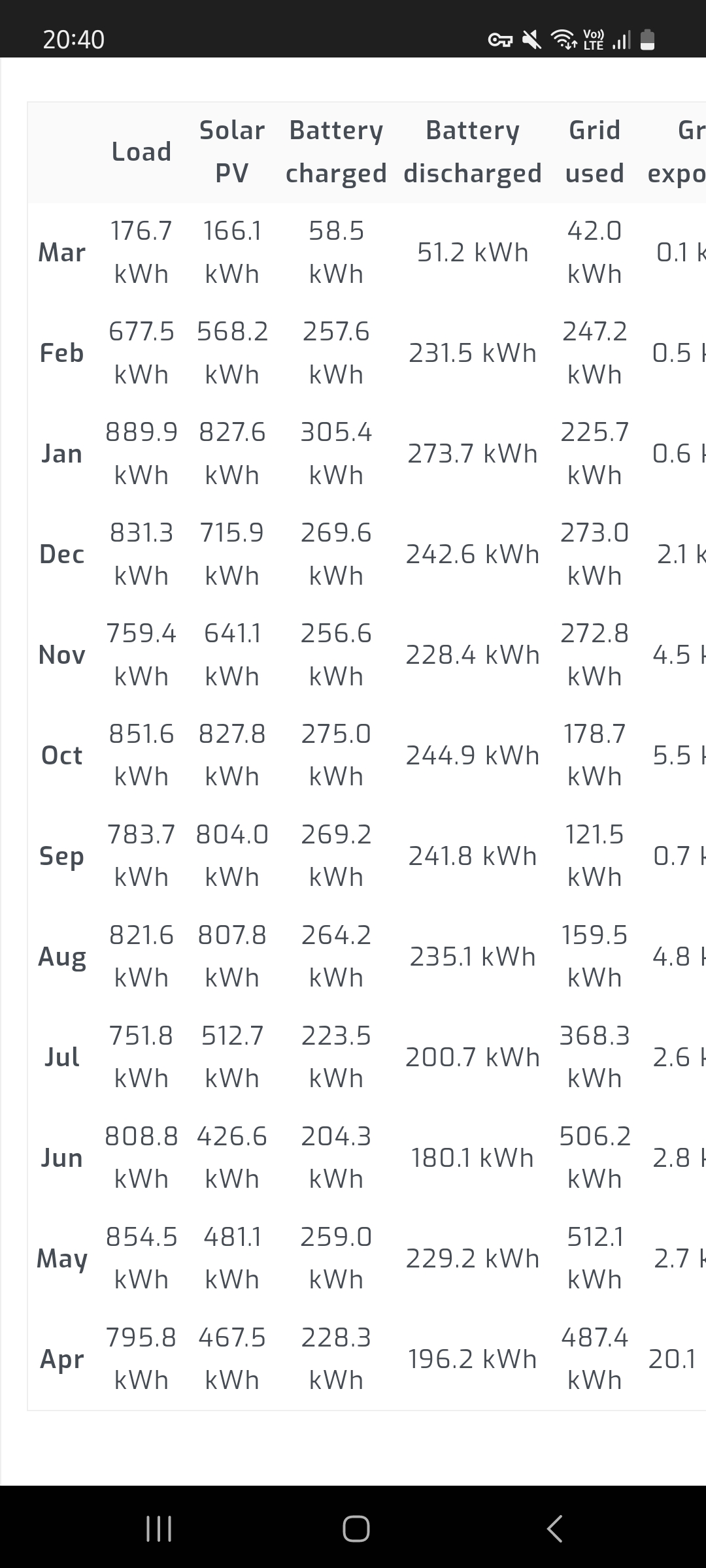
My numbers to add to the comparison

-
This ^ Its either not in the right place on the main line, pointing the wrong way or connected to the wrong pins in the inverter (one or all 3 could be a factor)
-
It's proof that you're a real G I'll see myself out
-
Yes it is possible. A number of settings need to be correct in both Solar and Home Assistant to get it working but once that's done it works 100% Home-Assistant setup MQTT integration Work through these resources and see how far you get
-
It can be overwhelming indeed. 140k should get you a base system like that. Just something to note with some of the batteries, e.g. Dyness / Pylontech - they are 0.5C so you'd only be able to draw a max of 50% the batteries capacity in power. There are other batteries such as Greenrich which allow you to draw more. Its a consideration for loadshedding as that limits what you can run Supply is pretty limited at the moment so if you can find places with stock then get it - check other users' installs and see who they used - there are a lot of flyby night guys so please please do your due diligence https://www.solarwaysuppliers.co.za/product-category/solar-packages/5kw-solar-packages/ has some decent kits and stock solar.co.za also has decent kits and can recommend installers for you @Leshen or @Steve87 are some notable installers on the forum that you could also reach out to
-
If you can shift your geyser to mainly charge during the day using the PV then you'll hopefully reduce or even eliminate the need to have it run overnight Oven can also be run during the day on PV- the nighttime usage might be an issue with 2 batteries though - remember you always want to have a % in the batteries in the case of a midnight loadshed or fault. There ARE ways you can schedule things and switch them on / off smartly depending on your inverter and general IOT skills. You could also set the time the oven is on to be drawn from ESKOM, e.g. have the house run on Eskom from 5-6pm and use the oven then?
-
Have been using both Sonoff and Tuya for sometime with HomeAssistant. Sonoff do not have that renewal thing that you mentioned and the sonoff integration is pretty easy to install. SOME of the sonoff devices support SonoffLAN but not all - so be aware when you add the devices
-
If you get the 1 8kw you will be limited to 2 mppts whereas having 2 5kw inverters you double the mppts to 4. The 2x5kw also give some redundancy / resilience if 1 inverter packs up - all be it at 50%. The 2x5kw will work as 1 systems as the inverters are installed in parallel Some questions to help you: Do you regularly use more than 8kw of appliances at a time (this helps with 8kw vs 10kw) How much electricity do you use between 4pm and 7am (this will help with battery sizing) How much of that 40kwh usage can be moved to daytime hours? How much roof space do you have (theoretical max number of panels) >> number of mppts
-
No that definitely wasn't me - im just an end-user like you 🙂
-
Always better to put the newer battery as the main(master) and the others as the secondary. Most battery manufacturers don't allow mixing sizes but I know Pylontech does. So with most batteries you have to get the same size, brand and model
-
Do you know if the inverter is communicating with that single battery? What does the inverter show on the screen regarding the battery? In general there should be something under menu 03 as that's where the battery settings are
-
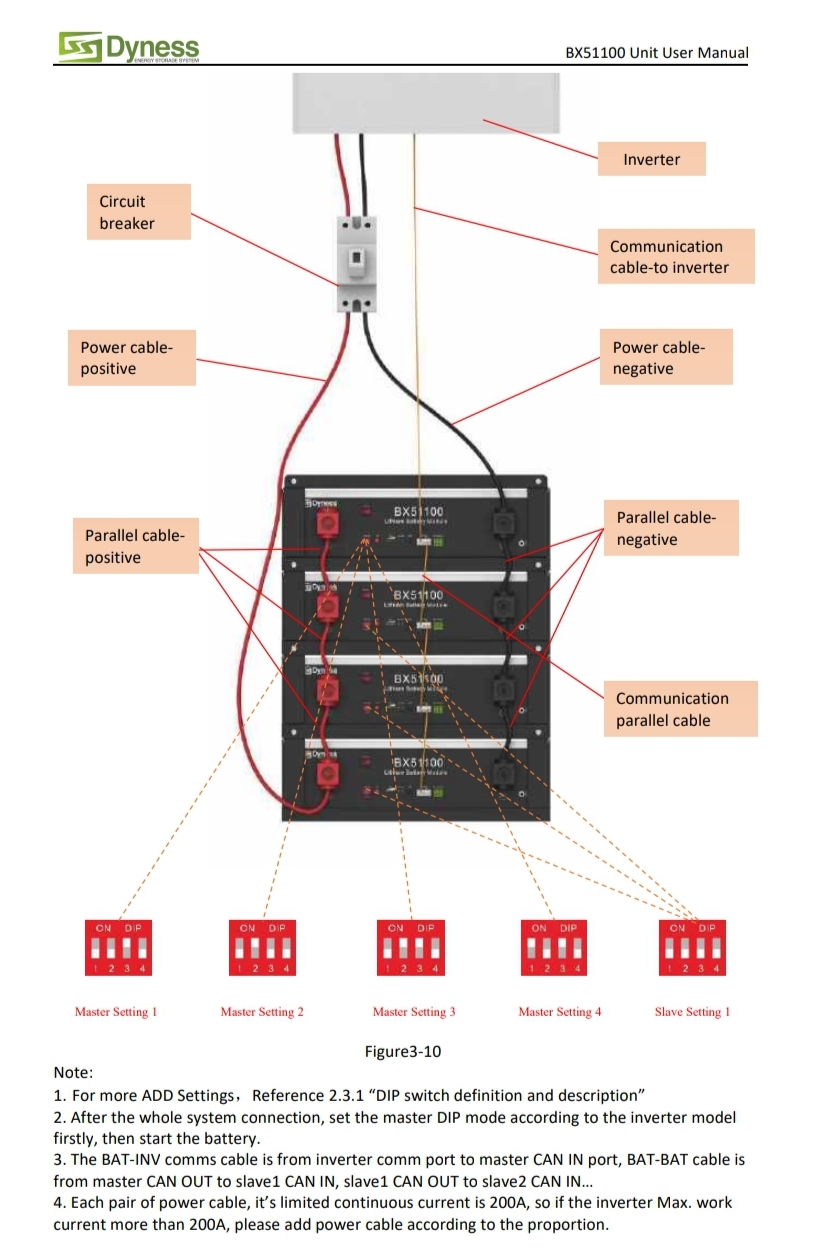
From the manual (screenshot) On inverter you would set capacity to 200ah You can bridge the earth


-
Solarman does have that functionality but its not user intuitive and it requires your installer / deye to give you that level of access. As @wolfandy said - something like solar assistant provides this but at a fee (for the raspberry pi + software)
-
How many batterie? What make and model of battery? The inverter itself can work with up to 5000w of devices with no problem but this is battery dependent - we need to know your battery setup before confirming if it will work or not. Also the power rating of the hairdryer and iron
-
Maybe it was this integration that could write >> https://github.com/kellerza/sunsynk
-
@Leshen @Steve87
-
How are they wired up to the inverter (How many panels per mppt?)? Are they wired in parallel or in series? What Inverter (make and model) are they wired to?
-
I have HA and Solar Assistant and using mqtt I am able to write changes to the inverter. I thought the HA>Solarman integration allowed the same?
-
With the system as-is there isnt available yet in terms of firmware that can allow you to do this. If you are a tinkerer you could look into HomeAssistant and integrate the inverter into it. From there you can then have an automation that looks at any number of variables (day of the week, weather, Loadshedding) to then do something based on that data
-
They will work - the Amps MIGHT get clipped on certain days but they will work. What you need to keep an eye on is the VOC - which is 49.6 - each MPPT can take a max voltage of 425v so 49.6*8 = 396v is your max number of panels
-
I would go for the luxpower as it has 2mppts, should the time come and you need more panels this would be an easier upgrade for you