Chris Louw
Members
-
Joined
-
Last visited
Everything posted by Chris Louw
-
Load for the same time

-
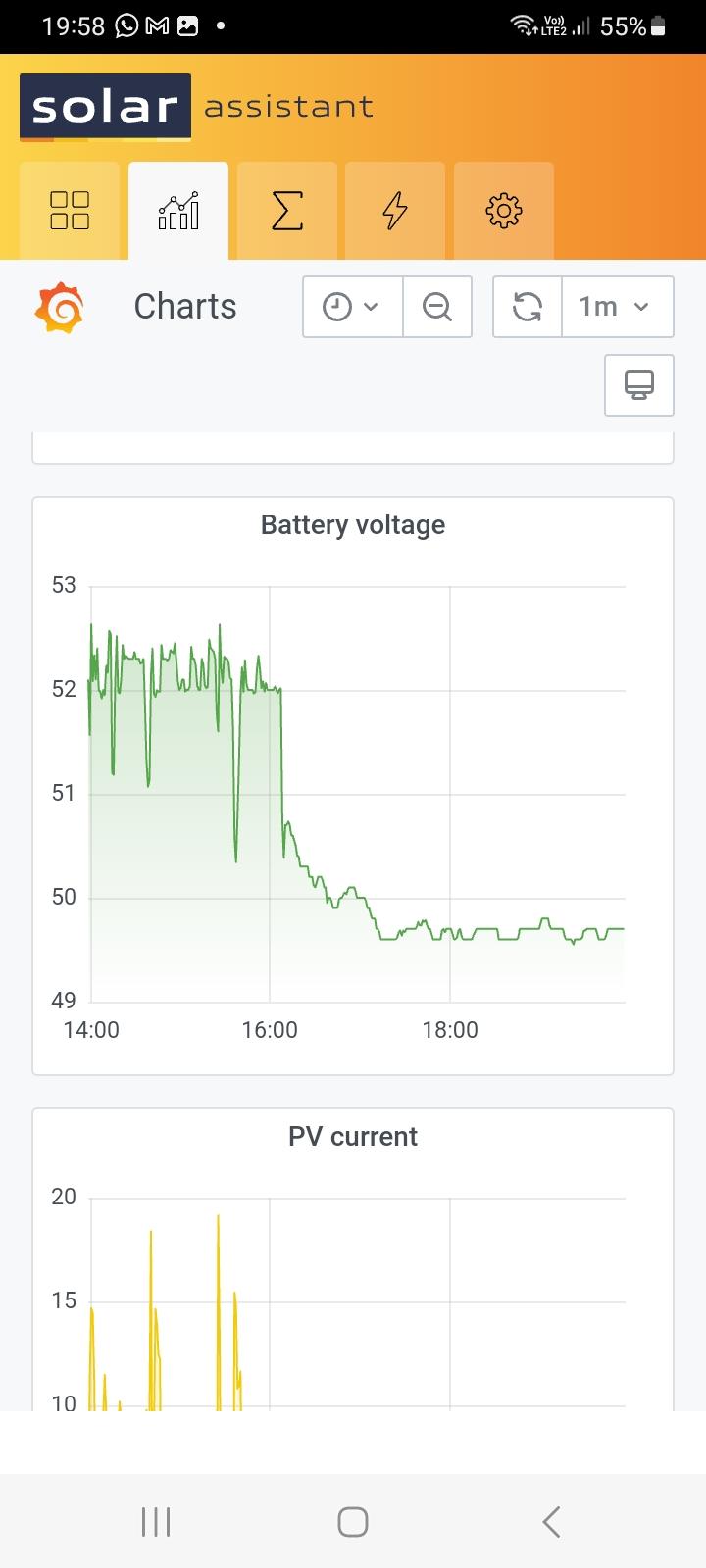
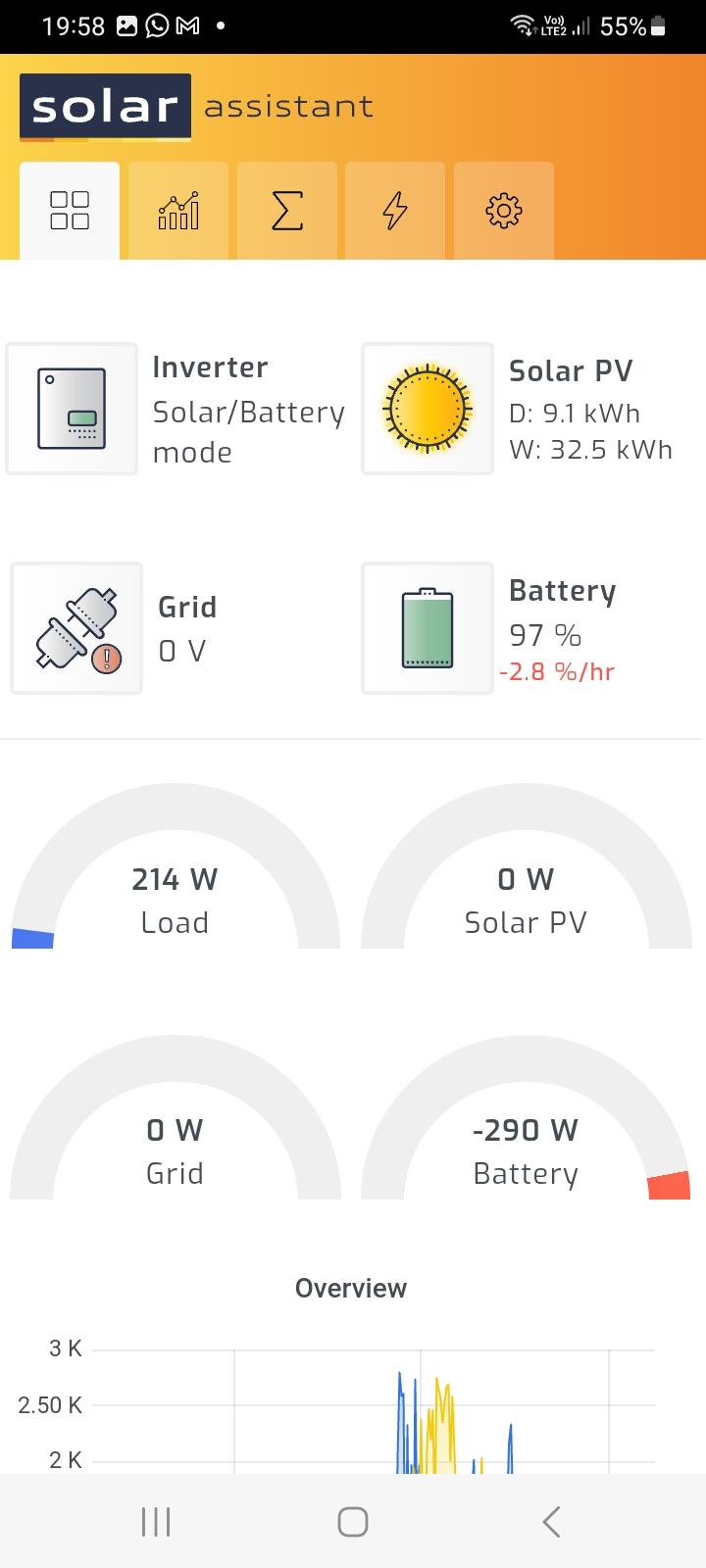
@Ockie OlivierThis is what my battery voltages is for the last 3 hours.This should give you a idea of what you can expect.You can see the voltage drop when the sun goes down. It is nearly 8pm and the batteries is 97% and 49.8v.


-
@Ockie OlivierThe Best is to measure the battery with a multimeter when the error starts. With setting 29 set to 46v the error 4 will start when the battery reaches 48v . This is to check if the Inverter or battery is faulty. Even if your battery is at 49v and should you boil a kettle and a fridge starts up the battery would be pulled down to 48v for a second and the error will start. The error will then stay until the battery gets to 50v before it will reset . I run 3 x Pylontech 3000 for nearly 5 years and this does happen to me sometimes as well. There is 2 ways to get rid of this . Set 29 a bit lower 45.5v or get @ Coulomb kettle comp software . The software alows for more voltage drop before error 4 starts . I believe set at 46v the error will then start at 47v . I will recommend that you adjust setting 13 to 51v and leave 12 at 48v .
-
@Ockie Olivier If you run the batteries on User setting 5 you must change setting no 26 to 52.5v and no 27 to 52.0 v. This is what most of us use . Charging the battery at 56.4v will damage your batteries
-
@Coulomb Thank you for your time to explain how the premature float bug affects charging of batteries. There is still something I wonder about. Pylontech batteries do not use a float setting in their Standard operating practice for Axpert inverters. Only bulk/absorb is selected. Will it affect the battery life if 26 and 27 is set the same voltage.
-
@andreasvanzyl this is the recommended settings from Svolt. Your is the 48v battery .

-
You can get the info from the battery display . Select analog info enter -Packv -press down until cell voltage . Pres enter -pres down 3 times see if it is 15 or 16 .
-
The resting voltage should be 3.4v per cell . 15 cell 51v . The inverter load can pull it down to 50v .
-
No firmware update is needed. Just change the charge settings on the inverter. How many OVP dit you have. My OVP warnings stop after I lowered the battery charging. I lowered the charge voltage just after installation because of OPV warning. The new recomendated voltages only came later .The battery cells stay within 10mv from 40 % SOC to 100% SOC.@TaliaB the SVolt BMS stops charging when the fullpack settings is reached. This does affects the SOC.
 @WannabeSolarSparky I have a 24v so 8cell. The balacing start at 3.45v that is why I assumed 3.5V would be OK. Thank you for the details.A good top balance will it be 3.5 V per cell.Thanks @TaliaB and @Scorp007 now I can also do ½ , 10⁰C and 18²I they should have the right specs in the box. This is the Product parameters
 Code 13 is a Warning indicator. Solar charger stops due to high PV voltage. Maximum voltage should be on the sticker on the side of the inverter. What PV voltage is displayed on the display panel.Recommended panel installation configuration for this inverter.
 The installation specifications : Max. PV Array voltage Open Circuit Voltage should never not be exceeded. If the voltage does exceed the max voltage your inverter is not safe. I would remove a panel as was suggested .I dont have the knowledge of the components of the inverter to give advise. If it was my installation and the voltage was within specifications I would swop the wires of the arrays to check if the inverter is faulty.Measures the voltage at the circuitbreaker supplying the MPPT. If the reading is to high the MPPT cannot bring it down. This overvoltage will damage the MPPT. It is normal for the voltage to rise to Open circuit voltage of the panels if the battery is full. No current is taken from the panels If the battery is full. When battery is charging current is draw and the voltage go down.The device does have a Device Restart Status that can be set.What do you have to do if the inverter is changed from a low voltage MPPT to the new high one voltage. Can the strings be changed from parallel to series at the combinerbox or do you rewire the lot.@Danie834 The BMS has a config page where you must select the Inverter brand connected to the S-volt battery. Was this done. You can also contact S-volt South Africa.
 Hi Danie I dont know the Max 8kW. I am using a old 5kW inverter. There is no Rs 485 cable to the battery. The battery settings of the Axpert is set on User. The charging settings is done on the inverter. I have set the Pack full charge voltage and pack fullcharge current setting on the BMS using the PbmsTools HS1.0.6 download. The battery charges normal and Amps taper off when full and stop charging. All this is controlled by the BMS .The display on the battery - BMS will display - Full. I have a 24v battery so use the specs I sent.The BMS will stop charging a minute or 2 after reaching the settings. Use the interface Definition for the Rs485 cable.
 The Axpert was installed 2015 and still growing.