Denarius
Members
-
Joined
-
Last visited
Everything posted by Denarius
-
Hi guys If I call the Axpert Max with the QPIGS command, the PV watts is the same as the inverter screen displays for MPPT 1 and is not the total MPPT. Does anyone know how to find the value of MPPT 2?
-
With ICC or SolarAssistant you will basically ignore the inverter state of charge and just look at what the app reports. It won't solve the charging issue, that should be charge voltage settings as mentioned. It will solve switching between battery/grid: https://solar-assistant.io/help/power_management/axpert
-
@TheoG I'm pretty sure the best monitoring for sunsynk is solar assistant. If you email them you can probably get a free trial (email at bottom of site). This page shows more or less what it looks like: https://solar-assistant.io/help/getting_started/remote_access
-
Hi @MrOccO I just want to confirm something, you mention that: RJ45 PIN 3 ------- DB9 PIN 2 RJ45 PIN 6 ------- DB9 PIN 3 Is that male or female DB9? Because PIN2 and PIN3 is swapped between male and female. It swaps the RX and TX of course.

-
This is actually a common issue with various PIs (2B, 3B+, 4, etc.):
-
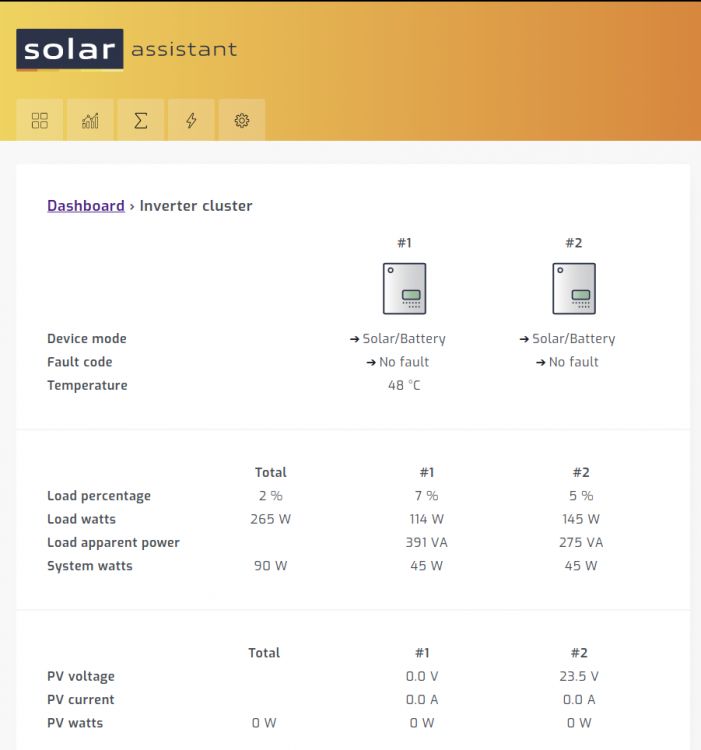
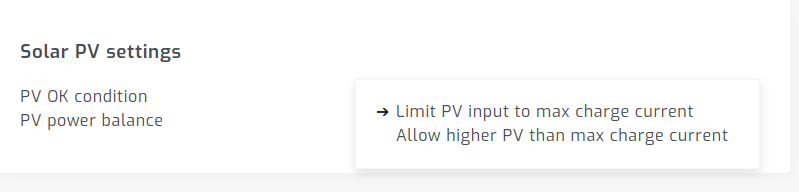
Hi Geoff Before I upgraded my firmware, I noticed the power balance setting slightly improves the situation: Then after upgrading the firmware as described in the topic below the error hasn't happened again. It seems the inverters try to squeeze less watts out of the MPPT but achieves more stability. My inverter brand is Full Circle Solar which is Voltronic. Are you also on firmware 71 82 or later? I also switched from ICC to solar assistant for monitoring, but I doubt that monitoring has an effect on inverter performance.
-
I'm going to try the MQTT feature when I have time. I'm running the HASSIO version of home assistant with a tasmota sensors. Will post some screenshots of what I find.
-
I've tried both. It's practically the same software. It's two partners that split up and each is now selling it separately. Since they split up, each have made their own changes to it.
-
You can thank me for that part. I use to be a Centurion Solar customer. I noticed the app hanging every 1 - 3 days. I wrote a script to detect that it hangs and then restart it. I emailed the script on to Centurion Solar. I then saw my script is included when they sell new devices.
-
Hi @Youda, I have a similar issue: I can read my Pylontech batteries via RS232/console. I can read other Lithium BMS batteries via RS485, but I can't read my Pylontechs via RS485, they simply don't respond. Did you ever manage to get a response from your Pylontechs on RS485?
-
For those that are already using the RS485 port for battery connection, has anyone tried the RS232/Wifi port? The protocol document does seem to mention it, also the solarman wifi data logger connects via this port.


-
The inverter reports SoC based on voltage and is designed for Lead not Lithium. Doesn't matter much as it doesn't do anything with SoC. All settings work on voltage. You mention it's charging. I assume the light is just flashing now and then. What is your bulk/float charge voltage setting?
-
Sorry for spamming this topic, but everyone here seems very knowledgable on the infinisolar V range. In South Africa we are not allowed to feed power into the grid, but you still want to use the grid feed function of this inverter to power your own loads so that you are not limited to 5kw. Is there a way to limit the feed to grid so that it only feeds enough for your own loads? On other inverters there is usually an external energy meter to tell the inverter to limit export power. Perhaps via USB commands?
-
@Bloubul7 Instead of using a Raspberry PI zero to read from the inverter, are you now considering connecting a Raspberry PI 4 via a USB to RS485 converter like the ones below? I assume the PI 4 then also runs home assistant where you show metrics/charts. If this is not your current plan. Do you see any issues with going this route? https://www.robotics.org.za/W17286?search=usb to rs485 https://www.robotics.org.za/RS485-MINI?search=usb to rs485
-
Hi @JacquesVDM, thank you for the clarification. I'm interested in developing something similar for my setup (pylontechs + axpert parallel) and I'm familiar with reading data from these devices. Once you have something you are willing and happy to share please feel free to do so 🙂
-
I see there is a big price and size difference between this inverter: https://voltronicpower.com/en-US/Product/Detail/InfiniSolar-2KW-5KW And these "V" range inverters where the V2 is the high voltage MPPT: https://voltronicpower.com/en-US/Product/Detail/InfiniSolar-V-II-1.5KW-2KW-3KW-5KW https://voltronicpower.com/en-US/Product/Detail/InfiniSolar-V-1K-5K Does anyone know the difference between the two ranges?


-
Hi @perg67, which USB to serial adapter are you using? I think normal serial is 12V while others are 3.3V: https://electronics.stackexchange.com/questions/274287/what-is-the-difference-between-rs-232-and-ttl-uart
-
What information is inport for you to see across all sites? What price site is acceptable?
-
Thank you for sharing your results. Although I can see the inverters is having a hard time handling that specific problem scenario, my problem is fixed because the output voltage remain stable. I've created my own software that I will probably make available for free. It runs an embedded grafana which is what you see in the screenshots. It runs on a Pi and in future I will probably have a closed beta if you are interested.
-
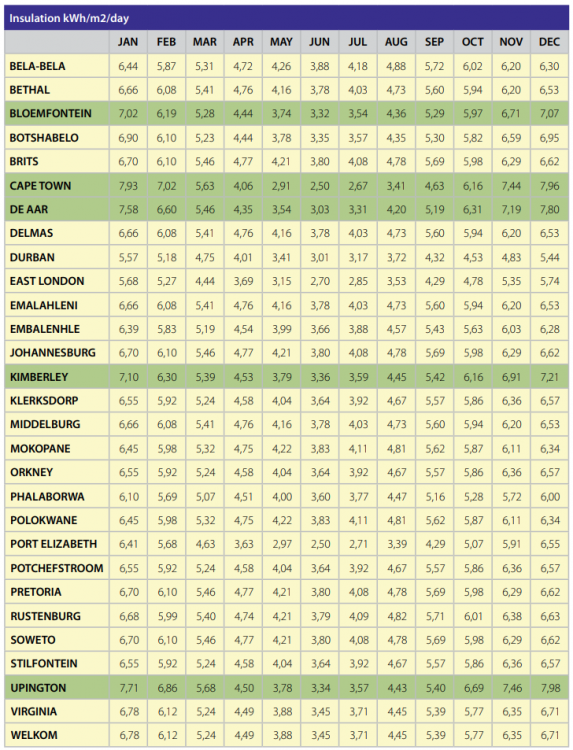
@Blowdart18 This table from geyserwise is pretty good as a reference for how much difference there is between the months. Don't mind what the actual value is in this table, just calculate the percentage relative to the best summer month, then do the math to predict what you will get in that month based on what you currently get. https://www.geyserwise.com/wp-content/uploads/2016/03/0207_PV-system-installation-manual_web.2016March09.pdf
-
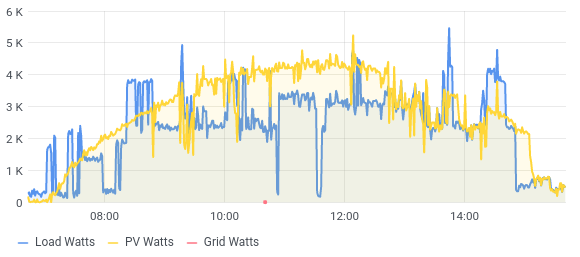
@Jaco P Bloem I have 9x 340W in serie per inverter. My PV voltage generally goes between 310V and 390V. What do you have? Feedback in terms of the upgrade: I can confirm that my problem has 90% been solved at the cost of 5% less PV generation. As far as I can tell the inverter now tries to squeze out less power from the panels, but is much more stable. The PV voltage doesn't have sudden drops and my AC out doesn't drop below 220V, where it previously dropped to 190V. There is another forum topic where a user also reported less PV generation when upgrading from 71.70 to 71.80. I've upgraded from 71.71 to 71.82. I think the big change came when going to the next major version 80. When looking at the chart below, pay attention to where the blue and yellow lines meet, at those points the voltage tended to become unstable and then the yellow and blue sticks to each other for larger periods by getting stuck in the unstable state. Before: After: At the one point just before 12pm I increased the load slightly on purpose to see what it does when PV generation and load is equal. It became slightly unstable but output voltage remained above 220V.

-
Yes it's the 450V models. I upgraded them a few hours ago so I don't know how they perform yet. I'm hoping it solves this issue.
-
I just upgraded my MKS II (yes the 450V MPPT) to 71.82. I wouldn't upgrade unless you have an issue. If you do have an issue, the supplier/installer should give you the latest firmware and provide support if something goes wrong. In my case my installer came to my house and did the upgrade with me. It's not that it's hard to do, but if something goes wrong it should be fixed as part of warranty. That is just my opinion and perhaps not industry tendency.
-
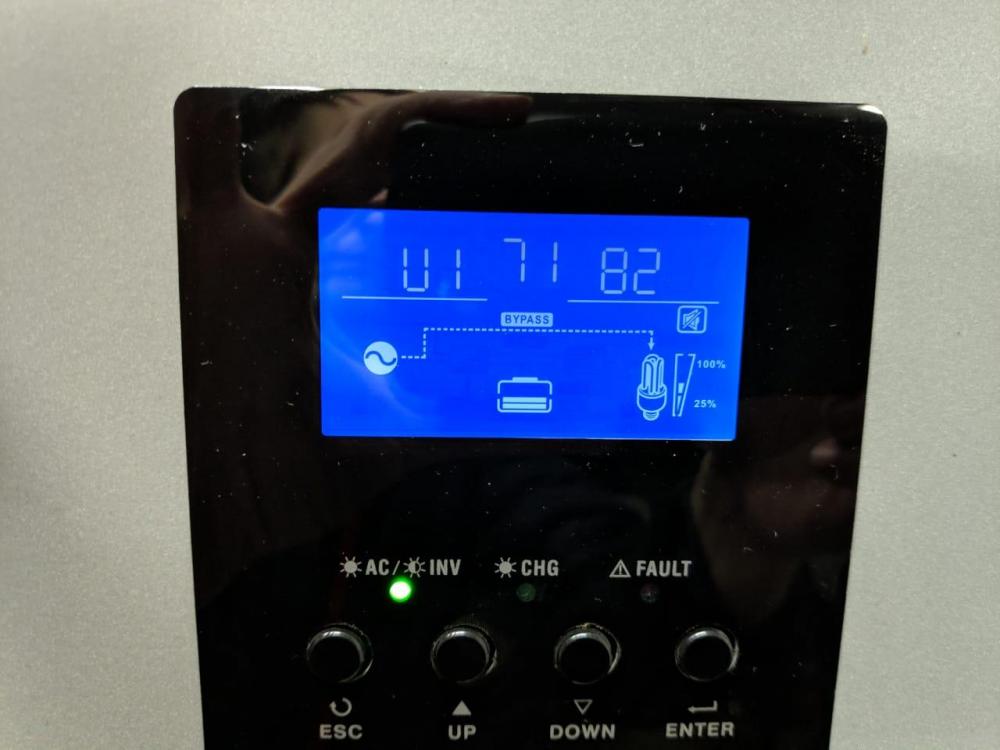
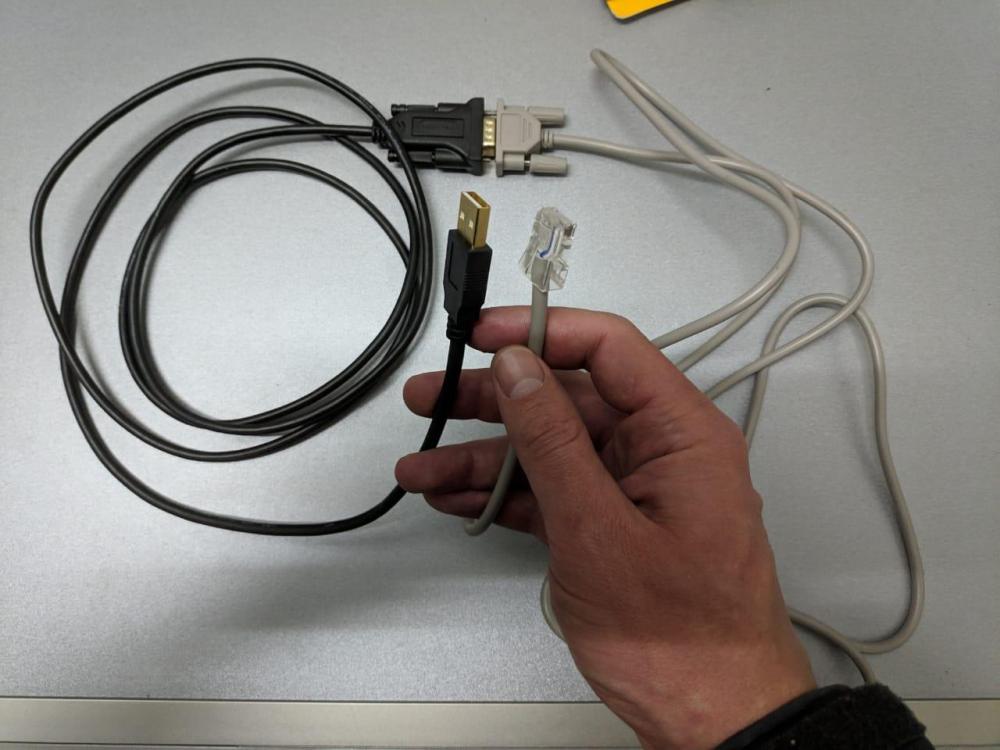
I've flashed my 2x Axpert MKS II inverters with the latest firmware (71.82). I've attached the firmware to this post for interest sake. Whatever you do with it is at your own risk. I used this cable and it worked the first time on both. Note this cable goes from your computer to the serial cable that came with the inverter (see picture): https://www.takealot.com/ce-link-usb-2-0-to-rs232-db9-serial-male-a-2m-cable/PLID51855970 The inverters remained connected via parallel cable during upgrade. I turned one on and the other off, which sets the one turned on to master. I then flashed the master. Did the same to the other one. Note sure if this process made any difference I'm just posting it anyway. Mostly followed the instructions from @Coulomb from this link. Didn't reset all settings with watchpower afterwards. Note files on this link should NOT be used with MKS II, the instruction is just the same: https://forums.aeva.asn.au/viewtopic.php?title=pip4048ms-inverter&p=64096&t=4332#p64096 Note it seems like the MKS II doesn't have SCC firmware to upgrade. On the inverter display I can see the inverter version (U1) but scrolling up or down doesn't show a SCC version (U2). MKS II Firmware 71 82.zip
-
I haven't read through this entire forum topic, but note other users reported Axpert king solar PV production issues were fixed with firmware upgrade: