


Denarius
Members
-
Joined
-
Last visited
Everything posted by Denarius
-
The Max software should be the same as the King software, it's pretty horrible. I think your real options are Riot and solar assistant. Since you have CAN comms between inverter and BMS, solar assistant will show battery SoC without a PI to battery cable. If you add the PI to battery cable then you get cycle counts, temperature, etc. https://solar-assistant.io/shop/products/hubble_am
-
That would be absolutely amazing thank you.
-
Hi @Coulomb. I have a battery that supports the new voltronic LIB protocol. I'm trying to read data from it. Does the firmware you posted somewhere contain the bytes the inverter sends to the BMS to query it? I've tried various things and haven't received a response from the BMS yet. Any help will be greatly appreciated.
-
Hi @Sc00bs Are there any settings required on the inverter to be able to read modbus via the Deye 8kW RS485 port? Currently I'm not getting a reply.
-
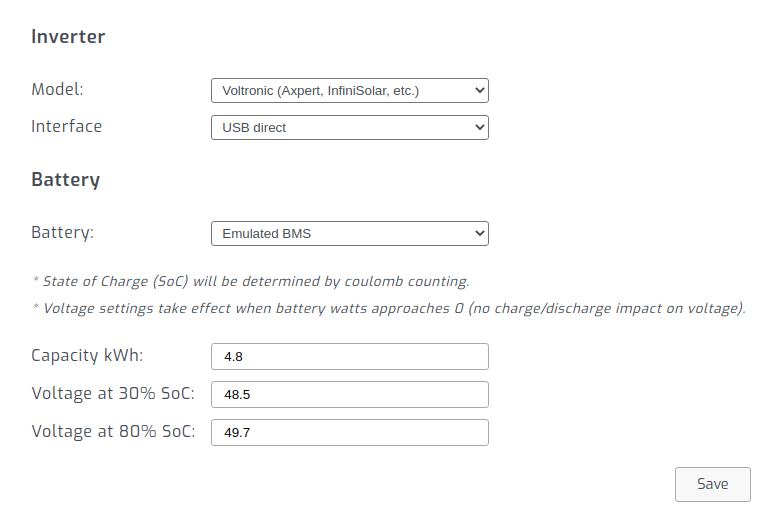
The "Emulated BMS" of solar assistant is basically a software based SoC, or a "software shunt". From the description you can see it does coulomb counting, which is the same as Victron BMV or Victron inverter, etc. It's less acurate because a BMV takes better measurements but generally I find it works fine.
-
Your case doesn't sound like the same issue. The issue discussed here is simply an inverter voltage warning. It sounds like your hit your battery low voltage cutoff. Are you using ICC or SolarAssistant?
-
Note JacquesVDM started the thread by saying it's not for a raspberry pi: ESP8266 is much cheaper than a Pi, but probably need a bit more skills to get working. The closest thing to this for a Raspberry Pi is probably solar assistant: https://solar-assistant.io
-
@isetech Home assistant will require it's own Pi and SD card. You run hass.io which is an operating system, you can't run Raspberry Pi Desktop or any other OS together with hass.io. There are technically ways that you can run home assistant without hass.io on Raspberry Pi Desktop, but if you are a new user it's probably not a good idea. Solar assistant is similar to home assistant meaning it's an operating system and not an application you run within Raspberry Pi Desktop. Both hass.io and Solar assistant is used as a network device, you don't plug in a screen, keyboard, mouse into it. I'm mentioning all of this because it sounds like you were expecting Raspberry Pi Desktop where you install home assistant and solar assistant, which is not true for either apps.
-
I do that with solar assistant https://solar-assistant.io/help/power-management/axpert
-
Hi Theo, can you confirm if solarman pro has real time data? It seems like solarman smart is not: https://play.google.com/store/apps/details?id=com.igen.xiaomaizhidian&hl=en_ZA&gl=US&showAllReviews=true

-
Slow intermittent data is not due to inverter, it's due to solarman monitoring device. There are other options that are real time up to the second, stores years of data on device and doesn't require internet to access it: https://solar-assistant.io
-
Being able to export solar must be awesome. My PV is reduced during the day because I can't export and don't have load to use it, then my chart looks like this:

-
If you have a battery comms cable from the Pi to the battery, then you can switch inverter mode based on the true SoC with software such as ICC or solar assistant. This page explains how it works: https://solar-assistant.io/help/power-management/axpert
-
I don't see such a setting in the manual and also don't see it listed in solar assistant:

-
Hi @Bloubul7, have you tried to read multiple SunSynk inverters that are connected in parallel via a single RS485 connection? Theoretically you should just be able to read the modbus address configured on each inverter, but I'm asking if you have tried it before.
-
Check your RS232 console port. If it looks like a phone line you have an A or B. If it looks like a network port you have C.
-
@Eddie R The problem that ICC hangs has been around for years as discussed in link below. The only solution I found was to use solar assistant instead of ICC. It's basically a drop in replacement for ICC, works with the inverters, batteries, cables, etc. but supports extra ones such as sunsynk, etc. https://solar-assistant.io/explore/axpert
-
It's already supported by solar assistant. I know a few users that are using it with SunSynk and Deye inverters. I switched from ICC last year. https://solar-assistant.io/
-
@R Cerva You can use solar assistant for Deye/SunSynk. As far as I know multisib doesn't support SunSynk. https://solar-assistant.io/
-
@coulomb Is this the case? Is there no way to read MPPT2 of the inverters not connected directly via USB?
-
Hi @cristimv It's possible to monitor the entire bank via a single cable into the master battery. I use solar assistant, what stats are you interested in monitoring? Then I can tell you if it's there or not. https://solar-assistant.io/
-
The original question of this thread is basically: give me something similar to ICC for SunSynk. One potential solution is solar assistant which provides real time monitoring and remote access: https://solar-assistant.io/ This is the options listed under the inverter: If I select "Use inverter values" for the battery and don't have any PI to battery cable, it reads the SoC, volts, amps, watts and temperature from the inverter:


-
I bought my Pylontechs due to the empiric evidence of this report a few years ago. Would love to see a South African battery dominate that report.
-
@GMeiburg I doubt you will be able to read inverter values when you are plugged into the battery. Everyone here is reading via the inverter RS485 port, but according to the documentation you should be able to read the data from the Wifi/RS232 port. So you probably want one of these (there are cheaper options): https://www.takealot.com/ugreen-usb2-0-m-to-db9-rs232-2m-cab-bk/PLID40361956 Or is your inverter Wifi and RS485 port already occupied?
-
Thank you @coulomb, that was exactly what I was looking for. Your knowledge of the internals of these inverters is amazing. (09.4 128.7 01213 I guess if you have multiple Axpert Max in parallel, you can only read the MPPT2 of inverter you are connected to.


