



CobusK
Members
-
Joined
-
Last visited
Everything posted by CobusK
-
With regards to the highlighted script, just compare with this diagram

-
Measure the voltage on ATS in the current state- Grid available. There should be 0V. If it measures 240V, then you must tick the Signal Island Option under Advanced Menu.

-
I think one realizes that the best (only?) solution would be a proper re-installation.
-
Wow, not very wise...
-
新-Deye Approved Battery list(DY-LV48-0073) (deyeinverter.com)

-
Yes, the Pylontech is compatible with Deye, thus always utilize the BMS communication. The BMS manages the battery system and communicates with the inverter. Why play around with voltages settings and risk voiding the warranty, when the solution is just as a click away?
-
Yes, this is the correct settings. Remember to power down the system before changing the Dip switch settings I apologize, I am slow 😆
-
Hi, refer to this thread : 2. The protocol as per your inverter UI shows BMS - Pylon protocol Just check your settings on "Time of Use' Your current settings keep your battery at 100% 24/7 and do not allow for back-up ( perhaps your requirement was to keep the batteries at 100% all the time and not use them for supply during the night)


-
Check the Battery settings as well.

-
Some settings on work mode: The Batt settings determine the SOC and will influence the charge requirements. When the PV is abundant, the inverter will automatically negate the GRID/GEN charge instructions. If you de-activate the TOU setting, you loose the management functionality.

-
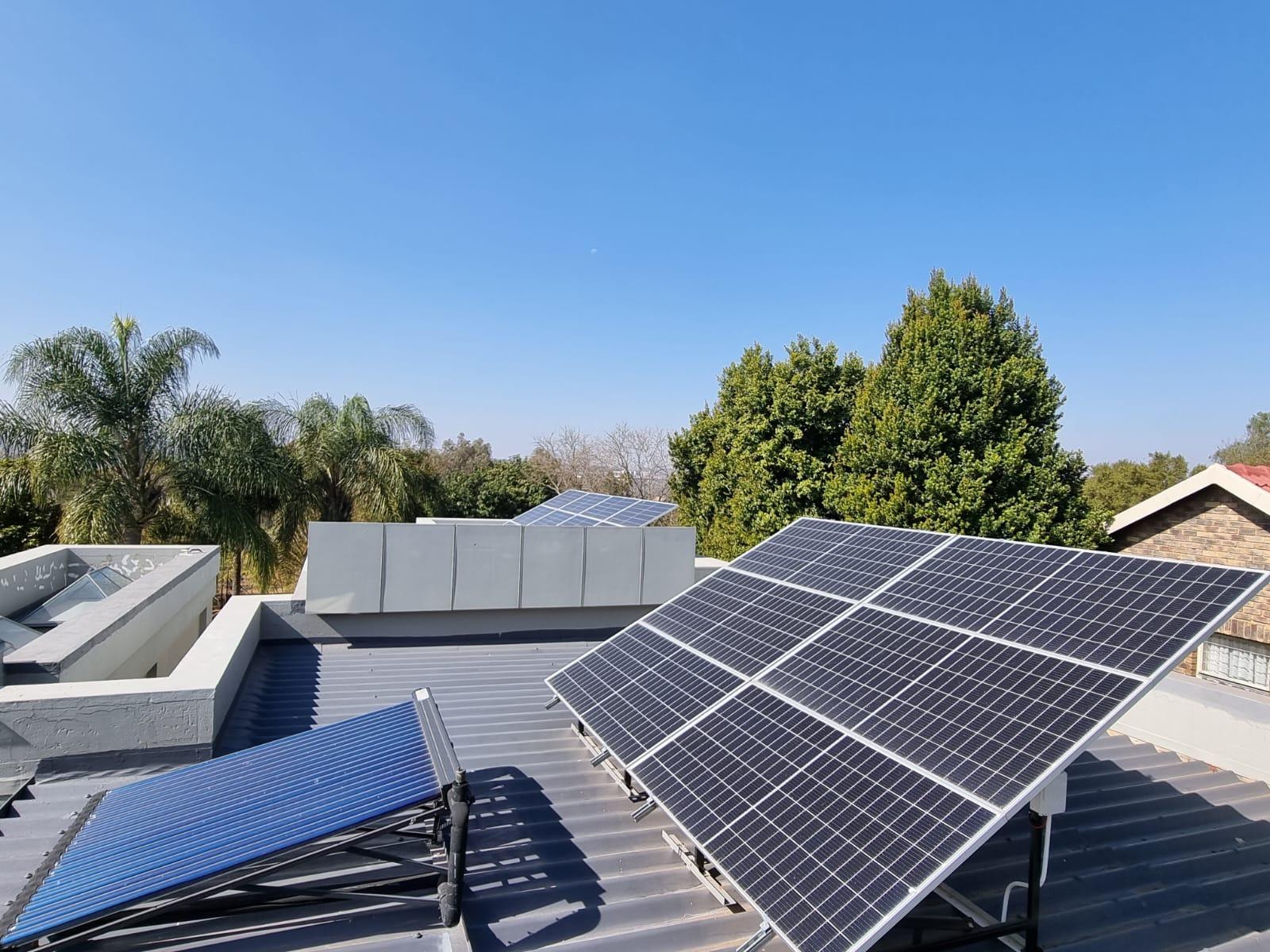
ATS Solar ITS 20 Tube Collector - ITS Solar
-
🙂 'holier than the Vatican'..... good one! Don't hesitate to re-inforce the roof structure with additional tie beams that are connected (bolted) to the current roof- and building structure, which would then serve to be the anchoring base for the panel structure. It is of utmost importance that the structure to which the panels will be adhered to, be properly designed, build and affixed in such a way, that the PV panels won't be considered as structural- or stressed members. In other words, stresses are not allowed to be applied to, or induced into a PV panel. Just as important is to mount the panels correctly as per specification of the manufacturer. All panels have specified mounting positions. They have been tested to withstand severe windstorms up to a certain windspeed-if installed correctly.
-
Would be interesting to see what the DEYE optimizer would do with the Deye inverter. I would think that it would seamlessly integrate with the inverter and that the communication protocols would solve some of the issues regarding voltage/power and PV panel control. 【B】单页 SUN-XL02-A (deyeinverter.com)
-
Hi, it needs an external NE bond.

-
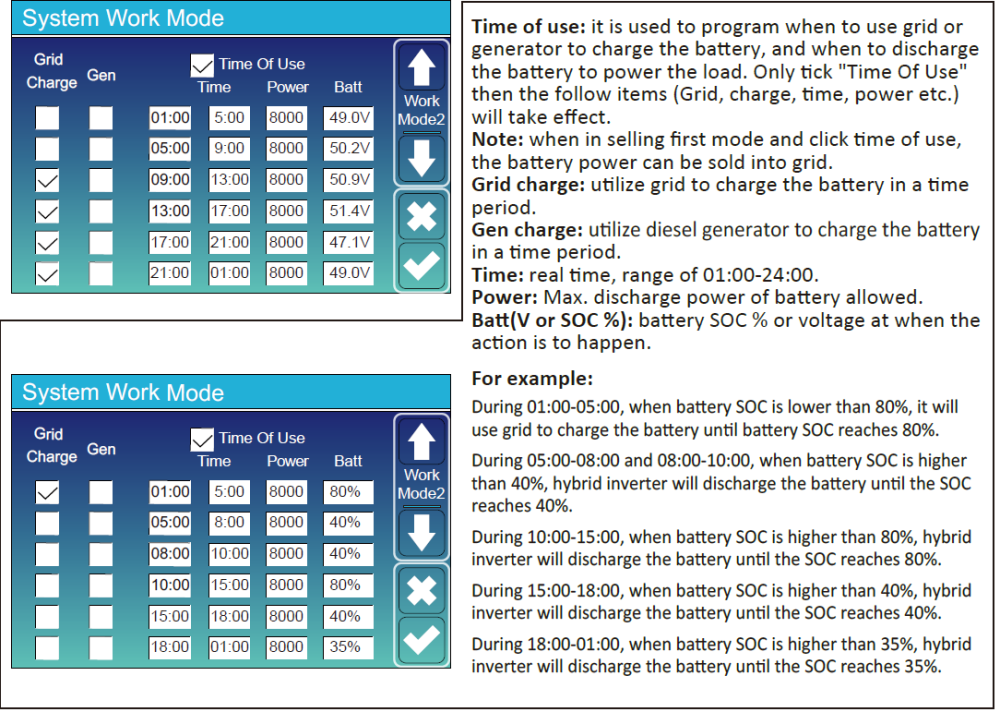
Good morning, these are the settings on your Deye inverter With regards to time of use, you select the GEN CHARGE tick box for the specific time period as determined by you. The inverter will manage the GEN as if it is the GRID that has been selected. Just keep the requirements for a proper connection of the signal cable to the GEN relay in mind.

-
Hi there, even at the home page you can see the different parameters

-
I had some repaired at UniRoss
-
Hi G, this option will help to recover a battery that's been discharged beyond it's lowest threshold by activating a slow charge mode from either the grid or PV. It is mainly for AGM, flooded or Gel batteries, not lithium. The BMS controls lithium.
-
Hi, untick the 'Activate' box and i would suggest to increase the charge and discharge values. The batt specifications suggest a charge/discharge value of 50A. You can thus safely increase the values to 150A for the 3 batteries. The BMS would manage the charging/ discharging amperages according to the parameters of the battery design and chemistry.

-
I have noticed that the TOU menu is not selected.
-
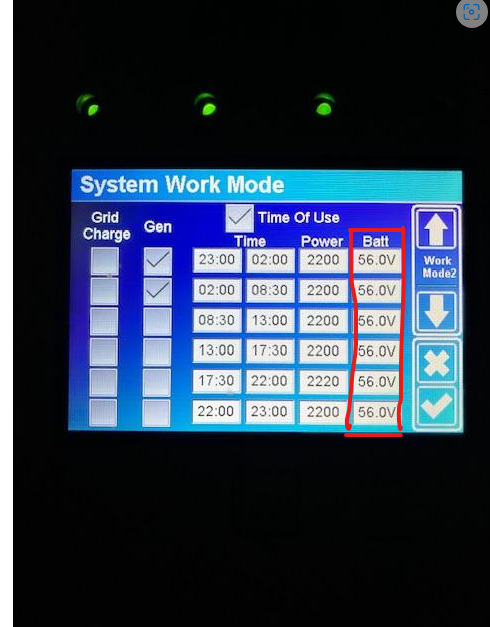
The "power' column is pinned down to 2Kw. So if and when the batteries power the system, this setting determine the max power that will be delivered by the batteries. Your question about why the inverter (8K) is drawing more power than the values programmed, is because the batteries are not being used due to the setting of 56V in all time slots.. The power value only comes into play when the batteries provide the backup. You are using only solar and grid and whatever the load demands, it will get.
-
Looking at the other TOU settings, your battery pack will never be fully charged as the Batt voltage parameters are set 49V for 24/7. You further more restrict batt performance by the values in your battery settings . Low batt is 44V, restart is 45V and DOD is 49V

-
Your 'Time of use' settings, indicate that your batteries are kept at 100% SOC 24/7 The Batt column dictates the batteries to be kept at 100% SOC or 56.0V. If you want to use the Voltage as reference, you must determine the volage at a specific DOD and change the parameter accordingly. I've found that using the % DOD more user friendly than voltage references. Compare your TOU to the example underneath

-
Yes, it is the Deye 16K. Herewith the data sheet p41 of the manual:

-
The specification indicates a design value of 370V DC as the target value (per MPPT) that can safely fluctuate up to 425V with maximum input as 500V. I would stay in the 370 to 420V range, keeping in mind the input current of 26A and the maximimum power of 20.8 Kw.


