TonyH
Members
-
Joined
-
Last visited
Everything posted by TonyH
-
There is a lot of confusion. I belong to a Body Corporate which is ESKOM's customer. I am not a customer. The SSEG registration is for an existing ESKOM customer or a new ESKOM customer. The municipality in the area is no help.
-
https://ecasa.co.za/technical/neutral-earth-bonding-clarified/ Here are the clear regulations. A bonding relay is required in islanding mode. The Neutral output from the inverter is pulled down to earth through the relay to an earth spike. People who say that the relay can fail forget that the eskom earth cable can be stolen or disconnected for some reason. The earth bond installation at your inverter must be according to regulations that is the installers responsibility. The Eskom earth is eskom's responsibility.
-
Here is a solution:

-
The battery 48VDC is converted to 220VAC by the inverter. The 220VAC Neutral on the output is isolated from the Grid during islanding. Normally the neutral is connected to earth in the substation. That is why the neutral floats in reference to earth. Hence anti islanding needs to be installed to pull the neutral down to earth potential.
-
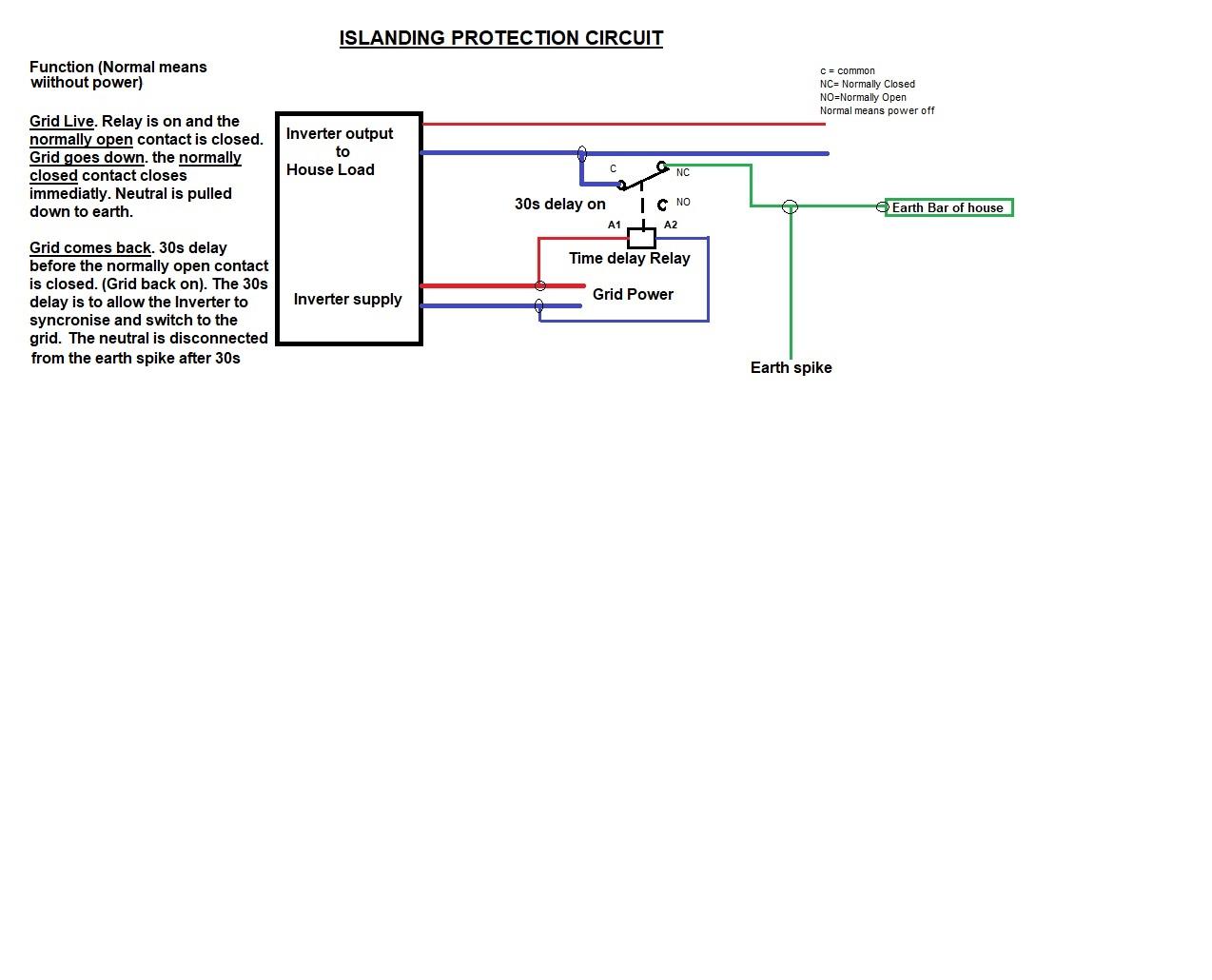
South African regulations forbid connecting the Inverter output neutral to the earth permanently. No power generator may connect the output neutral to ESKOM neutral permanently. Some inverters like Sunsynk have terminals that can drive a relay when on islanding mode. The relay then connects the Inverter output neutral to an earth spike and house earth. Other inverters connect the inverter output neutral to earth internally. The manuals should provide that information. If an inverter doesn't have terminals to drive a relay or internal neutral bonding then a relay can be installed as shown below.

-
Anti Islanding to ground the neutral when the grid fails or is off. If the Inverter you have doesn't have a contact that gives 220VAC when the grid falls away one can use the normally Closed contact with the live connected. A time delay on relay should be used to allow the inverter to synchronise. Each inverter is different in the time it takes to switch back to the grid after the grid powers up.

-
If you have a Sunsynk inverter use the aux output to charge your geyser as soon as the batteries SOC is 100%. This is a great way to get your thirsty geyser away from the rest of the house. On bad days it is simple to switch on the aux and use the grid. Remember to put in a EL and double pole isolator.
-
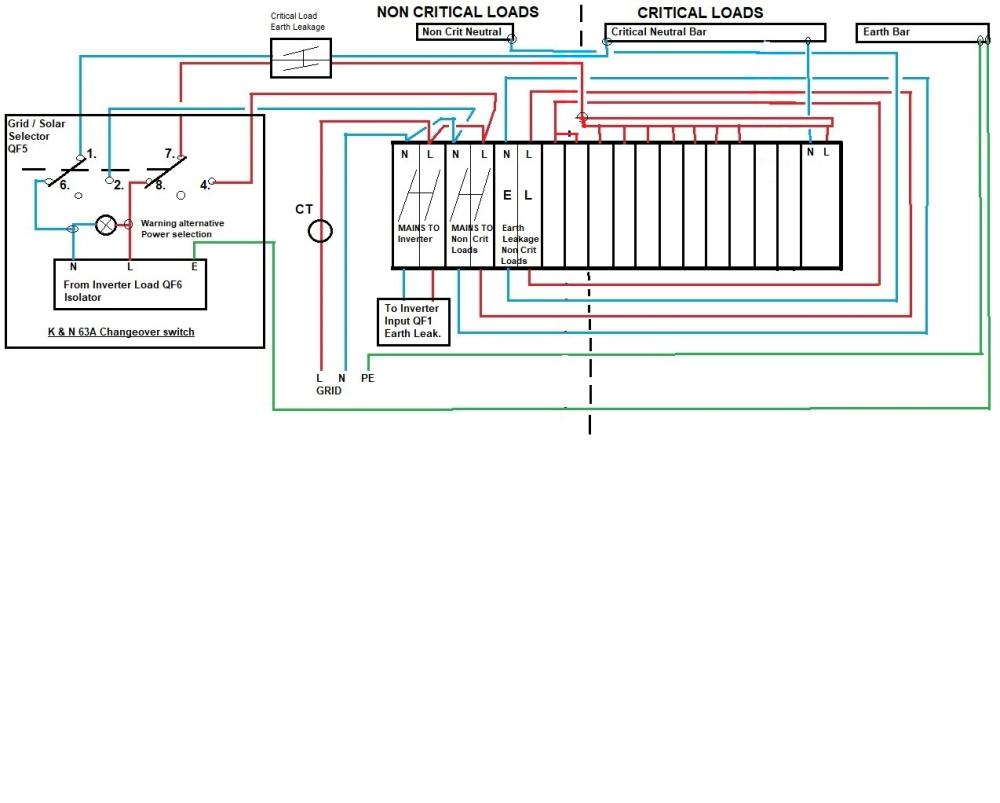
Hi, here is my as build

-
I suspect that there were no comms. When you connect try the CAN BUS comms port. If it is working you will see it on the LI BMS selection.
-
Hi, the SunsynK inverter has an Aux output which you can use to charge the geyser after the batteries are 100% SOC. Remember to put an earth leakage into the circuit to the geyser. This is useful if the batteries do reach 100% SOC around the middle of the day.
-
Have you got comms? The comms are usually setup for CAN BUS and the cable put into the CAN bus input.
-
Hi, I had the same problem. I had connected the comms cable to the 485 input instead of the CAN Bus input.
-
I have used he auxiliary to heat the geyser for a year with no problems.
-
Hi, the Sunsynk inverter has a table that will ensure that the SOC never goes below the level at any specified times.
-
Hi, are you aware that the auxiliary can be used to charge your geyser when the batteries are 100%. It works very well. Just remember to place an earth leakage as well as an isolator for safety reasons. It is very easy to heat the geyser from the gril in rainy or overcast weather if you need to.
-
Hi, on the grid side of the inverter the Neutral is always bonded to earth at the substation. It is illegal to bond the neutral to earth on the input or grid side as this may cause an earth loop. If you have a newer version of the Deye Hybrid the ATS output must drive the anti islanding relay. The normally open contact of the relay should be connected to the earth spike. The common must be connected to the ups neutral output of the inverter. This will ensure that the neutral is pulled to ground potential at the earth spike when the ATS energises the relay. If you have an older model of the Deye without an ATS output I suggest that you look at the drawing that I have attached. The Deye takes 60s before it switches off the Island mode when the grid comes on. My anti islanding drawing is for a different inverter that takes 30s to sync. Just change the time delay on the relay to 60s. The nuisance trip can be a number of things. A faulty Earth leakage could cause it. Can you show me a rough drawing of how your ups output is connected to your home? I am assuming that you are in South Africa where the earth is bonded to neutral at the substation. Regards

-
I took the earths of the panels to the earth spike.
-
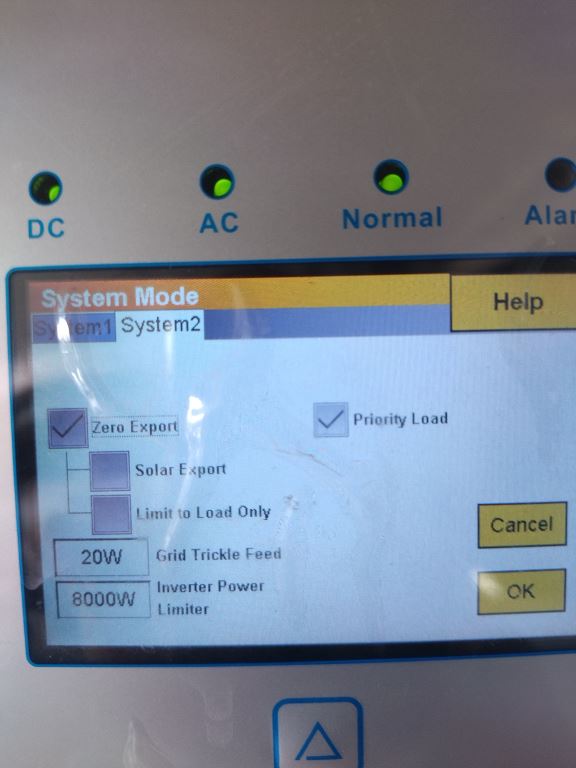
Hi, the CT is critical and must be installed correctly. Untick solar export and set "Grid Trickle Feed" to 20W. This prevents exporting. If you are going to use the Aux later, set up for Aux and untick "On grid always on". This setting allows one to use the grid through the Aux when solar power is low. The way the table is set up the battery SOC will never go below 50%. The way I have set up and tested my table is the grid supplies whenever the battery is below the SOC values I have set. 8kW Sunsynk Inverter 10 390W panels. 5 East and 5 West. 2 x Hubble AM2 batteries


-
Hi, it is easy to make twisted pair. Buy 5 m of 0.5mm two or three core and strip it. Use a speed control dril to wind up two individual wires. The trick is to keep the two wires not attached to the drill free to allow the two wires to unwind as the drill turns slowly under tension. Make sure that you keep the direction of the twist on the original wires. The CT is showing 19W probably because you are not exporting and the minimum is set to allow for 20W to prevent export. It appears that the inverter needs an update because the other readings just don't add up. Contact Sunsynk and ask them to do an update for you. 8kV Sunsynk Inverter 10 x 390W panels East and West (5 each) 2 x Hubble AM2 batteries.
-
It is normal that the solar panels show little production when the batteries are charged. The only power that will be generated is the power that the house is using and the loses. As soon as the load is increased the solar output will increase. This is why it is a good idea to use the auxiliary output to charge the geyser as soon as the batteries are 100% SOC. This is a great feature of the Sunsynk inverter.
-
It is very important that you install the CT. If you extend the CT cable make sure that you twist them in the same direction as the original wire. If you don't twist the cables you will get interference which may affect your CT readings. Make sure that the arrow on the CT points to the inverter.
-
This was drawn with Microsoft paint. It is quite laborious but I had the time.
-
Hi, what inverter are you using and how much battery storage do you have? It is essential to know this so that we can help. Regards
-
Hi, Sorry i didn't read correctly. I was referring to a hybrid on grid installation. If you are off the grid there is no Eskom neutral to bond to. There is also permanent islanding so no islanding protection is needed. Regards
-
Yes I heat up my geyser exclusively on the AUX output. I have setup the Aux as an output. When the battery is 100% SOC the AUX switches on and at 96% SOC it switches off.