Sidewinder
Members
-
Joined
-
Last visited
-
-
Thanks @-cK- , the updated download open successfully. Will connect to my bank to check functionality.
-
Same here, downloads fine, extraction creates directory structure, but app does nothing. Something is amiss. Anybody else with the same?
-
66
-
-
-
@waynehooper , Either battery should be fine, most (LFP) batteries, irrespective of what BMS they have inside, will work with SS/Deye. However, I suspect with your 8 x ?(say 550W) panels, you don't have close to enough PV to recharge a 16kWh battery - depending on your base load/daily load and depth of discharge. Even with sufficient PV, personally, I would not charge above 60A (20A per 5kWh) in any case, to ensure longevity. LFP likes to be cycled, in order for the BMS to trigger a SOC calibration, otherwise you may suffer from "SOC creep". So charging the battery close to 100% is advisable. If ever I need to replace my batteries, I would also considering going your route. Uses much less space, less cabling etc.
-
@PearlJam , If you are a bit OCD and like non electrical DIY , why don't you just ignore the dongle and spend on rather installing a proper management system e.g https://smarthomeintegrations.co.za/ If you go this route, just don't get the V5 version, at this new version requires that faulty RS232 port to work. V4 will work best. PS, if you have such a management system, you really only need to use the dongle to upgrade your firmware. And you know the classic saying: "If it ain't broke...." I have disconnected my dongle 4 years ago, as I don't like the idea of sending all my data to a Data Centre who know where, and what they can do with my info, so I keep all my data (stats) at home. Takes a bit of effort to get it all working, but well worth it in the end. Hope this helps you with your current issue. PPS. You will need to have a HA server to do this method. Plenty of YT videos on how to install etc.
-
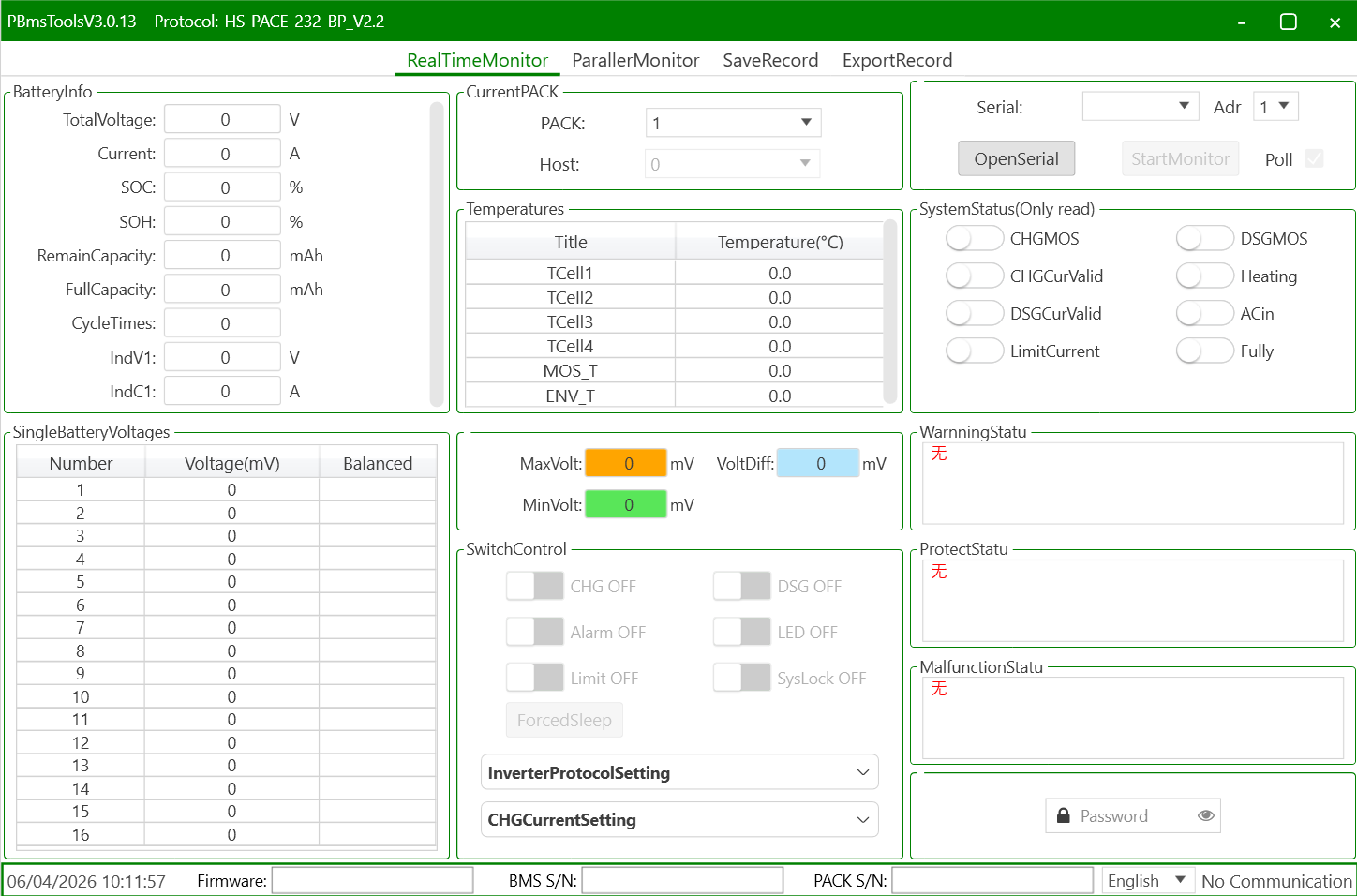
@George Christian , You would need a Serial (RS232 - with a RJ11 connector) to USB cable, like this one https://solar-assistant.io/shop/products/pace_rs232 Then download and install PBMSTools. Note that there are plenty of versions out there. Some work with RS232 only, some only RS485, and some even both. But this version should work fine.

-
-
@frivan , If your geyserwise main unit is located within wifi range (should be, as it is installed in a convenient place), (next to the DB, typically), then I would just equip it with a Geyserwala unit. It's an easy DIY upgrade, and then allows one to control your geyser remotely, or via Home Assistant, if you want more automation capabilities. BTW, is the relay on the R3 able to handle a geyser? I thought it has a 10A relay.
-
@BronCo , It might be useful to indicate the town/region you're in. Hint, just update your profile!
-
@TiredTractor , Only saw your port now. Getting a Pi for SA & another Pi for HA is like your are paying twice for one thing. I no longer use SA, due to the lack of battery data available, despite having a cable connected. My solution was to go with the smartdeyedongle, and run HA on RPi/PC. But you need to factor in, because you have 3 x inverters, you are going to need 3 x dongles. (1 for each inverter, irrespective if they are in parallel of 3 phase) Either way, if you go/went for SA, you will also need 3 x SA cables @ +-R600 a pop. So question is, a) do you want to control more than just your geyser. What about A/C, pool pump, gate motor etc. b) Are you a bit OCD for statistics?, c) and like to view things differently? If yes to all, then go the HA route. SA gives a nice view of things, but the fact that the graphs are not configurable, is a downer for me, + the lack of battery cell info.
-
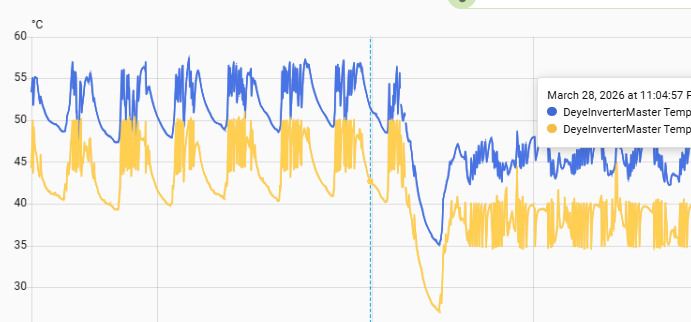
@TaliaB , Thanks you for the detail explanation and calcs, as this saves me from retyping the numbers that substantially matches your's! I concur that in moderate low temps (up to 0 deg C), there is still some small margin left to play with and the mentioned config should work as planned (i.e. max overpanneling). In parts of our country e.g. Sutherland, I would be a little nervous, but maybe that's just me. What I would like to see is if anybody does experience Amps clipping regularly, what the AC & DC temps do in that case. In my (limited) experimentation, I've experiences lower temps when I work the inverter harder, specially via PV. What I would insist on (for my own installation), is additional cooling fan, if clipping does occur, as my 3 x extra computer fans lowers both AC & DC temps by approx. 10 Deg C.
-
-
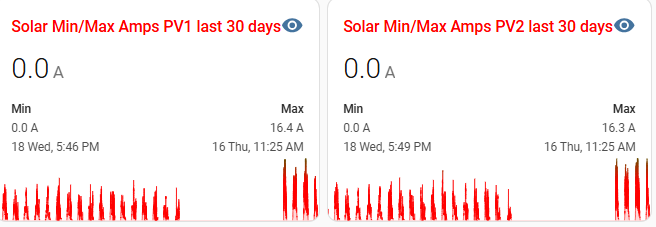
@TaliaB Just want to check my logic on your suggestion of MPPT1: • 9 × 550W North • 9 × 550W West MPPT2: • 7 × 610W East Even though the 2 strings on MPPT1 is pointing in 2 different directions, for most of the day (sun up high) they will each produce close to maximum Imp of 13.15A. Paralleling them will mean they go to 26.3 A total, way above the 22 A a 8kW can handle. So that will only result in a lot of clipping to 22A. Also, 9 x 550W PV will generate up to 480V DC (in winter, allowed for temps down to -5), way above the efficient MPPT voltage top end of 450V. To me that may be sailing a bit too close to the wind (or sun in this case!). I have more or less the same scenario, but as my system is old, and when the 8kW came out, it had a 18A limit, so i chose 365W PV, to give me max. 18A. I've upgraded F/W , supposedly to get the 22A limit, but them again, I've never seem close to 18A ever. Had a quick look at my stats, and see that my PV1 = 8 x 365 x 2 (both north) and PV2 (8 x 365 North + 8 x 365 West), and they are maxing out at the same Amps. So if I extrapolate my experience of getting 16.4A (actual) vs 18A (theoretical), the 2 x 550W String should max out to about 26.3 * 16.4 / 18 = 24A.....So hopefully the MPPT's can handle that clipping long term. Maybe one day I will swop out my PV2 with 2 x 8 x 545 PV, but that is a schlep with new COC's, permissions etc,. Hopefully I'll get incentivised to do this, sooner than later as I see an EV being part of my long term future.
-
Just set your batteries to 20%, just ensure your PV is enough to fully recharge your batteries the next day. You may need to increase your charging rate to achieve this, risking that you may run out of PV, specially on low sun days. So long before I would add batteries, I would just add more PV to the max.
-
 Sidewinder reacted to a post in a topic:
Power4Less Omnivolt G2 Hybrid Inverter (Details and Review)
Sidewinder reacted to a post in a topic:
Power4Less Omnivolt G2 Hybrid Inverter (Details and Review)
-
-
In the words of @Coulomb , "You've got a clone". Not sure if a solution is at hand for this.
-
-
Back to topic.... Form what I can read from solar assistant is that one cannot "read" the Shoto (assumption here is that it uses a Seplos BMS, as per solar-assistant.io This is due to the fact that the dip switch needs to be set to CAN mode, for comms to the inverter, so disabling 3rd party access. If you really ant to get info out of the batteries, then set it up as RS485, remove the inverter comms cable and set the inverter up with normal (as in lead acid type battery) Just populate the relevant values e.g. bulk/float etc from the batterie's spec sheet. You would need a new USB to RS485 cable and a computer (e.g. Raspberry Pi) to ingest the battery data. SA can do the volts, SOC & temps of the batteries, but little else. There is a HA integration for Seplos BMS's under HACS, but to me it seems to require that the BMS has Bluetooth, AND it will give you even less info than SA. Hopefully one day some clever guys can solve this.
-
Virwat reacted to a post in a topic:
How to measure SOC individually on a bank of 4 batteries with a Sunsynk inverter
-
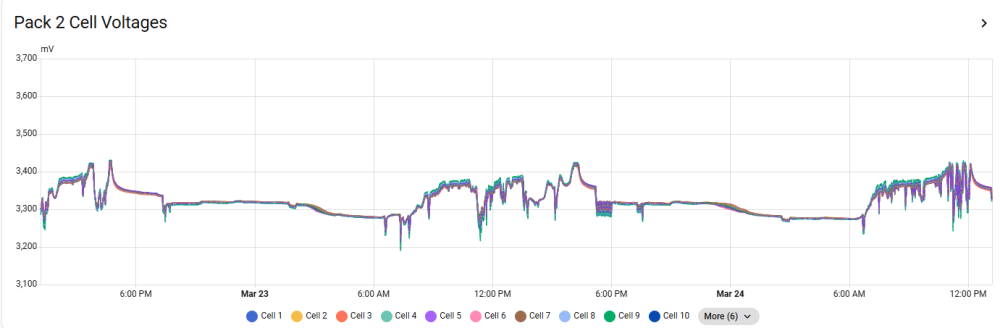
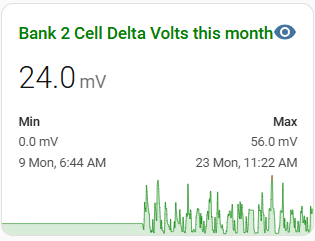
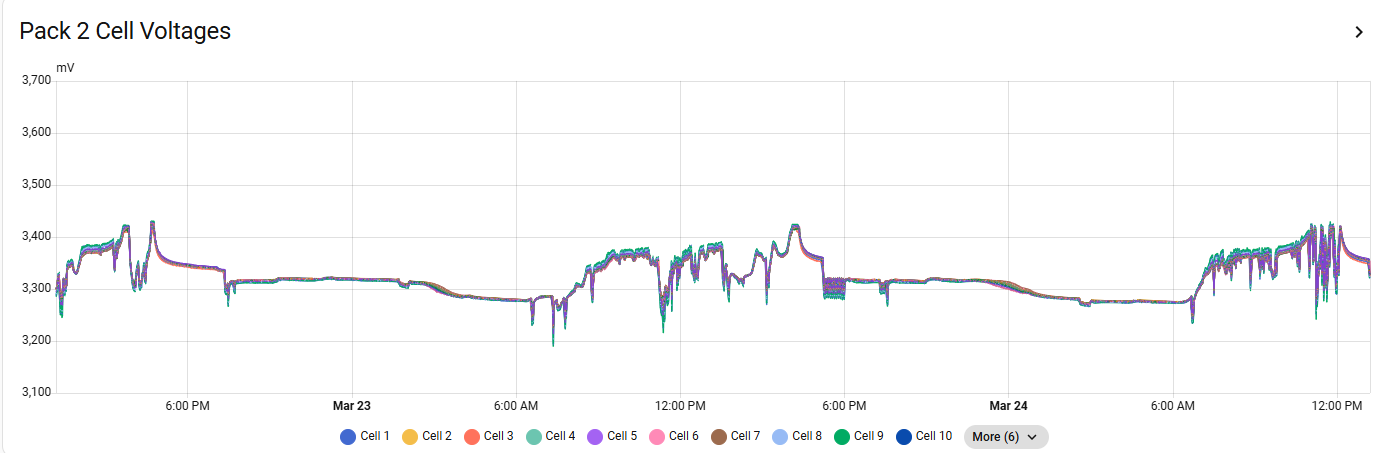
Solar Assistant has it's place, but detail multi battery analysis is not one of them. They can give you individual battery SOC's, temps, volts etc, but struggles to give detail. One of the most important metric's is the individual cell voltages, as well as the delta cell voltage per battery. I, like @-cK- , use the Home Assistant method, so I can observe my batteries. Cell voltages like this: This way, you can actually "see" when a cell sag's/lag's during a charge/discharge cycle. Because this graph tells me when the max. was achieved, I can at least attempt to retrace to see if anything extra ordinary has triggered such an occurrence.