


system32
Members
-
Joined
-
Last visited
Everything posted by system32
-
The SoC displayed by SA/pbmstools is directly from the BMS Do the batteries have the same firmware?
-
Thanks. Also enable grid charge: This will cause the inverter to charge the battery from grid after load shedding if the SoC dropped below 20%. Also:


-
@David-OLW I would use a higher value on System Mode 1 SOC/V than Shutdown, something like this: This means the switch to grid happens at 20% SoC You have 13% (20-7%) reserve for load shedding. In my case that's about 3+ hours as our load shedding is ~2h long. The above values is what I use. EDIT: Not sure if "Low Batt" sounds an alarm or stops using battery for load. The documentation says: "Inverter low battery warning" whereas Solar-Assistant says: "Stop battery discharge"


-
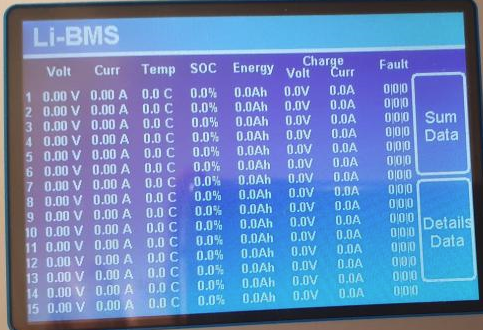
Without inverter/battery communications the inverter won't know the charge parameters / SoC of the battery and will rely on voltages. LiBMS shows the battery values - if get the below, then communications is not working: You need a "canbus" cable to connect the Canbus port on the Inverter to the canbus port on the first battery A normally a Ethernet RJ45 cable should do the trick. Ensure the batteries are linked to each other and battery ID's are correctly set. You should be able to see the LiBMS screen show the battery status.
-
-
I've developed some python code that displays BMS data read via USB-RS485/modbus See https://github.com/mysystem32/hubble_lithium_am2 https://powerforum.co.za/topic/14845-hubble-am2-monitoring/ If you have Home Assistant, the readings be fed to HA.


-
PBMStools (download from thesunpays) with a USB-RS232 RJ11 cable (same cable as Solar-Assistant) displays a lot of information:

-
If you have grid, once load shedding over, it's cheaper to charge the battery from grid
-
With inverters you sometimes need a neutral / earth bond to prevent "floating" output. The "bond" is sometimes built into the inverter and sometimes it's an external device that bonds earth and neutral when in island mode. I suspect this is the same with Generators. When running on generator - measure the voltage between: Neutral-Live ~230V Live-Earth ~230V Neutral-Earth ~0V
-
It does work with more than one battery, you need a "splitter" to connect the RS485 multiple to the computer OR use multiple RS458/modbus dongles Something like this: or make your own by joining a bunch of Ethernet cables: To read a bank: instrument = minimalmodbus.Instrument(port="/dev/ttyUSB1", slaveaddress=1, debug=False, close_port_after_each_call=True) instrument.serial.baudrate = 9600 print(f"modbus serial instrument={instrument}") # 4 packs in the bank, create AM2_Pack object for each one bank={} for addr in (1,2,3,4): bank[addr]=AM2_Pack(instrument, station_address=addr) # read the bank every 60 seconds while True: for addr in (1,2,3,4): print(f"{time.strftime('%F %T')}: reading pack addr={addr}") pack = bank[addr] pack.read_pack() topic = f"hubble_am2/battery/pack_{addr}/state" payload = json.dumps(dict(pack)) print(f"topic={topic}, payload={payload}") time.sleep(60) I'll be upload some code to github that does the above, read bank and publish to mqtt
-
Please see: https://powerforum.co.za/topic/14845-hubble-am2-monitoring/ For code that reads the AM2 BMS.
-
Reserved for updates: Integration to Home Assistant

-
Hubble Lithium AM2 BMS modbus RS485 reader Python 3 module that provides read access to Hubble Lithium AM2 battery BMS via RS485/modbus. See Hubble Lithium website for more information on Hubble Lithium AM2 batteries. Uses the minimalmodbus for communications DISCLAIMER: Use at your own risk! Access is read only so no issues are expected. See https://github.com/mysystem32/hubble_lithium_am2 Example output: ads@solar-assistant:~/hubble_lithium_am2/examples $ python3 print_iter.py modbus serial instrument=minimalmodbus.Instrument<id=0x766f8e50, address=1, mode=rtu, close_port_after_each_call=True, precalculate_read_size=True, clear_buffers_before_each_transaction=True, handle_local_echo=False, debug=False, serial=Serial<id=0x76643c90, open=False>(port='/dev/ttyUSB1', baudrate=9600, bytesize=8, parity='N', stopbits=1, timeout=0.05, xonxoff=False, rtscts=False, dsrdtr=False)> Reading AM2 registers... { 0 : {'name': 'Current', 'register_scaled': -5.59, 'unit': 'A'}, 1 : {'name': 'Voltage', 'register_scaled': 49.07, 'unit': 'V'}, 2 : {'name': 'SoC', 'register_scaled': 70, 'unit': '%'}, 3 : {'name': 'SoH', 'register_scaled': 100, 'unit': '%'}, 4 : {'name': 'Capacity_Remain', 'register_scaled': 74.11, 'unit': 'Ah'}, 5 : {'name': 'Capacity_Full', 'register_scaled': 105.0, 'unit': 'Ah'}, 7 : {'name': 'Cycles', 'register_scaled': 492, 'unit': 'int'}, 15 : {'name': 'Vcell_01', 'register_scaled': 3.775, 'unit': 'V'}, 16 : {'name': 'Vcell_02', 'register_scaled': 3.765, 'unit': 'V'}, 17 : {'name': 'Vcell_03', 'register_scaled': 3.774, 'unit': 'V'}, 18 : {'name': 'Vcell_04', 'register_scaled': 3.76, 'unit': 'V'}, 19 : {'name': 'Vcell_05', 'register_scaled': 3.761, 'unit': 'V'}, 20 : {'name': 'Vcell_06', 'register_scaled': 3.777, 'unit': 'V'}, 21 : {'name': 'Vcell_07', 'register_scaled': 3.789, 'unit': 'V'}, 22 : {'name': 'Vcell_08', 'register_scaled': 3.792, 'unit': 'V'}, 23 : {'name': 'Vcell_09', 'register_scaled': 3.765, 'unit': 'V'}, 24 : {'name': 'Vcell_10', 'register_scaled': 3.749, 'unit': 'V'}, 25 : {'name': 'Vcell_11', 'register_scaled': 3.782, 'unit': 'V'}, 26 : {'name': 'Vcell_12', 'register_scaled': 3.753, 'unit': 'V'}, 27 : {'name': 'Vcell_13', 'register_scaled': 3.786, 'unit': 'V'}, 31 : {'name': 'Tcell_1', 'register_scaled': 22.6, 'unit': '°C'}, 32 : {'name': 'Tcell_2', 'register_scaled': 22.5, 'unit': '°C'}, 33 : {'name': 'Tcell_3', 'register_scaled': 22.3, 'unit': '°C'}, 34 : {'name': 'Tcell_4', 'register_scaled': 22.3, 'unit': '°C'}, 35 : {'name': 'T_MOSFET', 'register_scaled': 24.3, 'unit': '°C'}, 36 : {'name': 'T_ENV', 'register_scaled': 24.4, 'unit': '°C'}, 150 : {'name': 'Version', 'register_scaled': 'P13S120A-12290-2.05T', 'unit': 'str'}, 160 : {'name': 'S_N_BMS', 'register_scaled': '08331211300320S', 'unit': 'str'}, 170 : {'name': 'S_N_Pack', 'register_scaled': 'Jun 23 2021,14:46:38', 'unit': 'str'}, 1000 : {'name': 'Vcell_max_id', 'register_scaled': 8, 'unit': 'int'}, 1001 : {'name': 'Vcell_max', 'register_scaled': 3.792, 'unit': 'V'}, 1002 : {'name': 'Vcell_min_id', 'register_scaled': 10, 'unit': 'int'}, 1003 : {'name': 'Vcell_min', 'register_scaled': 3.749, 'unit': 'V'}, 1004 : {'name': 'Vcell_diff', 'register_scaled': 0.043, 'unit': 'V'}, 1005 : {'name': 'Vcell_avg', 'register_scaled': 3.77, 'unit': 'V'}, 1006 : {'name': 'Power', 'register_scaled': -274.3, 'unit': 'W'}, 1010 : {'name': 'Address', 'register_scaled': 1, 'unit': 'int'}, 1011 : {'name': 'Time', 'register_scaled': '2022-11-14T18:42:33+0200', 'unit': 'tm'} }
-
If you have an RS485/modbus cable see: https://powerforum.co.za/topic/14845-hubble-am2-monitoring/
-
Hubble AM2 does have strange way of counting cycles: Averages 1.5 cycles per pack per day. Seem to trigger just after charging starts.

-
Reading the manual does help. This is the settings I have: Grid is ticked: If SoC below then Charge from grid Grid not ticked: Discharge - not ever used this This says maintain a 20% SoC, except 4pm-9pm where it must maintain 35%. The inverter used the Grid to bump the SoC to 35% where it stayed until 21:00, then stared daring back to the normal 20% SoC. My shutdown is set to 5%, You can use the timer to work with high/low tariffs (not yet in ZA).


-
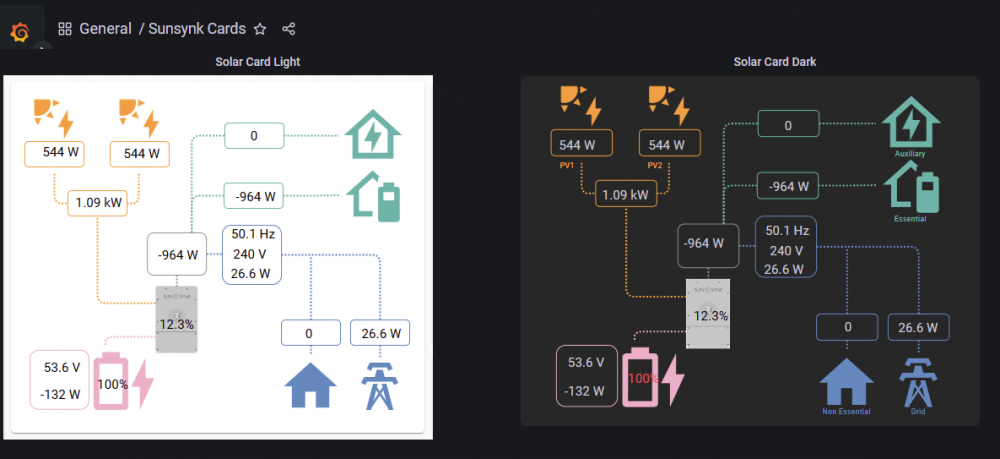
Grafana 9.2.3 has Canvas Visualizations which can do a similar thing: https://grafana.com/docs/grafana/next/panels-visualizations/visualizations/canvas/

-
Grafana 9.2.3 Canvas Visualizations can do a similar thing. https://grafana.com/docs/grafana/next/panels-visualizations/visualizations/canvas/
-
My inverter & batteries are on the back wall of the garage. The DB is in the house and I had to re-route grid cables to the garage and back. Also suggest Splitting electrical wiring into essential (UPS) and non-essential workloads Adjust roof orientation (north facing) and slope for optimal solar gathering [east-west may be better]
-
The power flow card (Power Distribution) is what I use.
-
TIP: Use pbmstools to get all sensor data from your batteries and compare. See https://powerforum.co.za/topic/11206-hubble-lithium-battery-am-2-55kwh/?do=findComment&comment=123830 for some info on pbmstools - there are a few posts in this thread which has some info and the download link and cable required. GIYF.
-
Make it an open source project so others can assist. Alerting/email on events - eg Grid fail, Grid Restored, Battery Low, Battery Full. Access to sensor readings via mqtt - allows for integration into HomeAssistant / Nodered. Access to database so I can connect Grafana and develop my own dashboards.
-
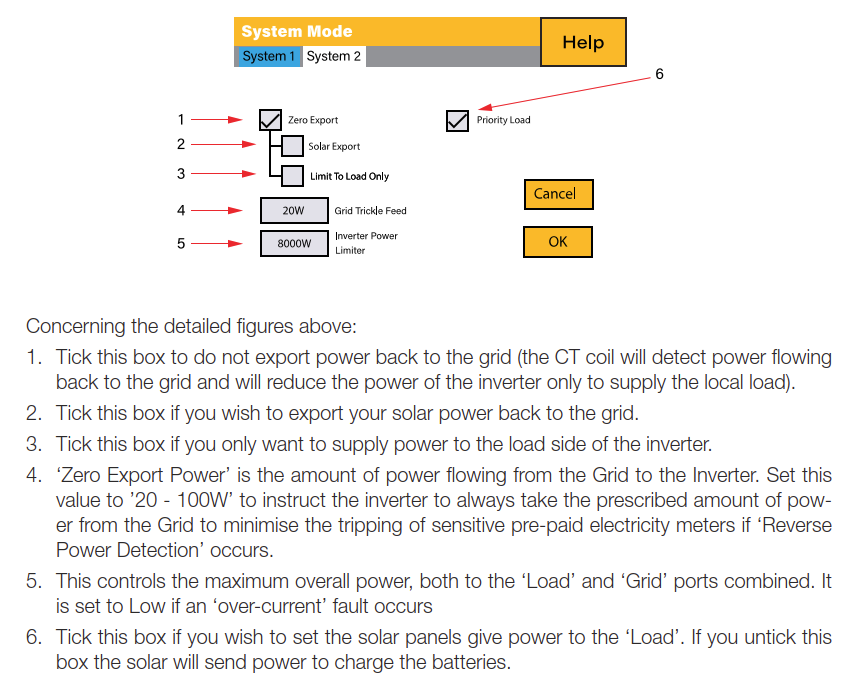
If you don't want to give away electricity, then configure Zero Export: According to https://solar-assistant.io/help/updates/changelog there will be Coming soon: Configurable alerts/email notifications (expected December 2022). Rework of power management to allow more possibilities (expected November 2022). You can also integrate Solar Assistant with Home Assistant and send messages that way. >I notice another thread "sunsynk monitoring" that looks a bit beyond my pay grade as a little domestic user If you doing selenium stuff, you should be OK - see the https://github.com/kellerza/sunsynk
-
AFAIK, if your battery BMS is not supported using Battery Type Lithium RS485 modbus/Canbus, then you should be using AGM/V with the appropriate voltage settings: | WARNING: Use the Voltages as per your battery - don't use my values.


-
@OnewheelerSA This forum post may help in getting RIOT working: https://powerforum.co.za/topic/9858-riot-cloudlink-sunsynk-deye-monitoring/?do=findComment&comment=135896


