GVC
Members
-
Joined
-
Last visited
Everything posted by GVC
-
Nope, it is local Emoncms running on Ubuntu laptop.
-
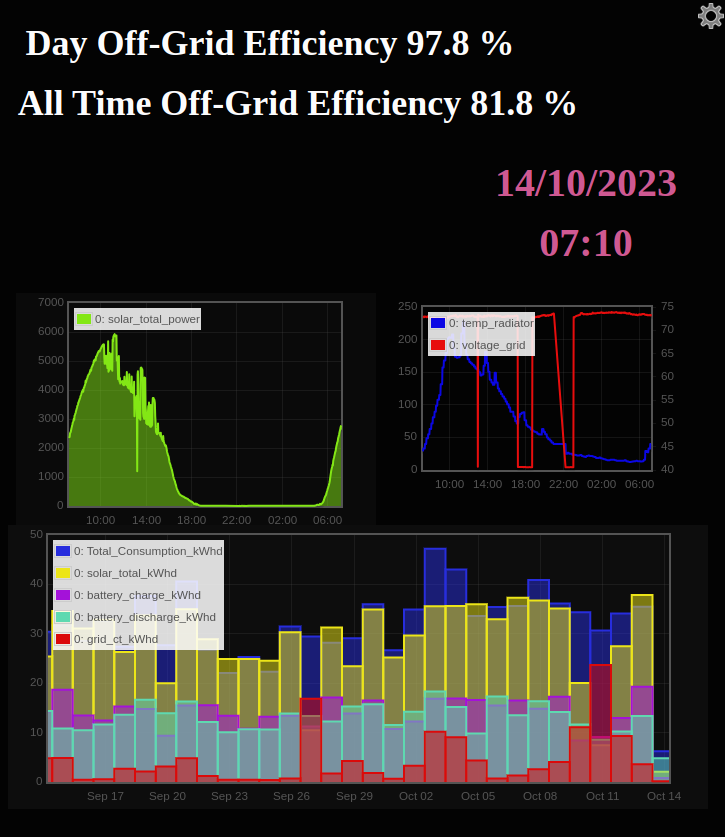
So far another good production day in the making....Swambo is taking full advantage.... Screencast from 14-10-2023 09_23_57.webm
-
I have had 2 really bad days in the last month...Yesterday was a humdinger...

-
I completed the software, but decided not to make it available as there was a legal dispute between the original developer and his ex-partner.... So basically, decided I did not want to get involved in that Sh#t show.
-
If I may be the devils advocate here..... I have seen too often where people pair one pylon 3.5kw....or lower to a 5kw or larger inverter and then cry wolf when their battery packs up and the supplier does not want to honour the claim. Get with it guys, you must at least match the battery to the inverter,s capacity.....as a bare minimum.
-
The problem is almost certain to be with the contactor that was installed. Either the wiring or the contactor itself.
-
I am interested in purchasing 2 of them. PM sent.
-
I recently had Robo Guard beams installed in the yard and on the roof for the panels.
-
You certainly seem to be living in a bubble..

-
I also use an external ssd drive with the original raspberry power supply. To be fair it did not crash on every update. It started about 2 months ago after an update where the rs485 would lose comms once a day. Thereafter, after an update about 3 weeks ago, it lost the mqtt connection. I read on the ha forum where several people had the same issue. It is probably not a major issue, but I do not have the time to spend on this and rather opted to return to my tried and tested systems.
-
I am rather fed-up with the constant updates on Home Assistant that keeps on crashing my system on a RPI4. The main reason for my installing HA was for the inverter monitoring. If it is not mqtt needing fine tuning, then the system stops reading from the RS485 until I reinsert the usb again. I decided to go back to basics and only using node red as an all-in-one service, including dashboard. It backs up to local emoncms and influxdb if I want to dig up history. (it has not crashed once on node-red...yet.)

-
Similar thing happened to me after the snow the other day, flat batteries switched off the Sunsynk and Swambo could not get it going again. I went home and followed the shutdown procedure as stated above by @mzezman, but before I switched off, I set the "Battery Shutdown", "Low Bat" and "Restart" to the lowest settings they could go to. I think it was 0,10,10. When i switched back on all was normal again.
-
If you want your entire DB on inverter, connect the mains incomer to inverter input and the output to your circuits. Or only connect the output to those circuits that you want on backup power. (you must obviously remove the current grid supply wire / busbar to the circuits and only run them on inverter output) You will have no feedback into the grid.
-
If it does not have the change over switch, then something like this should work. Switches - Loadshedding Power Failure Auto Backup Power Change Over Switch 2 x Relay 220V 10A **LOCAL STOCK** for sale in Cape Town (ID:589299981) (bobshop.co.za)

-
What inverter do you have? Has it got an auto change over switch built in?
-
LOL, To put it in context....4 X 400W panel heaters equates to approx: 1 x double-bar heater.
-
I have 400w wall-panel heaters in all the rooms and lounge area. They stay on 24/7 in cold spells, electricity usage is quite low. Keeps the house reasonably cosy.
-
Apologies for changing the subject, but what are you going to do with your old SS 8kw? If you want to sell, please give me a shout?
-
Mine is connected as per option 1. The problem with option 1 is that when the grid returns, the relay in the Neutral box immediately switches but the Sunsynk takes a full minute before it kicks over to grid...therefore you once again have a floating neutral for that minute. I suppose one can reduce the time to a couple of seconds, but I like this 1 minute feature cos as we all know of the problems with power surges when the grid comes back online. So, definitely option 2 is the better one.
-
Have you checked out this thread with pictures on how to connect it using the ATS240.
-
Connected my grid as pic below and works perfectly. (Connected at the bottom and not from the top) The rest of your wiring is all good.

-
Damn..... Seen this too late.... 😒
-
I want to warn everyone about Suntrix.co.za or Suntrix Green Energy…apparently in Bloemfontein. I paid for 4 x Canadian 405w panels in December which they assured me were in stock. The delivery never happened, and I was told lie after lie. When we agreed that they would refund me they even sent me proof of bank transfer, which of course never happened. When I bought the panels there was only one review on Hello Peter. EDIT: Amazingly, after posting here and another forum I was refunded in full today...
-
That is one good looking dashboard...
-
Think I figured it out. Copied the Raw Config file. EDIT: Open the file at the bottom with notepad or Text Editor. Copy and paste in Dashboard "Raw configuration editor" You need to install the following custom cards: card-mod Flexible Horseshoe card Layout card Atomic Calendar Revive card Mushroom card Plotly Graph card Sunsynk card (manual download from @slipx Home Assistant Dashboard