Sidewinder
Members
-
Joined
-
Last visited
Everything posted by Sidewinder
-
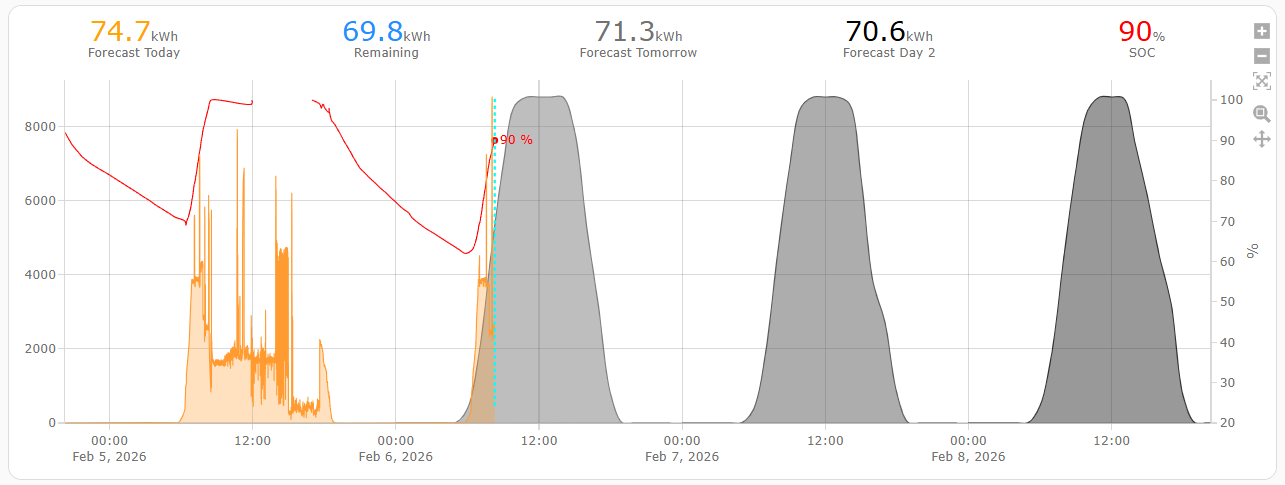
@Turbulance , Maybe read up on this thread https://powerforum.co.za/topic/515-solar-geysers-guide-me/#comment-6296 In it is an attachment of what my WH system looks like. Basically a 200 + 150 Geyser in SERIES with a HP and tubes. Gives you plenty of hot water for early morning showers, and doesn't burden my Solar system when not used (only 2 ppl in the house atm.) Scale = 1 faint line = 500W

-
The battery size does indeed match the Inverter capacity, so the 10kW version would have a 10kWh battery. PS, Installation without solar panels would be relative cheap, as all wiring (cabling) between battery and Inverter is sorted. It's basically just a one day job or less for a decent electrician, with wiring to and from your DB. Will need some extra space for a change-over switch, +more space if you are going to split your house Essential/Non Essential, and make provision for a couple a Wifi Switches to remotely control high demand devices. With regards to monitoring. Yes a USB port is supplied, but somehow I doubt if the dongle is included. Normally, the industry standard is RS232 for the wifi dongle, a la Sunsynk/Deye and many others, but I'm sure one can get the correct version.
-
Ok, so poked around BWH site, and the search function indeed displays these However, clicking on the item renders just an "Oops!" So best is to go to BWH and see for oneself! Edit:(No, online only!)

-
@Bernard du Toit Good find! But I suspect that this is why the link you provided doesn't work, as those prices are indeed too good to be true. Something one would expect from a scammer, not form BWH. Anyway, one can "learn" a lot by looking at the pictures alone, and here is my observation's: 1) The BMS used, seems to be a Pace BMS, as the battery port etc layout follows the typical Pace one. Only way to find out what goes on inside from a Battery perspective is to connect a PC with correct tools & RS232 cable to see at least if it is a 16S config. 2) Inverter. The layout of the port looks like typical Voltronics' type, as the parallel ports are clearly seen. 3) What is OK, is that the Inverter seems to support BMS operations (via CAN, I hope) AND a RS485 port, so presumably one can at least try and build one's own monitoring system for this. 4) What is weird though is why they didn't "internalise" the BMS cable, and removed the port altogether (cost saving). Just make things easier, so customers (never mind installers) don't struggle to get things working. General, I supposed pretty decent kit, apart from the fact that it is Voltronics based, and they are well known for not sorting out bugs, like charging, stuck on 90V PV, etc. Plenty of threads here on this forum covering those topics. A good option for people with limited budget (although those BWH priced would be very sweet). nevertheless. I'm sure other can add to this in time...
-
Wouldn't be the first time a SunSynk/Deye Installer doesn't install the CT coil. I once came across this during an inspection. Customer went and fetched the Inverter's original box it came in, but alas, the CT coil was missing.
-
@sam.tech96 , I use the Open-Meteo Solar Forecast Integration available in HACS for my forecasting, on which I base automations on to determine how low to take my batteries down in the morning, based on this forecast. I'd say about 90% accurate.

-
@Warlok , Couple of things I would check: 1) Is your CT coil installed in the correct location? Should be before your non-essentials on the incoming side. You can test this on a sunny day by switching on a non-essential load (eg geyser/stove, if you have non-essentials), and observe that PV generation should rise with a significant amount (e.g.1.8 kW for stove or 3-4kW for geyser - element depending) 2) Is your CT coil installed the right way round. Check you flow diagram on the inverter screen. There should not be a negative value against the CT consumption. 3) Is you timer function active and have you adjusted the SOC % to suit your requirements? 4) Remember your inverter consumes approx. 80W, so it makes sense to me that your laptop consumes 40 + 80 = 120W. But then I would expect that consumption to actually come from the PV (day time) or Batteries (night time), depending on settings. In 53 months after I installed my setup, I've consumed 1351 units, so 25 units ave per month. Most days it is Zero.
-
@chrisc , I feel for you. SA won't answer, as the info is posted on their www. If you really need the battery data (you should...specially if you are a bit OCD like me), maybe try to run the SS's in Voltage mode, and then you have access to the battery data via RS485. Then you might just discover things you would never see in SA. Be warned that SA's battery data available is fairly limited i.e. no individual cell data, balancing info, Temps (yes, some batteries have up to 6 temp probes), SOH, etc, etc. (from what I know using SA a few years ago, this may have changed) See below what I capture from my BSL's. I've moved on/over to HA for this very reason. Yes, SA have improved a lot of items over the years, but the flexibility of HA makes it a gamechanger for me. If I don't like a screen view/layout, I change it to suit. Having real-time info from the SS's also a plus for me.

-
Hence my comment about getting batteries with multiple RS485 ports, like the PACE BMS based batteries and others. Then you can run CAN for Inverter Comms & RS485 for Battery Comms to SA or HA.
-
@chrisc , Please verify that this cable is actually a RS485 to USB cable, and not just a "LAN" cable. If so, I would suspect you need to connect to the batteries "COM" port (normally RS232), and use the Shoto Battery Tool SW to enable RS485 comms. (Assuming your Shoto has a separate RS485 port) This is the reason why when selecting Batteries for a solar system, one needs to ensure that the BMS supports all these ports. Typically, it should have 5 ports nl. CAN, RS485, RS232 and 2 x RS485 (A & B or In & Out)
-
@Surge I hope it's something as simple as in this video from Keith. https://www.youtube.com/watch?v=2vLImRBxLPo
-
@Surge The 8kW SS does not have a Earth Bonding relay built in. (unless some newer models have changed). The "Click" is merely a relay energising to re-connect (after serving a specific timeout) the grid to the inverter. Did your installer install a Earth Bonding Relay / Permanent Bond, as mandated by your local supply rules? There shouldn't be any specific settings to change, as supplying output to load should be a normal thing for SS/Deye inverters.
-
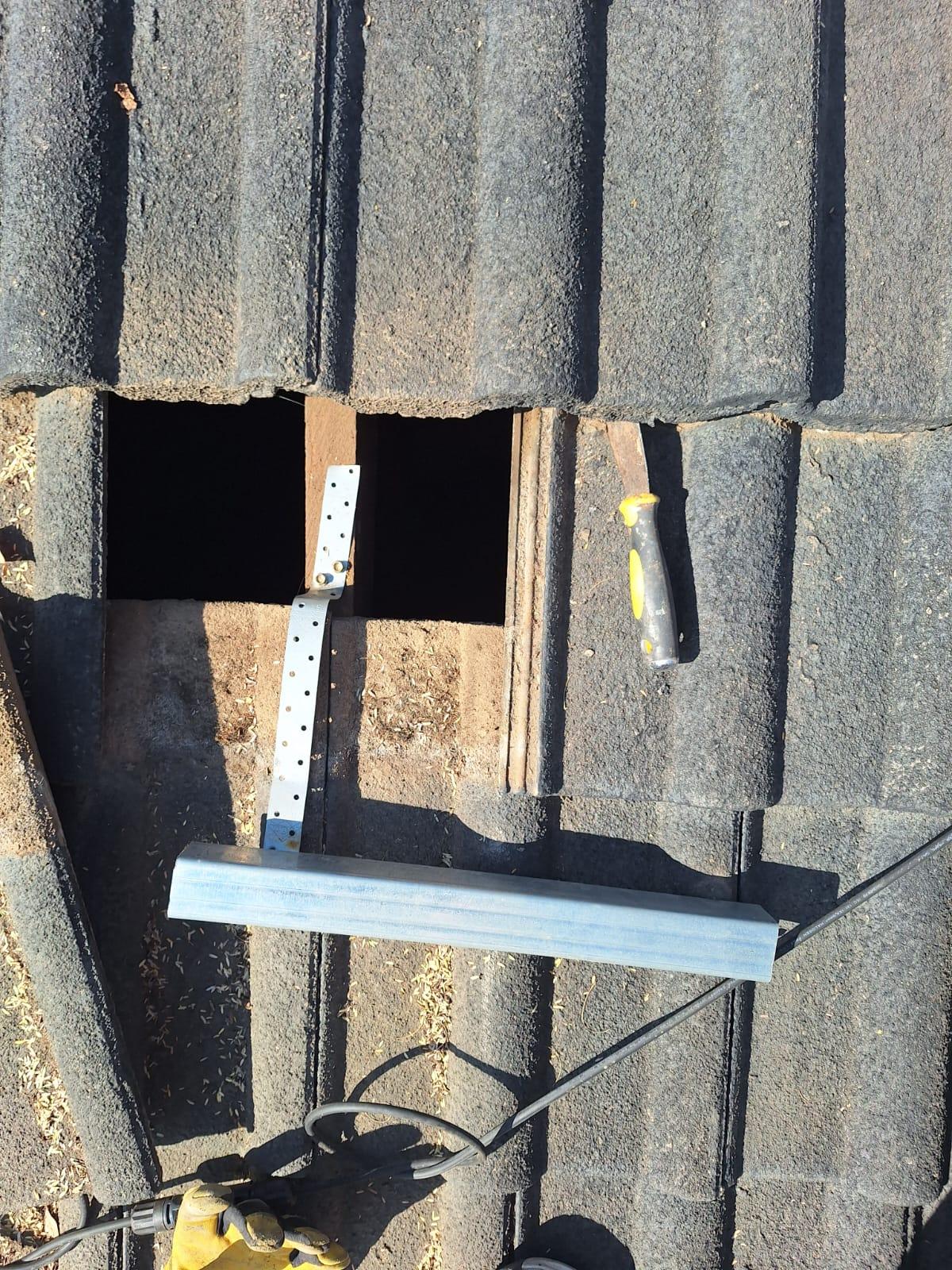
A simular "short" rail I came across when a friend was complaining about a knocking sound from his roof in stronger winds. And a CoC was issued like this. What was even worse is the roof attachment method. Needless to say, that register electrician won't be used again.

-
Best is to look at the code editor. Scroll down to the entities section: Mine looks like this: "load_frequency_192: sensor.deyeinvertermaster_grid_frequency" Change yours to match and Save.
-
@Derek Ramos , If your the tinkering type, try and get a RS232 to USB cable with the spec as per picture. Then install the appropriate monitoring software on PC to get some info out of all the batteries. Start with your current master and then each slave. See if you can get the battery firmware version of each. If the master isn't the latest one, then you can try and make the battery with the latest firmware your master. Sometimes even just swopping out your master with one of the slaves (NB.. change the dip settings on each!) may even solve this. Normally, inverters communicate to batteries via CAN, but RS485 is also possible.

-
@Derek Ramos , Until you can resolve, just run voltage mode for the time being, so the system can run by itself, so you can focus on getting a solution. A Sunsynk upgrade may help, let us know how it goes.
-
@flamegrilled If I read you signature correctly, you have a Solis & 2 x Axpert's. If so, the Axpert's will be a problem, as they are not on the list of approved Inverters. The Solis appears on the list.
-
@ChrisVermaak I believe you should use the TOU settings, allowing you to set the percentage of Battery SOC when the GRID is allowed to charge the batteries at which timeslots. Start from midnight (00:00)
-
Provided they have a Pace BMS or PACE-type functionality inside. By default, batteries are pre-set by factory for longevity, reliability etc. One can however, change settings with correct knowledge to suit each different scenario. E.g. when temperature alarms should activate, is far to harsh, specially if one lives in a mild climate.
-
@sarzyk , I don't know the HinaESS Powergem Plus batteries, but a quick google reveals that the ports looks like this: Weirdly, the manual does not identify what port the one between port 7 & 8 is, but my guess would be that is a RS232 port with a 6 pin RJ11 connector. Looking at some of the other HinaESS 5kW batteries, the port layout is similar to yours , but more familiar to the standard "Pace BMS" layout. So you may be in luck that your bigger battery also has this BMS. To test, get yourself a RS232 (with RJ11 plug) to USB cable, install PBMSTools program (RS232 version) on windows computer, and see if it responds. Even if it doesn't, it may just be that the signals on the RS232 port is not standard, as I found out when trying to get info out of an Eenovance (OEM Sunsynk) battery. Is also has a PACE BMS, but standard cable didn't respond. A quick changeover tester (RJ11 male to RJ45 female) gave me the correct response, as the RS232 port on that PACE BMS is not wired standard. Hope this helps.

-
@SulacoMcClaw , Agreed, you need to start seriously cycling your batteries. Looking at your monthly graphs, I could not understand why you are consuming vast quantities of grid (which you have to pay for). Lucky that the grid feed-in compensates somewhat, but in my book, grid usage should be very close to Zero. When I saw you daily consumption graph, it all made sense, you are (hopefully by now - where) using grid during the nights. Fix that setting, and smile all the way, and hopefully you batteries are not compromised by the "keep it at 100%" scenario you had. Keep a lookout what your SOH is doing. 4 years and 830 hard cycles my SOH is still 100% on both batteries. I ran my batteries down to 20% daily for years, while we could feed-in, and since feed-in tariff changes, it doesn't pay anymore, so the daily cycle is down to 50% on normal sunny days, with the occasional 20% during more cloudy days.
-
I'll just be worried that it does not have a RS232 port, as regular Pace BMS's have. Spec says: Ports: 1x CAN-bus, 1x RS-485 Battery Link ports, 2x Parallel Instruction ports. Hopefully local access via RS485 is enabled, in order to customise settings. If anybody knows/have knowledge of this, would be great to know. Also what PACE software version it comes with.
-
Not sure what exact battery the seller was referring to, but @Kibim might just run into the same problem with the bigger unit. "Reason: Brought higher capacity 16cell unit and they cannot be connected in parallel with these 15cell units." Best is to determine that both batteries have exactly the same characteristics, e.g. 15 vs 16 cells, cells = LFP, and BMS = the same. Manufactures sometimes change the BMS to a newer/different spec when bringing out new lines. If the batteries pass the first 2 tests, then you can try run them with "Comms" cable, else do as @Scorp007 suggest, just run them on voltage mode. If the seller's batteries are still available, you should have very little problems.
-
@viceroy , Maybe Municipal Permit = an updated COC, as you are modifying the electrical installation of your house. And while you at it, better double up on your complete Solar installation, you are going to need it!
-
@FransSmith , Yes, if you can, post your consumption graph. Else, just wait till around midday on a sunny day, and then switch on as many heavy loads as you can up to about 8kW, (assuming that the they are either on essentials, or on non-essentials with CT clamp in the right place), then observe you Solar production, it should climb to above 8kW, which your amount of panels should be able to deliver around midday. If not, you need to investigate why, as your system should be capable of providing it.