


mzezman
Members
-
Joined
-
Last visited
Everything posted by mzezman
-
Actually you make a good distinction there - when there is an overload like that the batteries would disconnect from inverter VS inverter actually switching off. That clarity is key
-
Actually you make a good distinction there - when there is an overload like that the batteries would disconnect from inverter VS inverter actually switching off. That clarity is key
-
Could be an earth leakage issue or as @madness_za noted high load on the inverters that causes the batteries to switch off. In any case we need more info in terms of your setup and the error conditions
-
The inverter sees the whole bank as 1 battery, you tell it how large that bank is (in ah) and then the BMS manages the charge / discharge based on comms
-
You haven’t given us much info to go on for us to try help… How are the batteries connected to the inverter? how are the batteries connected to each other? What settings are the dipswitches on each inverter? what mode are the batteries connected to the inverter? Is it Lithium with CAN comms or AGM%? If you can please take pics of the LiBMs screen, the Battery setup screens and the dip switches as well
-
I and others had it on the 5kw - not sure if the 8, 12 and 16kw versions had the issue. Its resolved now though (via firmware update)
-
Have you shut it down completely and tried the restart procedure? If that fails then get installer out to get you a new one / repair Else you could also use it without the screen with the App software (Solarman / Sunsynk / Solar Assistant)
-
Hardware wise they are the same - they come off the same production line in China. Software wise is where the difference is. In terms of remote monitoring you have the standard Solarman software or you could get the slightly better Deye Cloud software or you would also get an additional device and run Solar assistant. It really boils down to what your needs would be from a monitoring and control perspective
-
More batteries-pros Backup in case one or more dies Load is shared so less stress on one battery incl fewer cycles (potentially) Upgrades are less investment as smaller capacities are cheaper Cons More cabling and complexity Larger install footprint More points of failure (could be a pro as well) Added effort to balance (?) One battery-pros Smaller install footprint Less cabling and associated complexity Cons Single point of failure Greater stress on the single battery Upgrades may be a larger investment as often you can’t mix sizes
-
Part of the increase is the cooling of the panels - probably more than the actual cleanliness. Its not a bad idea if you can do it relatively effort-free
-
This is a good troubleshooting mechanism - Also check your startup procedure - ensure the Normal light is on while running on batteries only THEN switch on DC
-
Make sure "Use timer" is ticked on this screen 1 - For all timeslots that you want the battery to be at min 25% set the SOC to 25% - note that solar will charge your batteries as high as they can go based on the load and generation power. So the 25% is a minimum that your batteries will run down to. At 25% the house will draw from the grid to service the loads. If there is no grid (say during loadshedding) the batteries will continue to run down until their shutdown % 2 - If grid charge is ticked then the house will charge batteries from the grid. If you do not want this then make sure its unticked 3 - Tick Zero Export, Tick Solar Export and Priority load (this will export excess PV once the batteries and load are serviced)
-
A man of class and culture
-
The amount it can produce in a day is dependent on the amount of PV installed and the amount of sun-hours The 12kw rating is the total amount of load it can handle before it trips (at a high level)
-
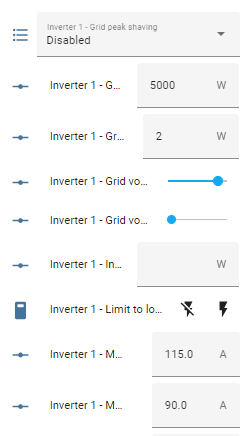
check if grid peak shaving is enabled - if so then disable it Also check that you have the latest firmware - there was a version of firmware that caused oddities with the use-timer funciton
-
When last were these top balanced?
-
from the integration github:
-
This requires a couple of systems to talk to home assistant. 1. HomeAssistant to manage all the automation and data 2. Geyserwise / Geyserwala to read the temp of the geyser and switch it on / off 3. Inverter integration into HA - options will depend on your inverter but SolarAssistant can obfuscate a lot of this complexity Once all is installed you setup HA on a Pi or computer of your choosing then get the Geyserwise/wala (Tuta) and SA integrations working When data is flowing into the system then you need to setup an automation that will use the data from the integrations based on certain triggers and conditions At a high level your automation would say: turn the geyser on then check if Eskom is off and geyser soc < x then switch geyser off
-
So the good thing about the Solar Assistant integration is it obfuscates the mqtt - so all I get are a set of sensors that i can toggle or values i can change / set Then based on this its a simple automation to change a value. In this automation i charge the geyser from the grid for the early morning showers based on a set of conditions and then i set the house to run off inverter again once this is done alias: Geyser morning charge description: "" trigger: - platform: time at: "04:10:00" - platform: time_pattern enabled: true minutes: "5" - platform: template value_template: >- {{ timedelta(minutes=(state_attr("sensor.load_shedding_area_tshwane_3_garsfonteinext3", "starts_in"))) == timedelta(minutes<65) }} enabled: true condition: - condition: time after: "04:15:00" before: "07:15:00" weekday: - sun - mon - tue - wed - thu - fri - sat enabled: true - condition: and conditions: - condition: state entity_id: binary_sensor.grid_available state: "on" - condition: or conditions: - type: is_battery_level condition: device device_id: 117ead9d1883967 entity_id: sensor.battery_state_of_charge domain: sensor above: 30 - condition: or conditions: - condition: template value_template: >- {{ timedelta(minutes=(state_attr("sensor.load_shedding_area_tshwane_3_garsfonteinext3", "starts_in"))) == timedelta(minutes<65) }} - condition: time after: "04:15:00" before: "07:00:00" weekday: - sun - mon - tue - wed - thu - fri - sat enabled: false action: - device_id: 117ead9d1883967 domain: number entity_id: number.max_grid_charge_current type: set_value value: 2 - type: turn_off device_id: 117ead9d1883967 entity_id: switch.use_timer domain: switch - delay: hours: 0 minutes: 5 seconds: 0 milliseconds: 0 - type: turn_on device_id: f58645638cce28e4 entity_id: switch.geyser_switch_1 domain: switch - delay: hours: 2 minutes: 15 seconds: 0 milliseconds: 0 - type: turn_off device_id: f58645638cce28e4 entity_id: switch.geyser_switch_1 domain: switch - delay: hours: 0 minutes: 5 seconds: 0 milliseconds: 0 - type: turn_on device_id: 117ead9d1883967 entity_id: switch.use_timer domain: switch - delay: hours: 0 minutes: 0 seconds: 15 milliseconds: 0 - device_id: 117ead9d1883967 domain: number entity_id: number.max_grid_charge_current type: set_value value: 120 - device_id: 117ead9d1883967 domain: number entity_id: number.max_charge_current type: set_value value: 120 mode: single
-
Just adding Solar Assistant <> HomeAssistant integration allows this as well (through mqtt)
-
I retract my AM2 statements then
-
You are correct that the time zone your inverter / dongle is set to is an hour ahead.
-
Has it happened again? If there is no shading on the panels and your load is constant then you CAN expect a bump in the SOC - if PV has shading etc and load is fluctuating it could go down as well
-
Is it the AM-2s that you have ? There is a firmware patch that can be applied but probably best to get hold of your installer who should be able to either do it for you for initiate the process with Hubble support. My understanding is that it IS fixable. Search for Hubble SOC on the forum and see what other users have been able to do. You could also mitigate it by top-balancing the batteries (letting them sit on 100% for a few hours each week) to realign the SOC
-
Aaaah Hubbles…. See you should have mentioned this earlier 😝. Some of the hubbles DO indeed have a bug where the SOC drops astronomically


